19 October 2026 · Comparison
Wispr Flow vs Superwhisper: Cloud vs Local Voice in 2026
The short answer
if you want cloud cleanup speed, cross-platform meeting notes, and shared team vocabulary.
if you want offline privacy, local voice models, prompt customization, and a lifetime license.
Verdict: Pick Wispr Flow if you want polished dictation the moment you install it, need meeting notes on both Mac and Windows, or manage a team that shares names, jargon, and billing. Pick Superwhisper if audio must never leave your machine, you want to choose your own models and prompts, or you would rather pay once than rent. Both turn speech into clean text in any app. The real split is cloud convenience versus local control, and neither side wins every category.
Affiliate disclosure: Wispr Flow runs an affiliate program, and some links on this site may earn us a commission if you subscribe through them, at no extra cost to you. We found no public affiliate program for Superwhisper, so there is no commercial incentive to favor it. This comparison is based on each vendor’s public pages and documentation as of October 2026.
The short answer
- Choose Wispr Flow for plug-and-play dictation, 100+ dictation languages, meeting notes on Mac and Windows, calendar-aware transcripts, MCP access to your notes, and shared team dictionaries.
- Choose Superwhisper for offline dictation on local models, custom modes and system prompts, bring-your-own-key model choice, audio and video file transcription, and a one-time lifetime license.
- Choose both if you write across devices and also handle sensitive audio. Several users do this: Wispr for cross-device polish, Superwhisper for offline work.
At a glance
| Dimension | Wispr Flow | Superwhisper |
|---|---|---|
| Processing | Cloud transcription for every dictation | Local-first; offline dictation on local models |
| Offline mode | None at any price | Yes, with local voice models; offline AI cleanup only in some modes |
| Free tier | 2,000 words/week desktop, limited mobile | 3,000-word Pro trial, then free forever with unlimited Whisper models |
| Entry paid plan | Pro: $15/user/mo monthly or $12/user/mo annual | Pro: $8.49/mo monthly, $84.99/yr, or $249.99 lifetime |
| Meeting notes | Mac and Windows; 21 languages | Mac only at launch; included on Free and Pro |
| Team vocabulary | Shared dictionary, snippets, team workspace | Personal vocabulary and replacements only |
| Customization | Auto Cleanup levels and Transforms | Custom modes, system prompts, model choice, BYOK |
| File transcription | Not a headline feature | Pro: audio and video files |
| Lifetime license | None | $249.99 one-time |
| Platforms | Mac, Windows, iOS, Android | Mac, Windows, iOS, Android (Android build is early) |
The October 2026 update that changes the comparison
For most of 2026, the easy line was that Wispr Flow bundles meeting notes and Superwhisper does not. That line is now wrong.
Superwhisper shipped Meetings in app version 3.0.0 on macOS on 2026-10-15. It records on your Mac, transcribes locally when you choose an offline model, labels speakers, writes summaries with decisions and action items, and does it without a bot joining the call. The company says Meetings is included for everyone on Free and Pro “for now”. There is no separate meeting add-on, and Superwhisper does not state a usage limit. That is not the same as unlimited, so do not read it that way.
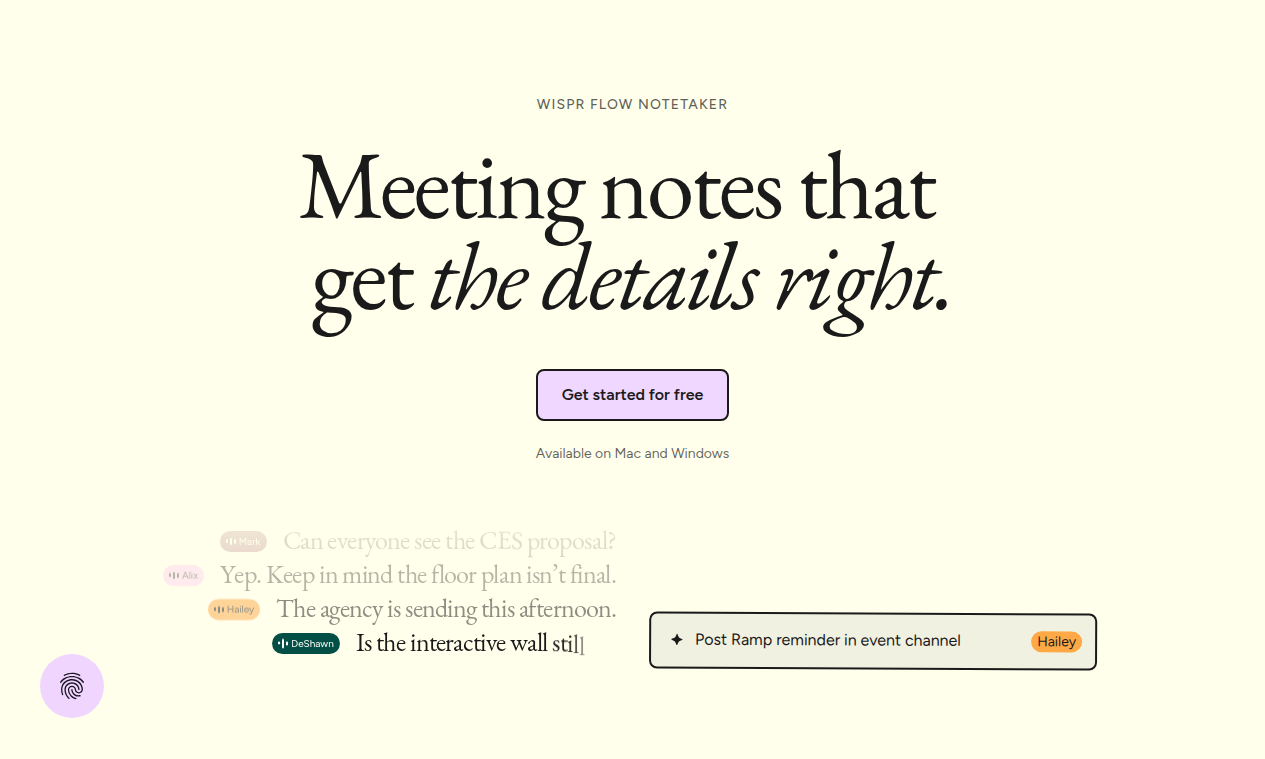
Wispr Notetaker is still the more mature product. It runs on Mac and Windows, supports 21 transcription languages, reads your calendar and dictionary to spell names, searches across past meetings with links back to the source moment, and exposes meeting transcripts over MCP to Claude, ChatGPT, Gemini, and other MCP clients. It also imports history from Granola and Otter.
So the meeting-notes comparison is no longer “yes versus no.” It is breadth and maturity versus a brand-new, Mac-only feature that keeps processing on the device.
Where the audio actually goes
This is the decision that matters more than any feature table.
Wispr Flow transcribes dictation in the cloud. Audio goes to Wispr’s servers over TLS, gets transcribed and formatted, and is deleted after processing unless you enable cloud storage. Privacy Mode and zero-retention settings control what is kept. They do not move processing onto your machine. If your connection drops, dictation stops. There is no offline mode at any price.
Superwhisper is local-first when you select a local model. On Apple Silicon, local Whisper models transcribe without an internet connection, and the local S1-mini model can handle basic cleanup in Message and Mail modes. Other AI processing, including cloud model formatting, needs a connection. Intel Mac users are steered toward cloud models, and Superwhisper’s own FAQ says offline models “only run really well on Apple Silicon macs”.
That difference is not a marketing preference. If you dictate client calls, medical notes, legal memos, or anything under an NDA, it decides the tool. If you dictate emails and Slack messages on a reliable connection, the cloud path buys you better cleanup with less setup.
Wispr’s approach has a real cost beyond privacy: the product is only as available as its backend. Wispr’s own changelog in May and June 2026 acknowledged outages, slower dictation, degraded accuracy, and backend instability before reporting 99.9% uptime in July. That is acknowledged history from a young, fast-scaling service, not a claim that it is down today. It is still the kind of risk a local model does not carry.
Pricing: subscription versus ownership
Both vendors publish a free tier, and the two free tiers are built on different economics.
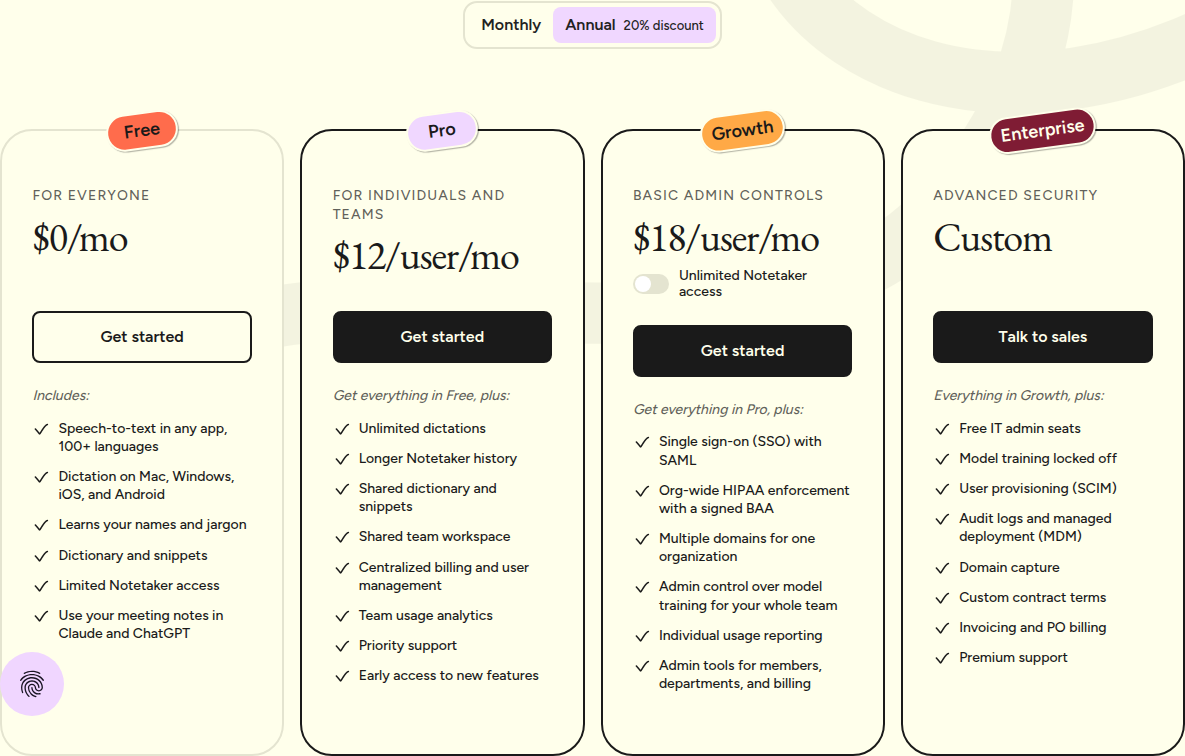
Wispr Flow Free is a metered cloud plan. It includes dictation in any app, 100+ languages, dictionary and snippets, limited Notetaker access, and MCP access to notes. The dictation allowance is 2,000 words/week on desktop with limited weekly use on mobile. When you hit it, you wait for the weekly reset. Pro removes the dictation cap and adds longer Notetaker history, shared dictionary and snippets, a shared team workspace, centralized billing, and priority support, for $15/user/mo billed monthly or $12/user/mo billed annually.
The plan most people miss is Growth. Its base price is $23/user/mo billed monthly or $18/user/mo billed annually for dictation only, and the “Unlimited Notetaker access” toggle raises it to $33/user/mo billed monthly or $26/user/mo billed annually. Pro gives you higher meeting limits and longer retention, not unlimited Notetaker. If unlimited meeting notes are the reason you are buying, budget for Growth or Enterprise, not Pro.
Superwhisper’s free tier is a local tool with a paid AI layer on top. You get a 3,000-word Pro trial, then free forever with unlimited use of Whisper models, custom prompt control, 100+ languages, and Meetings on Mac. Cloud AI models, AI modes, file transcription, and translation are Pro features. Pro costs $8.49/mo billed monthly, $84.99/yr billed annually, or $249.99 one-time for lifetime, and one license covers all your personal devices.
Superwhisper’s own public comparison table puts the three paid options next to Wispr Flow’s list prices. The figures match each vendor’s pricing page. The copy around the table is vendor marketing, so read the numbers and ignore the adjectives.
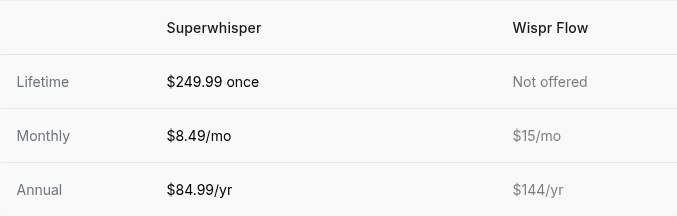
The lifetime math is simple arithmetic. At Wispr Pro annual pricing ($144/year at $12/user/mo), a $249.99 lifetime license breaks even in about 1.74 years, roughly 21 months. At Wispr Pro monthly pricing ($180/year at $15/user/mo), it breaks even in about 1.39 years, roughly 17 months. Against Superwhisper’s own annual plan ($84.99/year), it takes about 2.94 years. Those numbers ignore meeting add-ons and assume feature parity, which is false in both directions. They are still the right frame for anyone who expects to use the same tool for three years or more.
Prices accurate as of October 2026; check vendor sites for current rates.
Meeting notes: mature and cross-platform versus new and on-device
Wispr Notetaker is a fuller meeting product today. It captures audio on your machine with no bot, works with Zoom, Google Meet, Teams, Slack huddles, Discord, browser calls, and in-person conversations, and runs on both Mac and Windows. It uses calendar attendees and your dictionary to get names right, runs a second pass over the transcript, and organizes summaries by topic with decisions, timelines, and next steps. “What did I miss?” recaps the last few minutes, and “ask anything” searches prior meetings and links to the source. Granola and Otter imports preserve speaker names.
There are two catches. Notetaker supports 21 languages while dictation supports 100+, and accepting a HIPAA BAA disables Notetaker and Scratchpad entirely, so regulated users cannot have both meeting notes and a signed BAA. Meeting notes are also priced above Pro if you want them unlimited.
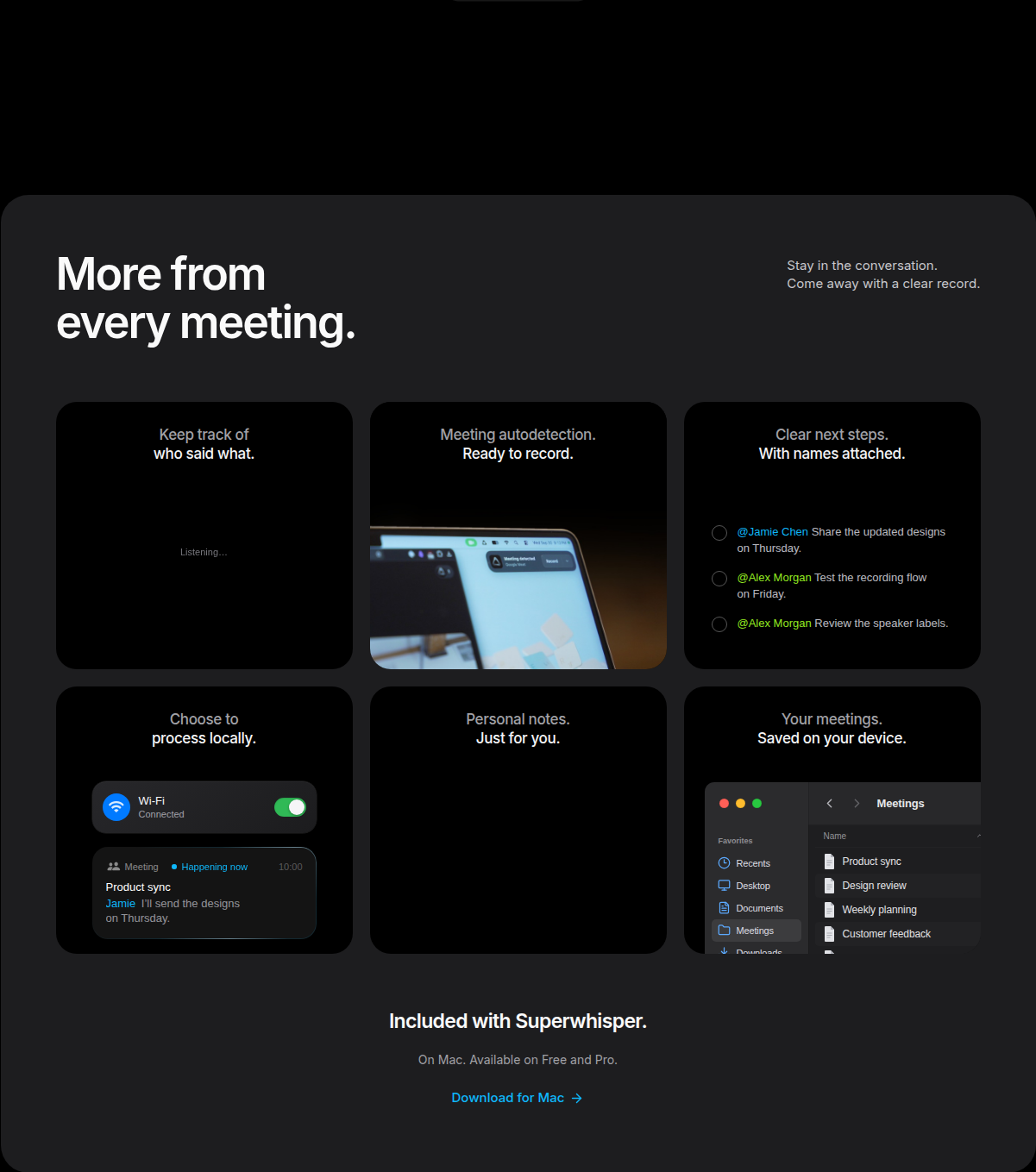
Superwhisper Meetings is narrower but has one advantage Wispr cannot match: the processing can stay on your Mac. Choose an offline model and the recording, transcription, speaker separation, and notes stay on the device. It shows speaker labels as people talk, detects meetings automatically, produces decisions and action items with names attached, and keeps private notes separate from shared summaries. It works with Zoom, Google Meet, Teams, Slack, and other meeting apps.
The limits are real. Meetings is Mac-only at launch, with no Windows or mobile capture. It is days old, has no public track record, and the vendor’s “included for now” wording leaves room for pricing to change. Its Meetings page also shows no calendar integration and no cross-meeting search that matches Wispr’s MCP setup.
Teams versus tinkerers
Wispr Flow is built to make a group sound consistent. Pro includes a shared dictionary and snippets, a shared team workspace, centralized billing, and basic usage dashboards. Growth adds SSO/SAML, org-wide HIPAA enforcement, multiple domains, model-training controls, and admin tools for members, departments, and billing. If your company keeps misspelling the same product names, this is the feature that fixes it.
Superwhisper is built for one person who wants control. Custom modes let you define system prompts, formatting rules, structure, per-app activation, and per-mode shortcuts. You can pick local or cloud models and bring your own API keys. It transcribes audio and video files, integrates with coding agents including Claude Code, OpenCode, Codex, and Cursor, and can read selected text or clipboard context in Super Mode.
What we could not find is a shared team dictionary or snippet library. We found personal vocabulary and replacements, plus enterprise billing and model access controls, but no equivalent of Wispr’s shared team vocabulary. For a five-person team with a shared product lexicon, that gap is more important than any model benchmark.
Where Wispr Flow loses
- No offline mode at any price. Dictation is transcribed in the cloud. No connection means no dictation, even on the paid plans.
- The free tier is metered weekly. An allowance of 2,000 words/week on desktop and limited weekly use on mobile disappears on a heavy writing day and resets the following week.
- Unlimited Notetaker is not in Pro. Pro gets higher limits. Unlimited meeting notes require the Growth toggle or Enterprise, which changes the real cost of the meeting-notes pitch.
- Meeting languages are narrower than dictation languages. Notetaker covers 21 languages while dictation covers 100+.
- Dictation sessions are capped at 20 minutes. A warning appears at 19 minutes and the session auto-submits, which is awkward for long-form dictation or an uninterrupted brainstorm.
- HIPAA comes with a feature cut. Accepting a BAA disables Notetaker and Scratchpad.
- There is no lifetime license. You keep paying for as long as you use it.
Where Superwhisper loses
- Meetings is Mac-only and brand new. It launched on 2026-10-15. There is no Windows or mobile meeting capture and no track record to judge reliability.
- Setup takes more work. Modes, prompts, models, and shortcuts all need tuning before the output matches Wispr’s out-of-the-box polish. User comparisons on Reddit repeatedly describe a configuration curve.
- The free tier is not the full product. Unlimited Whisper models is generous, but cloud AI models, AI modes, file transcription, and translation sit behind Pro.
- Team features are thin. Personal vocabulary, not shared team dictionaries or snippets. Enterprise adds SSO, SCIM, and billing controls, but not Wispr’s shared vocabulary layer.
- Local speed depends on hardware. Intel Macs are steered to cloud models, and offline models perform best on Apple Silicon.
- The macOS requirement is inconsistent. The download page lists macOS 13.3 or later, while a July 2026 changelog says macOS 14 or later. Check before you buy an older Mac.
- Android is early. The Android build is listed as version 0.5.2 (requiring Android 13 or later), not parity with iOS or desktop.
Bottom line
Pick Wispr Flow if you want the shortest path from install to polished text, need meeting notes across Mac and Windows, want calendar-aware transcripts and MCP access, or run a team that needs one shared vocabulary and one bill. It is the wrong choice if you work offline, handle audio that cannot leave your device, or need unlimited meeting notes without paying for Growth.
Pick Superwhisper if local processing is a requirement rather than a preference, if you want to choose models and write your own prompts, if you transcribe audio and video files, or if a $249.99 lifetime license beats another subscription. It is the wrong choice if you need Windows meeting capture today, if you want a tool that works well before you configure it, or if your team depends on a shared dictionary.
If you are choosing between dictation tools more broadly, our Happy Scribe vs Otter comparison covers the meeting-intelligence end of the market, and Happy Scribe vs Sonix breaks down multilingual transcription and compliance trade-offs. For the voice layer itself, ElevenLabs vs Murf AI looks at speech models from the output side.
Prices in this post were checked against public vendor pages in October 2026. Verify current plans on Wispr Flow’s pricing page and Superwhisper’s pricing page before you buy.