21 June 2026 · Comparison
HappyScribe vs Otter.ai: Content Tool or Meeting Tool?
The short answer
if you make content and need transcription, subtitles and translation in one tool.
if you live in meetings and want live transcription, CRM sync and search across all your calls.
Verdict: HappyScribe wins for content creators, video producers, and multilingual teams who need transcription, subtitles, and translation in one tool. Otter.ai wins for sales teams and anyone who lives in meetings and wants live transcription, CRM sync, and conversational search across all their calls.
If you produce videos or podcasts in multiple languages, HappyScribe is the better pick — its 150+ language support, subtitle export formats, and human-transcription fallback are things Otter simply does not offer. If your day is back-to-back Zoom, Meet, and Teams calls with a CRM to update, Otter’s meeting-first design, live transcription, and native Salesforce/HubSpot sync will save you hours per week. These are fundamentally different tools built for different workflows.
Affiliate disclosure: Some links below are affiliate links. If you purchase through them, we may earn a commission at no extra cost to you. HappyScribe is our affiliate partner.
At a Glance: What They Actually Do
HappyScribe is an all-in-one content platform — upload an audio or video file, get an AI transcript, generate subtitles, translate it into another language, and export it in the format you need (SRT for YouTube, FCPXML for Final Cut, etc.). It also has an AI Notetaker that joins your meetings, but that is an add-on to its core transcription-and-subtitle workflow.
Otter.ai is a meeting intelligence engine. It joins your Zoom, Meet, or Teams calls (or records locally via its desktop app), transcribes live, identifies speakers, generates summaries and action items, and lets you search across all your meetings with AI Chat. It can push notes to Salesforce or HubSpot. File-based transcription is secondary — Otter’s free plan limits you to 3 lifetime file imports, ever.
| Dimension | HappyScribe | Otter.ai |
|---|---|---|
| Primary use case | Transcription + subtitles + translation | Meeting notes + conversation intelligence |
| Languages | 150+ | ~6 (English, Spanish, French, German, Japanese, Chinese) |
| Human transcription | Yes (add-on, from €1.75/min) | No |
| Subtitle exports | 15+ formats (SRT, VTT, STL, FCPXML, etc.) | Basic SRT only (Pro and up) |
| Translation | 80+ languages | None |
| Live transcription | No | Yes |
| Bot-free desktop recording | No (bot joins calls) | Yes (desktop app) |
| Native CRM sync | No (Zapier, HubSpot coming soon) | Yes (Salesforce, HubSpot) |
| AI Chat across content | Across transcripts | Across meetings + integrated apps |
| Data residency | EU (GDPR-native) | US |
| HIPAA | Not available | Enterprise add-on |
| Free plan | 10 min AI trial, unlimited meeting recordings (45 min each) | 300 min/mo, unlimited meetings (30 min each) |
Language Coverage: 150+ vs ~6
This is the single largest gap between these two tools, and for many buyers it ends the comparison immediately.
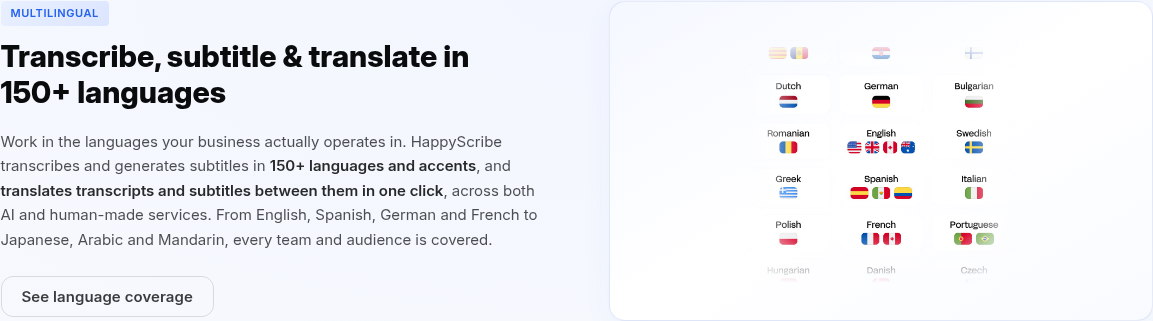
HappyScribe transcribes and generates subtitles in 150+ languages and accents, and translates transcripts and subtitles between 80+ languages. You can work in English, Spanish, German, Mandarin, Japanese, Arabic, Portuguese, Dutch, and many more. Its human-proofreading service covers 65+ languages.
Otter.ai supports 6 languages: English, Spanish, French, German, Japanese, and Chinese. That is it. There is no translation feature. There is no human-proofreading fallback.
Where Otter loses: If you work in any language outside Otter’s six, it is a non-starter. If you need translated subtitles for a multilingual video audience, Otter cannot help. HappyScribe is the clear winner here, and it is not close.
Where HappyScribe loses: If you only ever transcribe English-language meetings and never deal with subtitles or translations, Otter’s language limitation does not matter. But that six-language ceiling is real — it rules out entire teams and business use cases.
Meeting Workflows: Where Otter Pulls Ahead
If your workday is meetings, Otter is purpose-built for that job and HappyScribe is not.
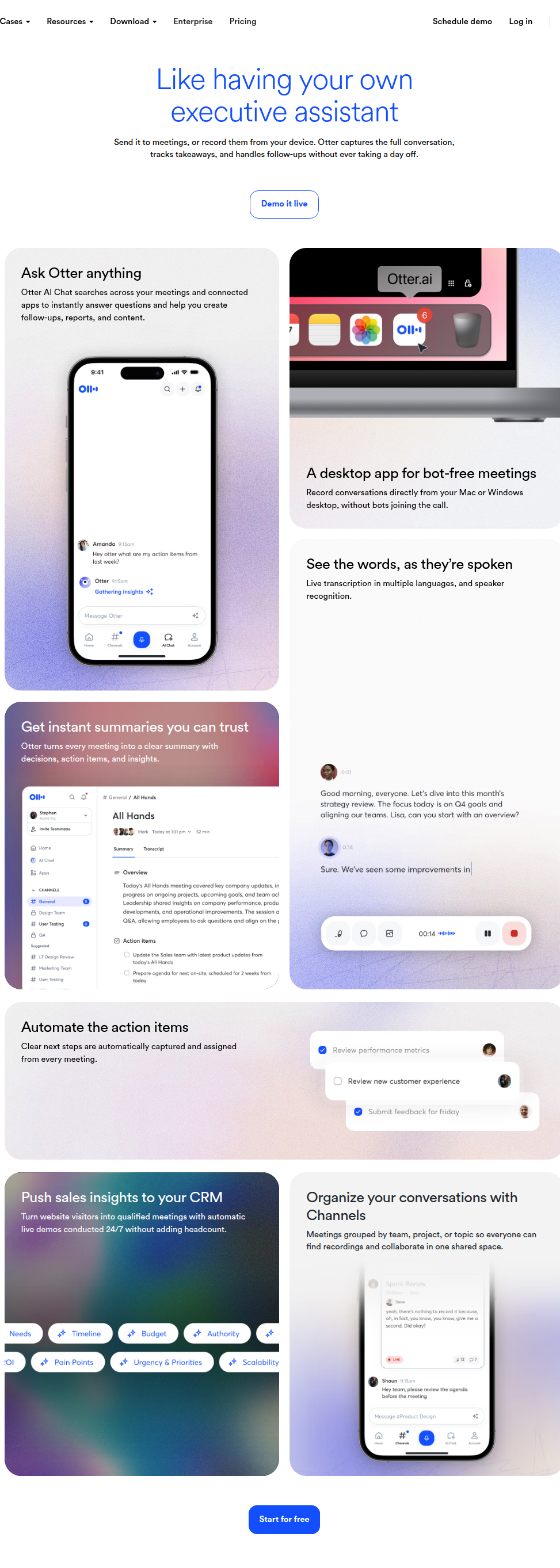
Otter’s core workflow: connect your calendar, and OtterPilot automatically joins every Zoom, Google Meet, and Microsoft Teams call. It transcribes live, identifies speakers by name, generates a summary with action items, and can push everything to Salesforce or HubSpot. You can also record bot-free via the desktop app — Otter captures system audio directly, so no bot enters the meeting and participants never know it is running.
HappyScribe’s AI Notetaker also joins Google Meet, Microsoft Teams, and Zoom calls, captures transcripts and summaries, and supports 150+ languages in meetings. But it always joins as a bot, has no CRM integration outside of Zapier (HubSpot is listed as “coming soon”), and offers no live transcription during the call. It covers the basics of meeting notes but lacks the depth Otter has built into meeting-specific workflows.
Otter’s role-based agents add another layer HappyScribe does not match: a Sales Agent that provides live coaching during calls, a Recruiting Agent that syncs candidate notes to Greenhouse, an Education Agent for lecture capture, and an SDR Agent that can run live demos for website visitors automatically.
Where HappyScribe loses: If you need live transcription visible on-screen during meetings, bot-free recording that is invisible to other participants, native CRM sync without middleware, or role-specific meeting workflows, HappyScribe does not compete here. Its meeting tools are solid but shallow compared to Otter’s.
Where Otter loses: If your work is mostly file-based — uploading recorded interviews, podcast episodes, or video footage for transcription and subtitling — Otter’s meeting-first architecture works against you. You get 3 lifetime file imports on the free plan, and the tool is not built for subtitle generation or translation at all.
Accuracy and the Human Fallback
Both tools use AI transcription, but they handle the accuracy question differently.
HappyScribe claims up to 99% accuracy on clear single-speaker audio, dropping to 85-95% with multiple speakers or background noise. The key differentiator: you can upgrade any file to human-made transcription, where professional transcribers deliver 99%+ guaranteed accuracy. This matters for legal depositions, published research, broadcast subtitles, and any scenario where a “good enough” AI transcript is not good enough.
Otter.ai does not publish an accuracy percentage. Its testimonials — including Tony Robbins calling it “the most accurate app out there [for transcription]” — suggest strong real-world performance. But there is no human fallback. If Otter’s AI makes a mistake on a critical call, there is no way to get a professional human to fix it within the platform.
Where HappyScribe loses: If your accuracy needs are met by AI alone and you never need human-verified transcripts, HappyScribe’s human-services add-on is something you will pay for (from €1.75/min) without using.
Where Otter loses: The absence of a human-transcription option is a genuine gap. For legal, medical, or published-content workflows where errors carry real consequences, Otter’s AI-only approach is a risk.
Pricing: Credit-Based vs Per-User Minute Quotas
Pricing models differ in ways that affect total cost depending on your usage pattern.
HappyScribe Pricing
HappyScribe uses a credit-based model: each plan includes a monthly pool of AI transcription/subtitle/translation minutes. You can top up beyond your plan at €0.20/min. Human proofreading is an add-on starting at €1.75/min.
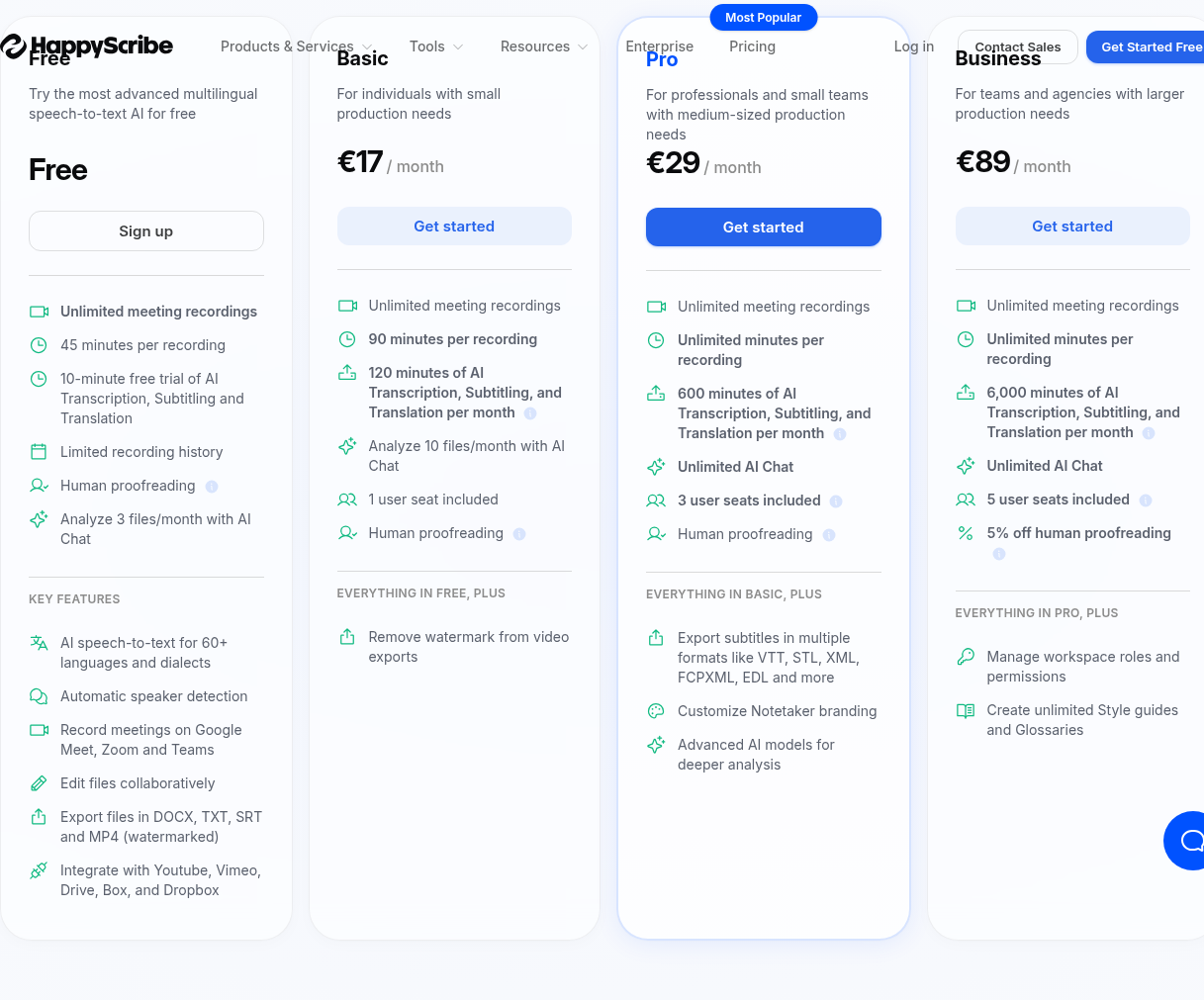
| Plan | Monthly Price | Annual Price (per month) | AI Minutes | Key Limits |
|---|---|---|---|---|
| Free | €0 | €0 | 10 min trial | 45 min/recording, watermarked MP4 |
| Basic | €17 | €8.50 | 120 min/mo | 90 min/recording, 1 seat, 10 AI Chat analyses/mo |
| Pro | €29 | €19 | 600 min/mo | Unlimited recording, 3 seats, all export formats, unlimited AI Chat |
| Business | €89 | €59 | 6,000 min/mo | 5 seats, style guides, 5% off human services |
| Enterprise | Contact sales | Contact sales | Custom | SSO/SAML, dedicated account manager |
All plans support unlimited meeting recordings. Human proofreading: from €1.75/min on Free through Pro; from €1.66/min on Business (5% discount). Additional seats: €29/mo (€19/mo annual). Overage: €0.20/min on all paid plans.
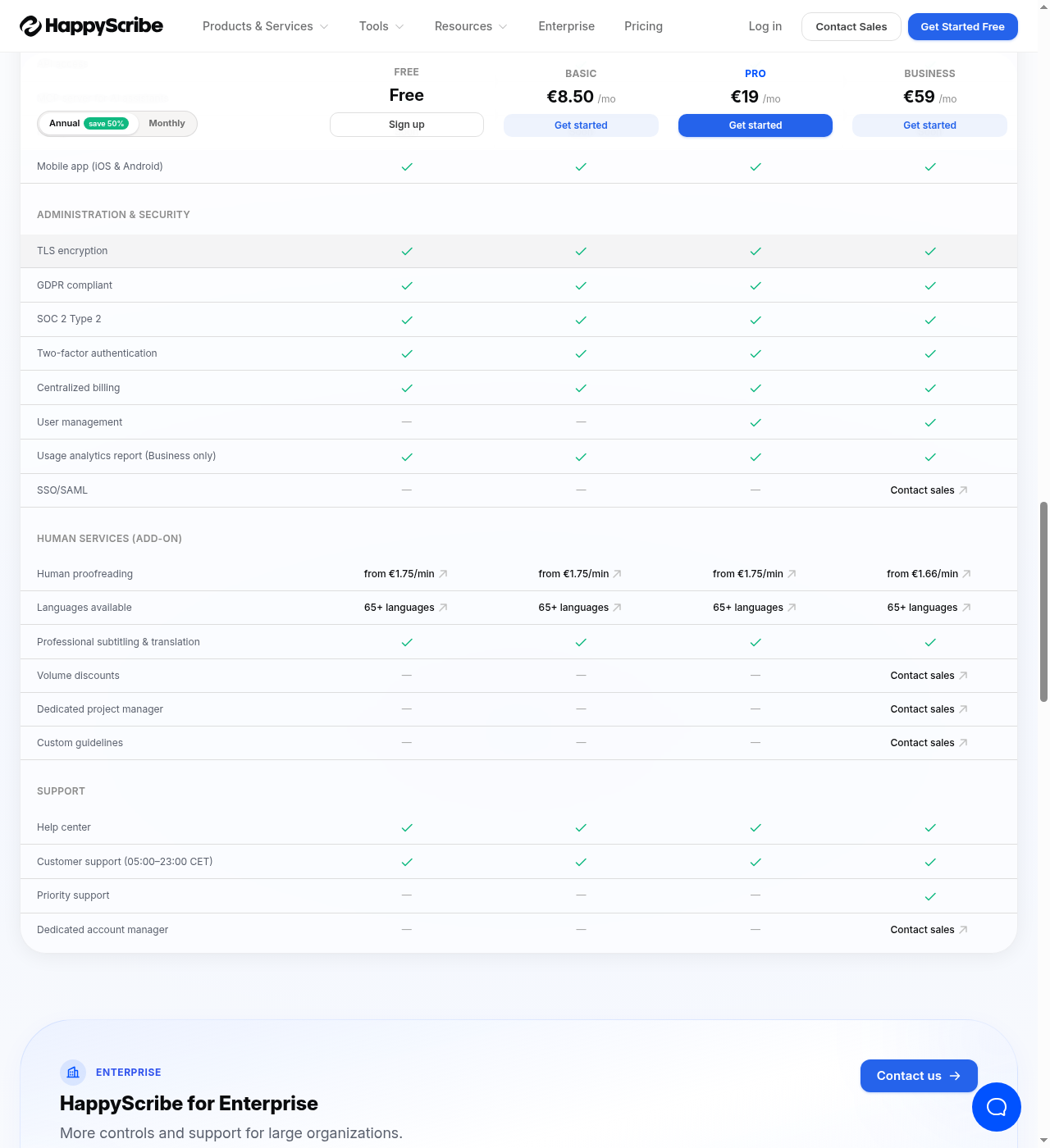
Prices accurate as of June 2026; check the vendor’s site for current rates.
Otter.ai Pricing
Otter uses per-user monthly pricing with transcription minute quotas and feature gates.
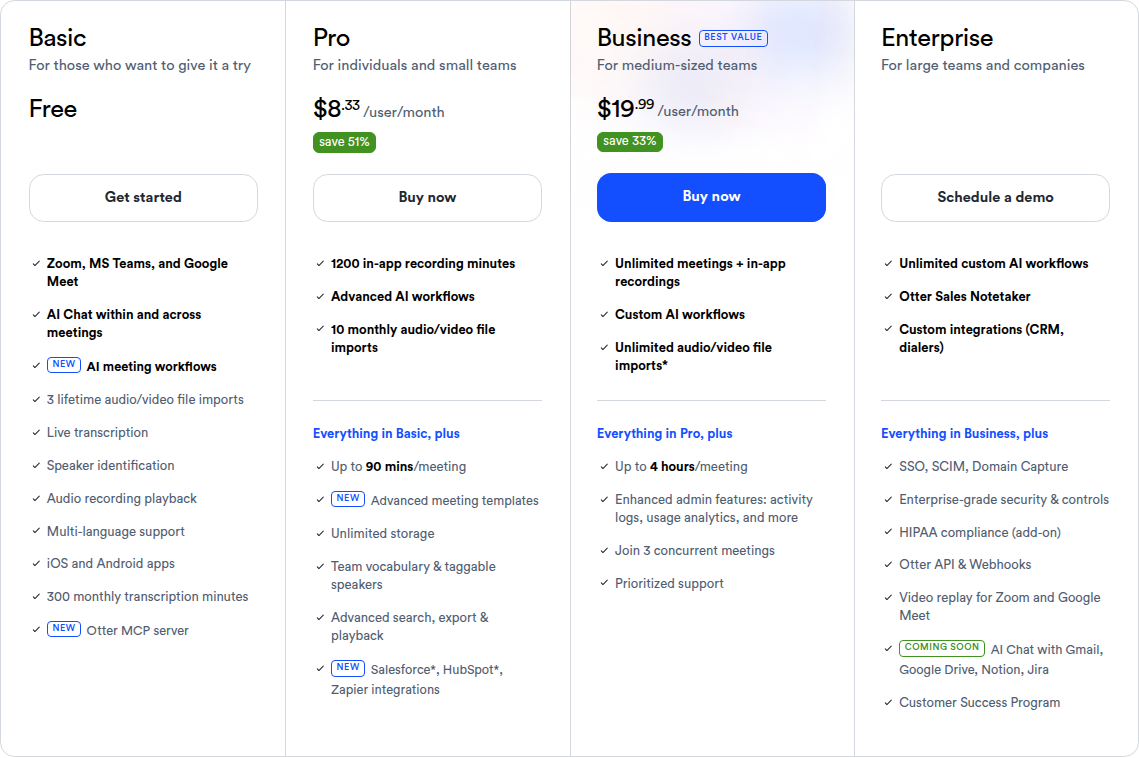
| Plan | Monthly Price | Annual Price (per user/month) | Transcription Minutes | Key Limits |
|---|---|---|---|---|
| Basic | Free | Free | 300 min/mo | 30 min/conversation, 3 lifetime file imports, 5 workspace members max |
| Pro | $16.99 | $8.33 | 1,200 min/mo | 90 min/conversation, 10 file imports/mo, 5 users, Salesforce/HubSpot (limited) |
| Business | $30 | $19.99 | Unlimited | 4 hrs/conversation, 3 concurrent meetings, admin tools, prioritized support |
| Enterprise | Contact sales | Contact sales | Unlimited | SSO/SCIM, HIPAA add-on, API, custom data retention, Customer Success |
SDR Agent is priced separately. Student/teacher discount: 20% off Pro with .edu email. Otter’s annual pricing saves ~51% vs monthly.
Prices accurate as of June 2026; check the vendor’s site for current rates.
Which Pricing Model Works for You?
Otter’s free tier is dramatically more generous for meetings. 300 minutes/month with no time limit on number of meetings vs HappyScribe’s 10-minute AI trial. If you just want a meeting notetaker and have no budget, Otter Basic is usable indefinitely; HappyScribe Free is a trial.
HappyScribe’s credit system is more flexible for irregular usage. If you have a burst of transcription one month and nothing the next, HappyScribe’s pay-as-you-go top-ups (€0.20/min) let you scale without upgrading your plan. Otter’s minute quotas reset monthly with no rollover; if you hit your limit mid-month, you either upgrade or stop transcribing.
Otter’s per-user pricing scales poorly for large teams. Business at $19.99/user/month adds up fast — 20 users is ~$400/month. HappyScribe Business at €59/month (annual) includes 5 seats with 6,000 AI minutes shared across the workspace; extra seats are €19/month each. For content-production teams that share a credit pool, HappyScribe’s workspace-pool model is often cheaper at scale.
Where HappyScribe loses on pricing: If you are a solo user who just needs meeting notes and occasional file transcription, Otter Pro at $8.33/month (annual) gives you 1,200 minutes vs HappyScribe Basic at €8.50/month for 120 minutes. Otter is 10x the minutes for roughly the same price. HappyScribe makes sense only if you use the subtitling, translation, or human-services features.
Where Otter loses on pricing: The per-user model hits hard for teams. And if you need translation, subtitles, or professional-format exports, you cannot buy those from Otter at any price — you would need a second tool, which adds cost and complexity.
Data Privacy and Compliance
For regulated industries and European companies, this section often decides the purchase.
HappyScribe is an EU-based company (Happy Scribe Limited, Ireland). Data is stored in the EU. It holds SOC 2 Type II certification, uses ISO 27001 data centers, is GDPR compliant by default, encrypts data in transit (TLS) and at rest (AES-256), and offers SSO/SAML on Enterprise plans. Two-factor authentication is available on all plans. There is no HIPAA offering.
Otter.ai is a US-based company. It uses TLS encryption and AES-256 for real-time content, offers two-factor authentication (authenticator app on all plans; SMS on Business and Enterprise), and provides HIPAA compliance as an Enterprise add-on. SSO/SCIM requires Enterprise with a minimum 100-user license. GDPR data processing terms are available, but the data stays in the US.
Where HappyScribe loses: If you need HIPAA compliance, HappyScribe does not offer it. US healthcare organizations evaluating these two tools have no choice — Otter is the only option that can meet HIPAA requirements.
Where Otter loses: For EU-based companies that require GDPR-native data residency in Europe, Otter’s US data storage may be a compliance blocker. HappyScribe’s EU-based infrastructure solves this directly.
Where Each Tool Genuinely Loses
Where HappyScribe Falls Short
- No live transcription during meetings. If you want to see words appear on screen in real time as people speak, HappyScribe does not do this. Otter does.
- No bot-free recording. HappyScribe always joins meetings as a visible participant. Otter’s desktop app captures audio invisibly.
- No native CRM integration. Salesforce and HubSpot require Zapier middleware. Otter syncs directly.
- No role-specific meeting agents. Otter’s Sales Agent, Recruiting Agent, Education Agent, and SDR Agent are purpose-built workflows HappyScribe has no equivalent for.
- Free tier is a trial, not a usable plan. 10 minutes of AI transcription is enough to test the product; it is not a plan you can rely on week to week.
- Pricing in EUR. For US buyers, currency exchange adds unpredictability.
Where Otter.ai Falls Short
- 6 languages max. If your work involves any language beyond English, Spanish, French, German, Japanese, or Chinese, Otter cannot help. HappyScribe supports 150+.
- No subtitle or translation tools. You cannot generate professional-grade subtitles (SRT, VTT, FCPXML, STL) or translate transcripts. Otter is not a content-production tool.
- No human transcription. AI is the only option. For high-stakes accuracy needs, there is no fallback.
- File-based transcription is secondary. The product is designed around live meetings. Uploading pre-recorded files is possible but limited (3 lifetime imports on free, 10/month on Pro).
- US data residency only. EU companies that require data to stay in Europe have no path forward with Otter.
- Per-user pricing adds up. Large teams pay per person, not per minute pool. 20 users on Business at $19.99/user/month is ~$400/month.
Other Tools Worth Considering
If neither HappyScribe nor Otter fits, there are alternatives in both the content-production and meeting-notetaker spaces.
Sonix sits between the two: file-based transcription with 99% claimed accuracy in 54+ languages, SOC 2 Type 2, HIPAA, and AI summaries. (We compared HappyScribe and Sonix head-to-head if you want a deeper look at that matchup.) It is closer to HappyScribe in feature set but narrower in language coverage and has no meeting notetaker. Pricing is pay-as-you-go at roughly $5/hour of transcription.
Descript is a full video/podcast editor where transcription is a built-in feature. You edit video by editing the transcript text. It includes AI tools like filler-word removal, Studio Sound, and eye-contact correction. Best for content creators who need editing more than translation. Pricing: Free / Hobbyist $24/mo / Creator $35/mo (annual).
Fireflies.ai is a direct Otter competitor: AI meeting notetaker with 100+ languages, SOC 2 Type II, GDPR, HIPAA, and conversation intelligence features like topic trackers, sentiment analysis, and speaker talk-time. Pricing: Free / Pro $10/user/mo / Business $19/user/mo / Enterprise $39/user/mo (annual). If you like Otter’s meeting focus but need more languages, Fireflies is worth a look.
Fathom is another Otter competitor with bot-free desktop capture, AI Scorecards for meeting coaching, Salesforce/HubSpot integration, and a cleaner UX. Free plan available. Strong in the meeting-notetaker space with HIPAA and SSO/SCIM.
Rev offers both human transcription (99%+ accuracy) and AI transcription, with a legal-industry focus. Pricing: subscription for AI features from ~$30/mo; human services by the minute. Narrower language coverage than HappyScribe (17 languages for subtitles) but strong in legal and investigative workflows.
Bottom Line: Who Should Pick What
Pick HappyScribe if:
- You produce video or podcast content and need subtitles in multiple formats
- You work in languages beyond Otter’s six (150+ supported)
- You need human-verified accuracy as an option (legal, research, published content)
- Your company requires EU data residency and GDPR-native compliance
- You want transcription, subtitles, and translation in one platform without stitching tools together
Pick Otter.ai if:
- You live in Zoom, Meet, and Teams and want automated meeting notes
- You need live transcription visible during calls
- You want native CRM sync (Salesforce, HubSpot) without Zapier middleware
- You want AI to search across all your meeting history (“what did we decide about the Q4 budget?”)
- You are a sales team that wants meeting summaries pushed to your CRM automatically
- You need bot-free recording that does not announce itself on calls
Pick neither if you need both deep meeting intelligence AND broad content production in one tool. These products complement each other more than they compete: Otter for live meetings, HappyScribe for file-based content work. Many teams use both.
For a deeper look at HappyScribe’s features, try HappyScribe free — no credit card required, and you get 10 minutes of AI transcription to test it out.