23 July 2026 · Comparison
Migma AI vs Mailchimp (2026): Which Builds Better Email?
The short answer
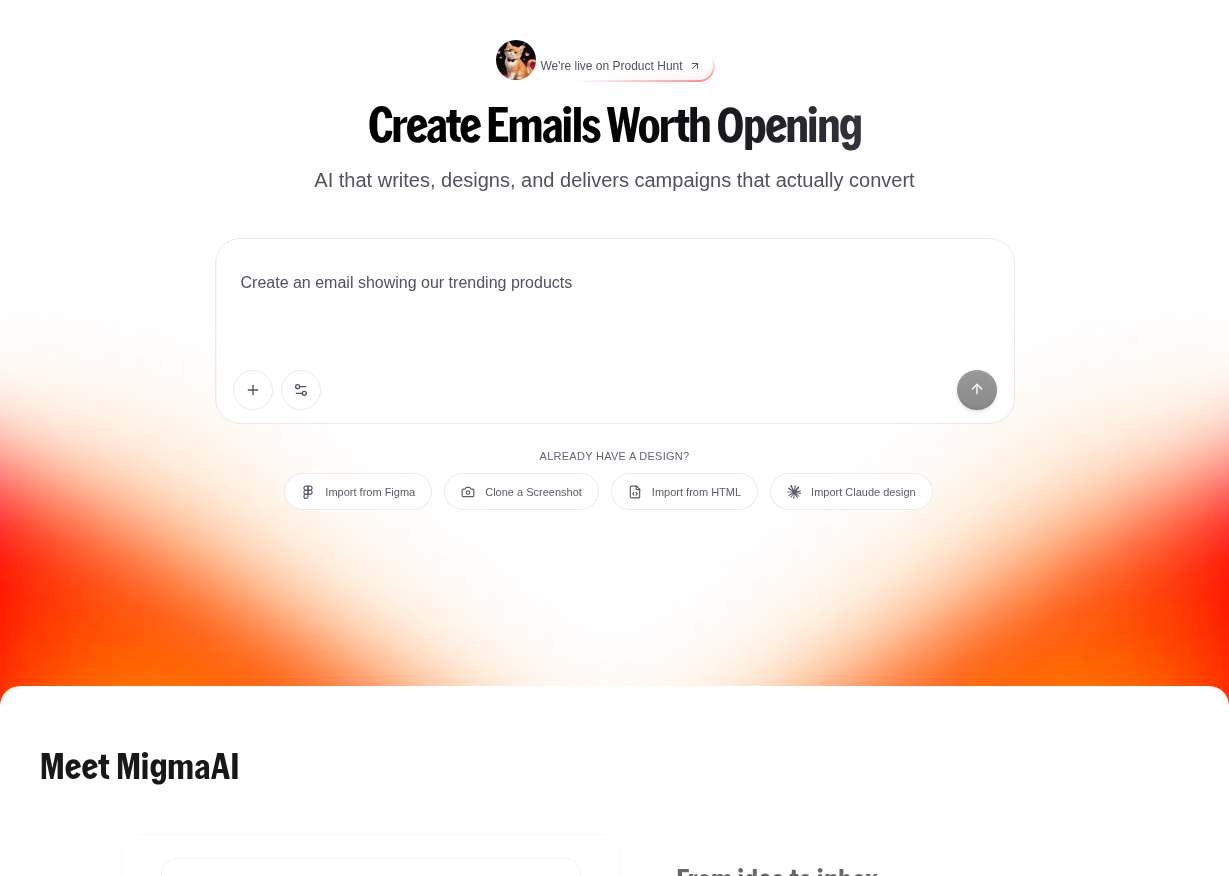
Migma generates complete campaigns from plain-English prompts. Mailchimp is the 20-year platform with SMS, landing pages and 300+ integrations.
Verdict: Pick Migma if you want AI to generate and test your emails in seconds. Pick Mailchimp if you need a complete marketing platform with landing pages, forms, automations, and SMS. If you already use Mailchimp but find creating emails slow, use Migma as a creation layer and export to Mailchimp. They are not mutually exclusive, and the smart play might be to use both.
Disclosure: This post contains affiliate links. If you sign up through them, we may earn a commission at no extra cost to you. We check every price against the vendor’s own live pricing page and say when we checked, and the opinions here are our own.
The Setup: Two Tools From Opposite Directions
Mailchimp is the 800-pound gorilla of email marketing. Twenty-plus years old, owned by Intuit since 2021, and responsible for half a billion emails per day. It has 300+ integrations, a drag-and-drop email builder, landing pages, signup forms, SMS, social media scheduling, and visual automation flow builders.
Migma AI is a startup, founded in 2025/2026 by two brothers in Stockholm and Barcelona. Its entire pitch: describe a campaign in plain English, and the AI builds the emails, segments, and scheduling. No dragging, no templates, no spending an hour on one newsletter.
These two tools come at the problem from completely opposite angles. Migma asks, “what if AI created everything?” Mailchimp asks, “what if you controlled everything?”
They overlap more than you’d think. Migma now sends campaigns directly and has audience management. Mailchimp now has Intuit Assist, an AI feature set that can generate copy, build automations, and predict the best send times. But each tool’s approach to email creation is fundamentally different.
Pricing: Flat Rate vs Contact-Tier Scaling
This is where the decision gets real. The pricing models are completely different.
Migma Pricing
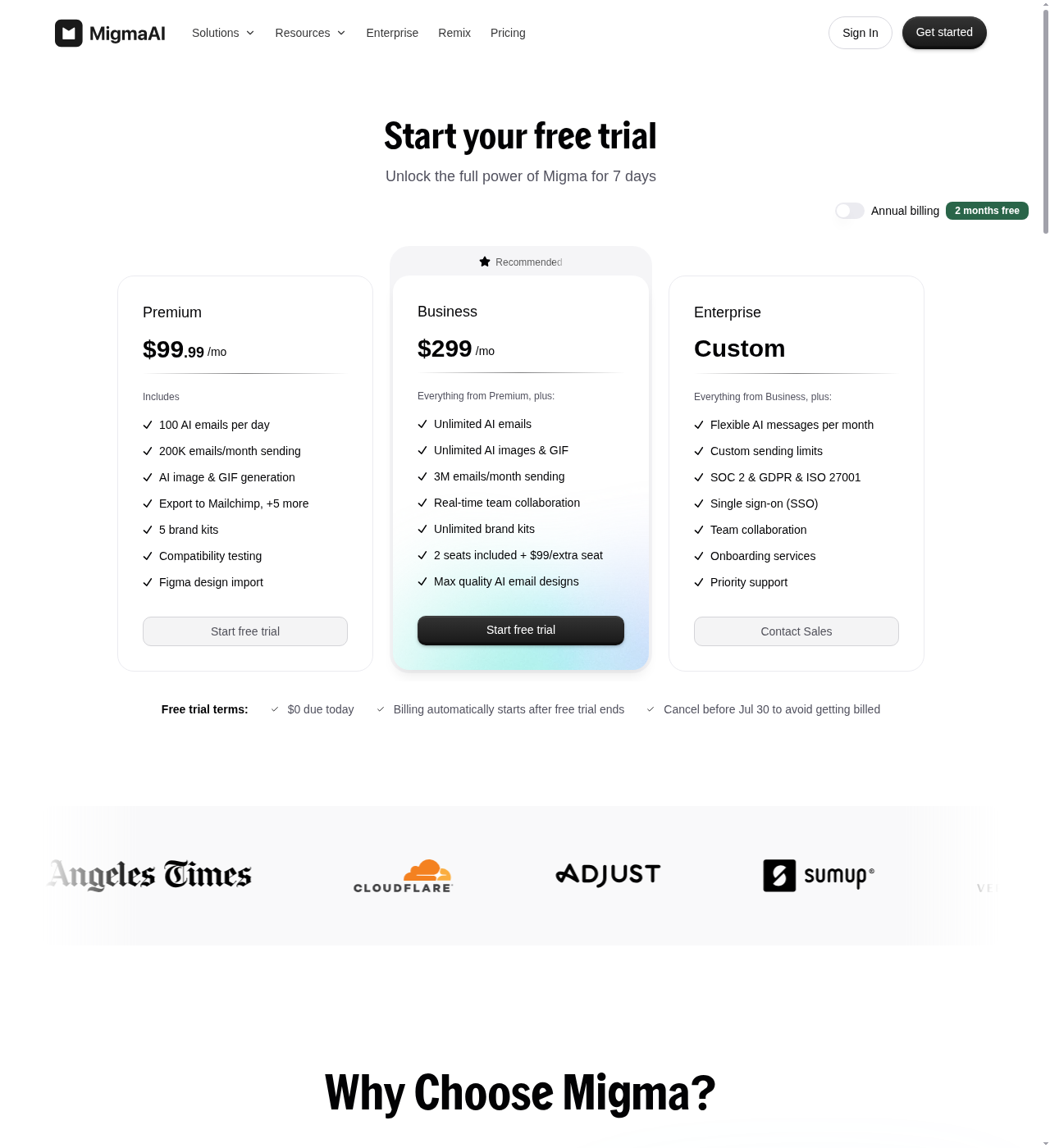
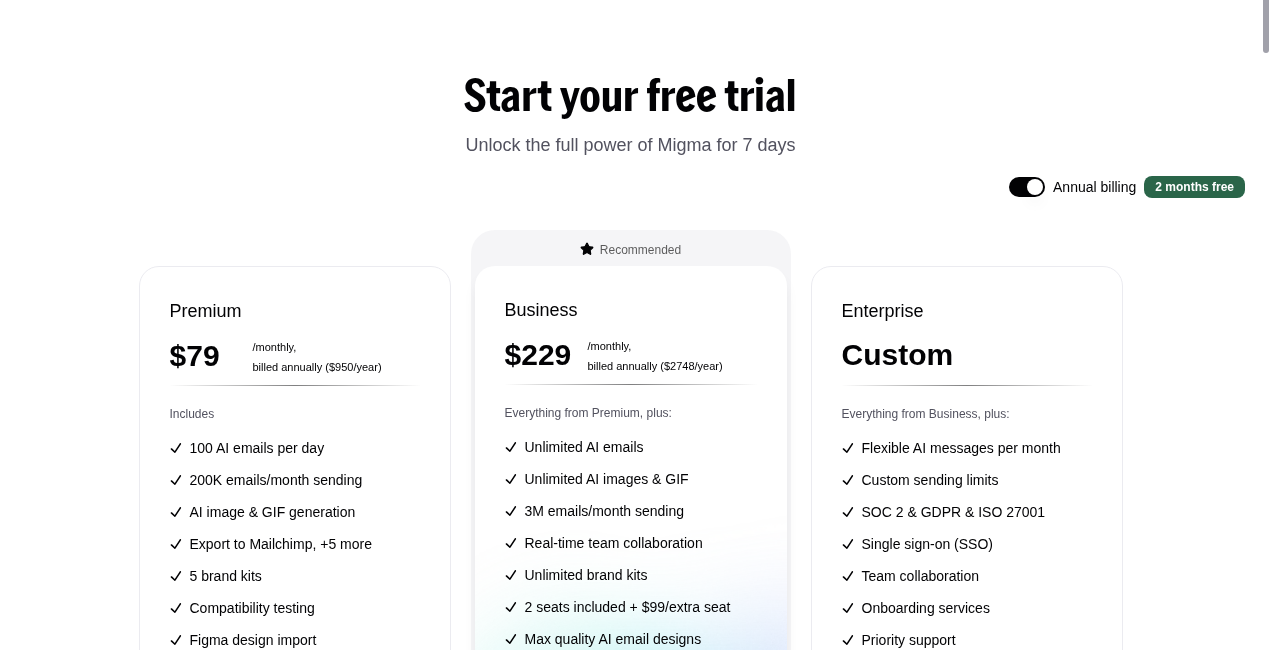
Migma uses flat monthly rates regardless of contact count (with sending limits):
| Plan | Monthly | Annual (billed yearly) | Key Limits |
|---|---|---|---|
| Premium | $99.99/mo | $79/mo ($950/yr) | Personal workspace, 100 AI emails/day, ~200K sends/mo, AI images & GIFs, Figma import, preflight testing |
| Business | $299/mo | $229/mo ($2,748/yr) | Team workspace, 2 editor seats, unlimited AI emails, ~3M sends/mo, best AI models, unlimited brand kits, priority support |
| Enterprise | Custom | Custom | SSO, custom sending limits, compliance packages |
There is no permanent free tier beyond a 7-day free trial on either paid plan.
Mailchimp Pricing
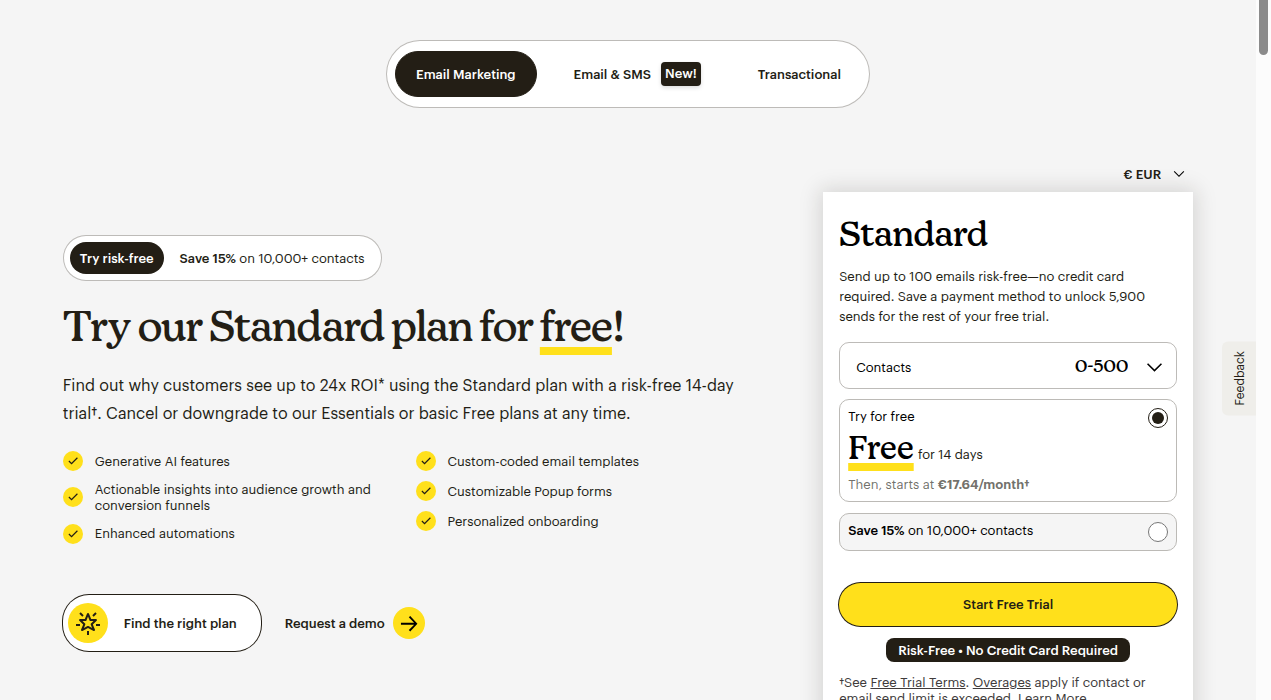
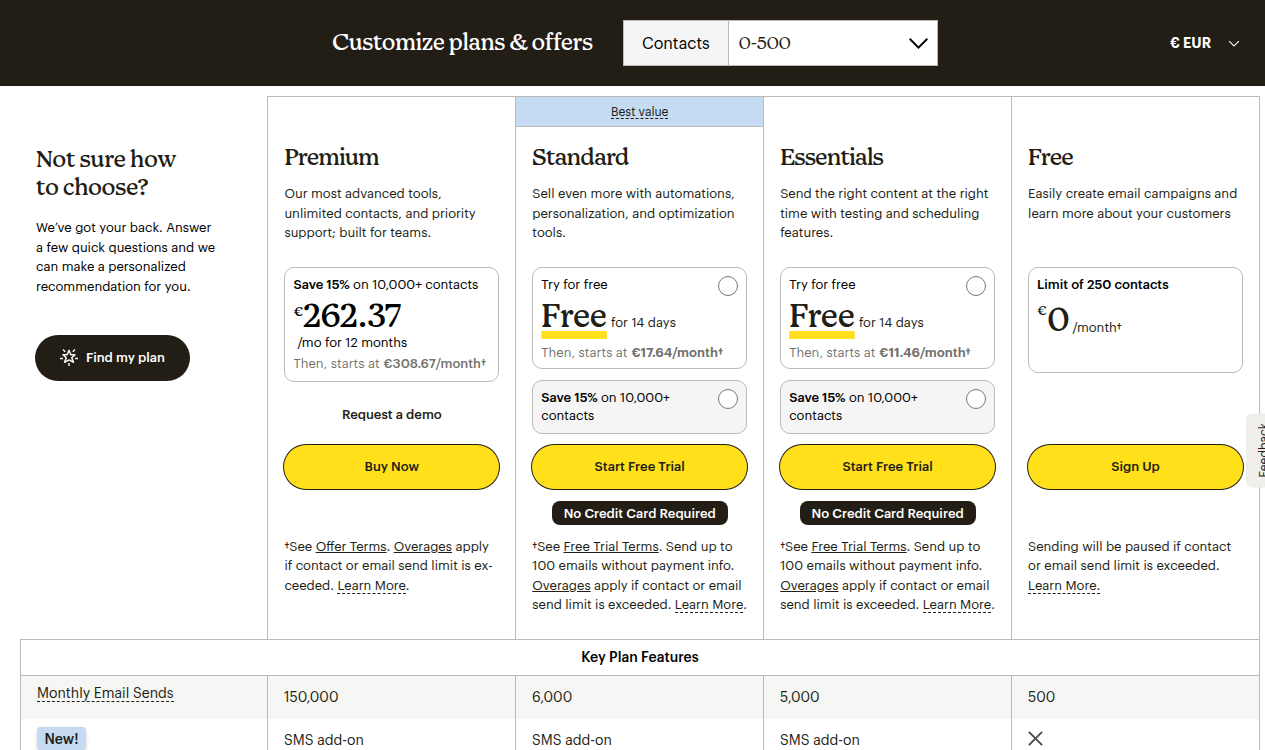
Mailchimp charges by contact tier. The plan price scales up as your list grows:
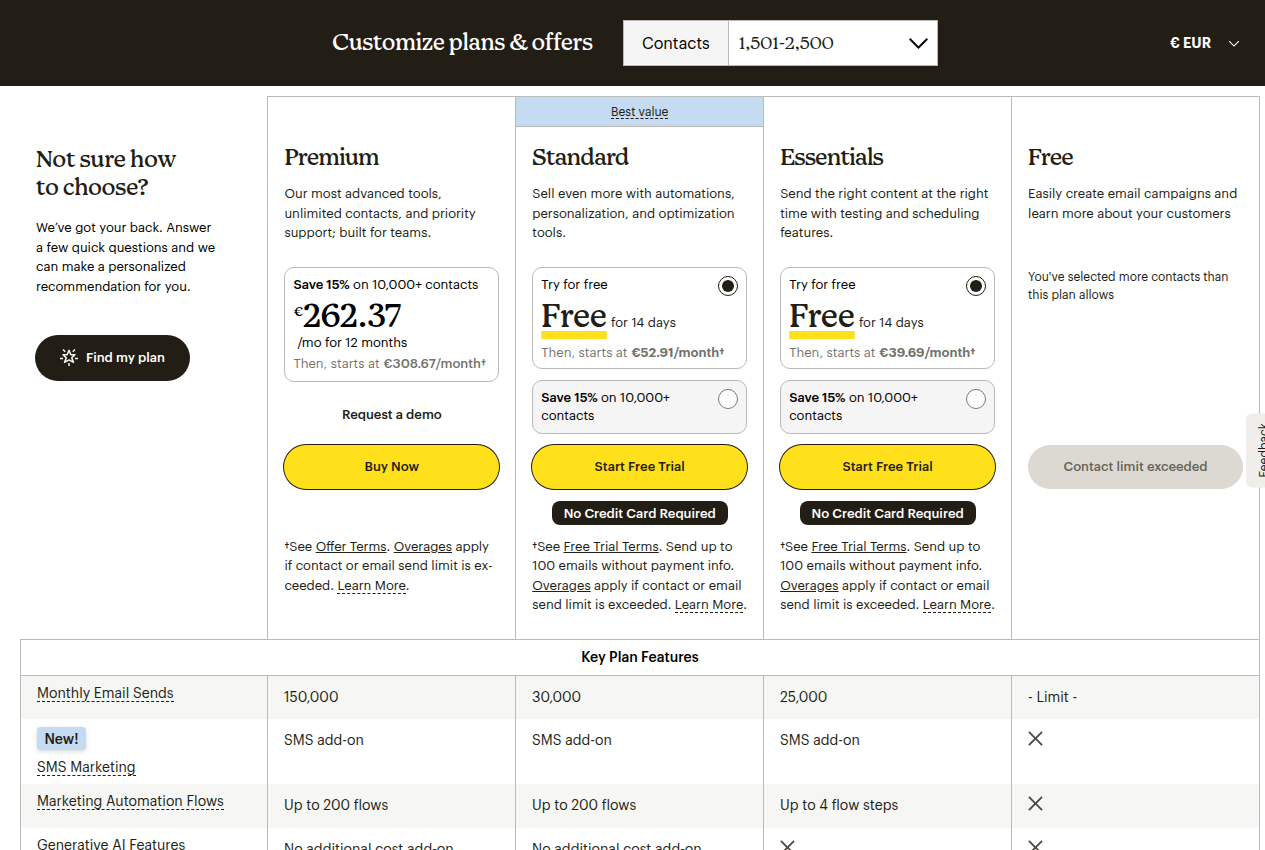
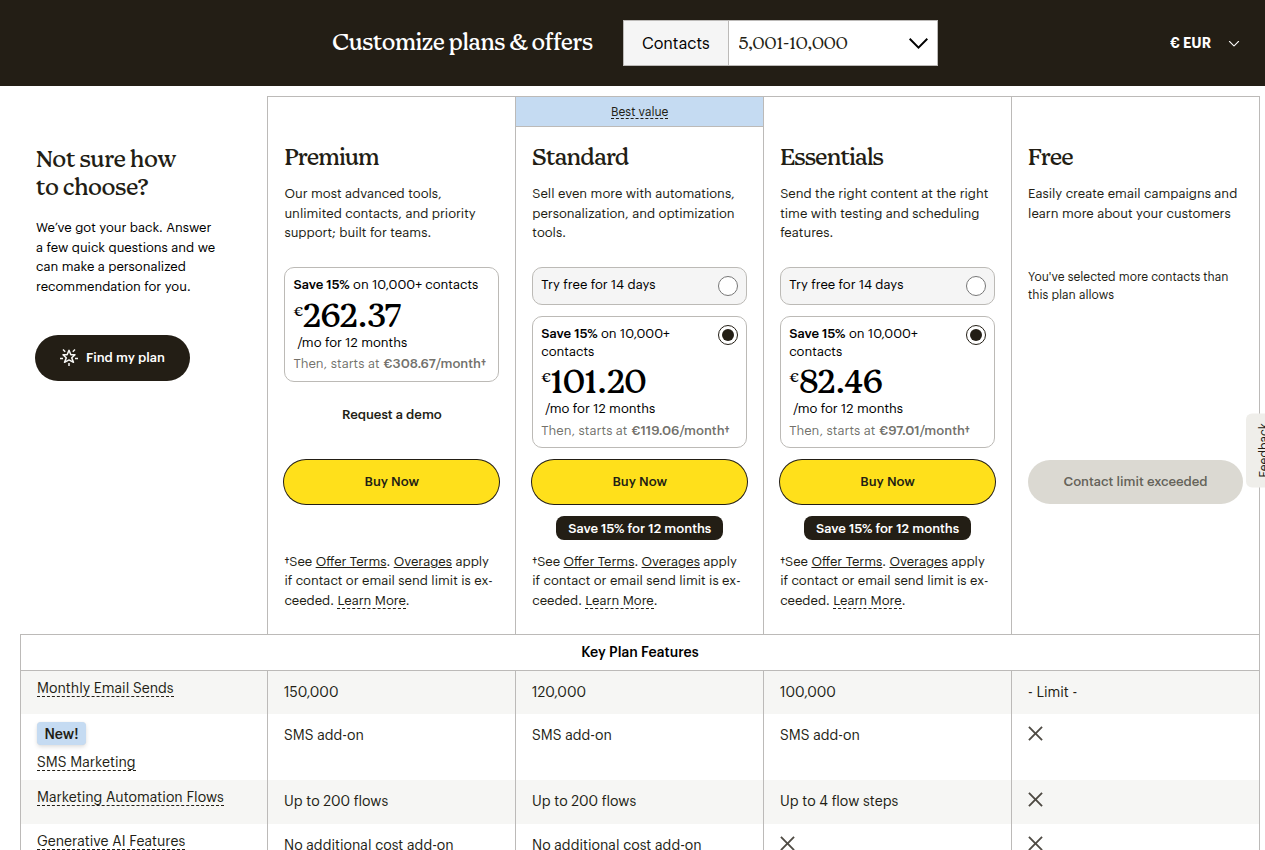
| Plan | 500 contacts (EUR) | 2,500 contacts (EUR) | What it unlocks |
|---|---|---|---|
| Free | €0 | N/A (max 250 contacts) | 1 seat, 1 audience, 500 sends/mo, Mailchimp branding |
| Essentials | €11.46/mo | €39.69/mo | 3 seats, 3 audiences, 4-step automations, A/B testing, no branding |
| Standard | €17.64/mo | €52.91/mo | 5 seats, 5 audiences, generative AI (Intuit Assist), predictive segmentation, multivariate testing |
| Premium | €262.37/mo | €262.37/mo | Unlimited seats, unlimited audiences, phone + priority support, dedicated onboarding |
Prices accurate as of July 2026. Check each vendor’s site for current rates — Mailchimp pricing is particularly dynamic and contact-tier based.
The Pricing Divide
At small scale, Mailchimp’s free tier is genuinely useful if you have under 250 contacts. Migma has no equivalent. For 500 contacts on Mailchimp, you pay about €17.64/mo for Standard. Migma starts at $99.99/mo for Premium.
But at larger scales, the math shifts. Mailchimp’s contact-tier pricing escalates fast. At 5,000-10,000 contacts, Standard costs €101.20/mo with the 15% intro discount for the first 12 months, then jumps to €119.06/month. Migma’s Business plan stays at $299/mo regardless of list size, with up to 3 million sends per month.
The broader point: Migma costs what it costs, period. Mailchimp gets more expensive the more successful your list becomes.
If you are curious about other AI-native email tools that compete with Mailchimp, see our Brew vs Mailchimp comparison for another take on AI-first email creation. For newsletter-specific alternatives, check out Kit vs Mailchimp for Newsletters.
Email Creation: Prompt vs Drag-and-Drop
How Migma Creates Emails
Migma’s creation flow is entirely prompt-driven. You type something like “Create a newsletter about our new summer product line, featuring the top 3 items, with a discount code SUMMER20 at the end,” and Migma generates the complete email: design, copy, images, layout, and audience segments.
You can then click any element to edit it visually. No code, no drag-and-drop canvas, no template library to browse. If you do have a starting design, Migma accepts imports from:
- Figma frames
- Screenshots (clone any email)
- Raw HTML
- Claude designs
- YouTube URLs
This is fundamentally faster than building from scratch. The company claims 95% time saved on email creation and 102K+ emails generated across its user base.
How Mailchimp Creates Emails
Mailchimp’s creation flow is the classic drag-and-drop builder you’d expect from a legacy ESP. You start from a template, drag content blocks into place, and write or paste your copy. The builder is mature and versatile — custom-coded templates, pre-built layouts, Canva integration for visuals.
Mailchimp’s AI (Intuit Assist) offers an inline “Write with AI” feature in the email editor. You can generate, rewrite, or polish copy. But it does not generate the entire email design from a prompt the way Migma does. You still build the email structure yourself, then use AI to assist with copy.
There’s also “AI-generated automations” (beta) that can build multi-step flows from a description. This is closer to Migma’s prompt-to-sequence approach, but it is:
- Beta only
- Available only on Standard, Premium, and Legacy plans
- English-only
- Focused on automations, not individual email creation
The Creation Speed Difference
The real difference is workflow: Migma generates the whole thing and you edit down. Mailchimp starts you from a blank canvas (or template) and you build up. For a team sending multiple campaigns per week, Migma’s approach saves hours. For a team that wants pixel-level control over every email, Mailchimp’s approach gives more fine-grained control.
Feature Comparison Table
| Feature | Migma AI | Mailchimp |
|---|---|---|
| AI email generation | Prompt-to-full-email (design + copy + images) | Inline AI copy assist (Intuit Assist) |
| Brand import | One-click from URL (logo, colors, fonts, tone) | Manual brand setup |
| Email preflight testing | 22+ devices, link validation, spam risk, spelling | Campaign review checks only |
| Design import options | Figma, screenshots, HTML, Claude, YouTube | HTML, templates, Canva |
| Competitor tracking | Yes (Remix - track and remix competitor emails) | No |
| Visual automation builder | No (prompt-based flows in development) | Yes (Marketing Automation Flows) |
| Email sending | Yes (direct sending) | Yes (with full campaign management) |
| A/B testing | Not listed as a feature | Yes (Standard plan and above) |
| Landing pages | No | Yes |
| SMS marketing | No | Yes (add-on) |
| Signup forms | No | Yes (popup + embedded) |
| Free tier | 7-day trial only | Permanent free (250 contacts) |
| Integrations | 30+ | 300+ |
| Developer tools | SDK, CLI, MCP server, webhooks, n8n | Marketing API, Transactional API |
| Multi-language | 30+ languages (AI-powered automatic localization) | Manual multi-language support |
| Ecommerce features | No | Yes (abandoned cart, product recs) |
| Social media posting | No | Yes |
Where Migma Wins
Creation speed. The core value prop: describe a campaign, get a complete email. If you send multiple emails per week, the time savings are real — especially with multi-email sequences generated from one prompt.
One-click brand import. Enter a URL and Migma pulls your brand assets automatically. No manual setup of logos, colors, or fonts. Mailchimp requires you to do all of this by hand.
Email Preflight. Before you send, Migma checks rendering on 22+ real devices, validates all links, scores spam risk, checks spelling/grammar, and flags compliance issues. This is a pre-send safety net that Mailchimp’s basic campaign review doesn’t match.
Competitor tracking (“Remix”). You can track what competitors are sending, see their send cadence, analyze their subject lines and design patterns, then remix their emails with your own brand. No Mailchimp equivalent exists.
Export anywhere. You can export to Mailchimp, Klaviyo, HubSpot, Omnisend, Brevo, plus HTML, MJML, and PDF. Migma is designed to complement your existing ESP.
Agent-native architecture. Full SDK (Node.js/TypeScript), CLI, MCP server for AI coding agents (Claude Code, Cursor, Copilot). Migma can be driven entirely through APIs and AI agents.
Flat pricing. Your bill doesn’t grow just because your list does. At scale, this is a significant advantage over Mailchimp’s contact-tier model.
Where Migma Loses
No landing pages. Migma is email-only. If you need landing pages for your campaigns, you need a separate tool or you stick with Mailchimp, which has them built in.
No SMS marketing. Mailchimp offers SMS as a paid add-on with multi-channel campaigns. Migma has zero SMS capability.
No signup forms. You cannot use Migma to collect email addresses from your website. You need a separate form tool or you use Mailchimp, which has popup and embedded forms.
No automation builder yet. Mailchimp’s Marketing Automation Flows is a mature visual journey builder with triggers, delays, conditions, and branching. Migma doesn’t have an equivalent yet — its planned automation flows (prompt-driven sequences with their own triggers, delays, and conditions) are listed as “Coming soon” on Migma’s site, not yet live.
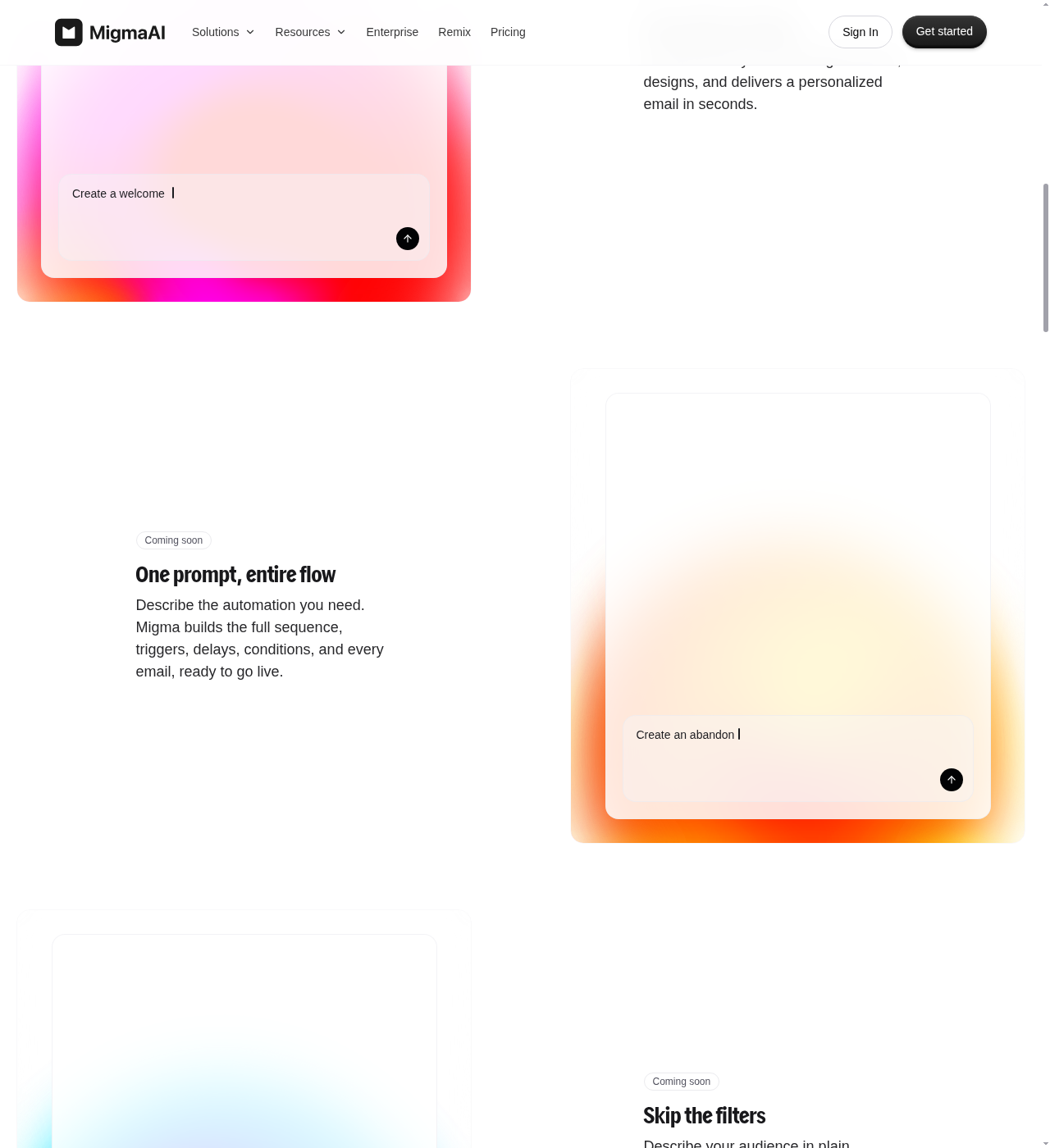
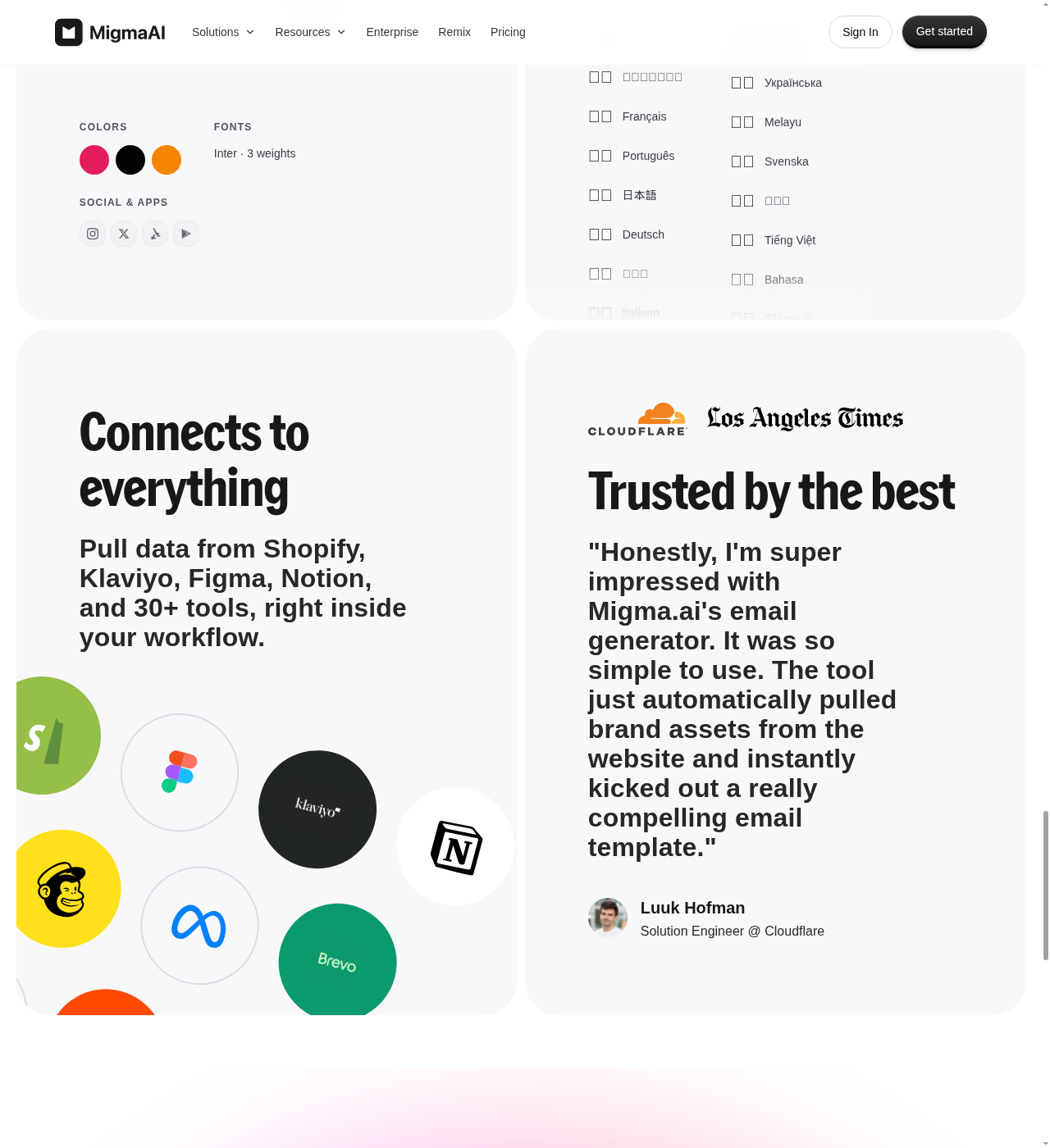
Smaller integration ecosystem. Mailchimp has 300+ native integrations. Migma connects to Shopify, Klaviyo, Figma, Notion, and 30+ tools — growing, but still a fraction of Mailchimp’s roster. If you depend on deep Salesforce, Shopify, or WooCommerce integration, Mailchimp is stronger.
No permanent free tier. Migma offers a 7-day free trial. Mailchimp’s free tier is permanent and usable for tiny lists (250 contacts). If you are just starting out with zero budget, Mailchimp lets you begin for free. Migma does not.
Newer, less proven. Mailchimp has 20+ years of deliverability expertise, TrustRadius awards, and a massive user base. Migma is a startup. For compliance-heavy or risk-averse teams, this matters.
No ecommerce features. Mailchimp has abandoned cart recovery, product recommendations, and deep ecommerce integrations. Migma has none of this.
No social media scheduling. Mailchimp includes social posting and scheduling. Migma is email-only.
Where Mailchimp Wins
Complete marketing platform. Email, SMS, landing pages, signup forms, social media posting, visual automations, reporting, and revenue attribution — all in one place. If you want one tool that covers everything, Mailchimp is the more complete option.
300+ integrations. Deep native integrations with Shopify, WooCommerce, Salesforce, Canva, Stripe, QuickBooks, and hundreds more. If your tech stack needs to plug into your ESP, Mailchimp has the broadest ecosystem.
Permanent free tier. 250 contacts, 1 seat, basic templates, and up to 500 sends/month. It is a real, usable free plan for tiny businesses getting started.
Visual automation builder. Marketing Automation Flows (formerly Customer Journey Builder) is a mature, visual drag-and-drop journey builder with pre-built flows, triggers, delays, conditions, and branching. This is especially powerful for ecommerce: welcome series, abandoned cart recovery, win-back campaigns.
A/B and multivariate testing. Mailchimp has campaign A/B testing on Essentials and multivariate testing on Standard and above. You can test subject lines, content, send times, and more. A/B testing isn’t listed among Migma’s public features — it doesn’t appear anywhere in Migma’s public docs or changelog through July 2026.
Predictive AI. Beyond content generation, Mailchimp’s AI does predictive segmentation (identifying contacts most likely to convert), send time optimization, and send day optimization. These are powered by real audience behavior data, not just generation models.
Ecommerce features. Abandoned cart emails, product recommendations, purchase-based segmentation. If you run an online store, Mailchimp’s ecommerce features are hard to beat.
Brand recognition and stability. Intuit owns Mailchimp. It is not going anywhere. For agencies managing client accounts or enterprises with compliance requirements, this matters.
Where Mailchimp Loses
Email creation is slow. Drag-and-drop is powerful but time-consuming. For a team sending 3+ campaigns per week, building each email from scratch (even with templates) adds up to hours of work. Migma’s prompt-to-email approach is dramatically faster.
No competitor tracking. Mailchimp has no equivalent to Migma’s Remix feature. You cannot track competitors’ newsletters, analyze their send patterns, or remix their emails.
No email preflight testing. Mailchimp’s campaign review checks are basic. There is no device rendering preview across 22+ devices, no automated link validation, no spam risk scoring. You find out about rendering issues after you send.
Pricing punishes growth. Contact-tier pricing means your bill goes up every time your list grows. At 10,000+ contacts, costs escalate noticeably. At 50,000+ contacts, you are likely paying hundreds per month. Migma’s flat-rate pricing becomes increasingly attractive as your list scales.
AI features are additive, not core. Intuit Assist is layered on top of the existing builder. It helps with copy but doesn’t change the creation workflow fundamentally. Migma rebuilt the entire creation experience around AI.
No Figma or design import. You can import HTML templates into Mailchimp, but there’s no direct Figma-to-email path, no screenshot cloning, and no Claude or YouTube import. If your design team works in Figma, this is a gap.
No agent-native workflows. Mailchimp has a Marketing API, but no MCP server, no CLI, and no agent workflows. Developers who want to drive email creation through AI coding agents will find Migma far more accommodating.
Many features are plan-gated. Predictive segmentation, custom-coded templates, multivariate testing, and generative AI features require Standard or Premium plans. Mailchimp’s feature matrix is complex, and many of its best capabilities are locked behind higher tiers.
Can You Use Both? Yes.
Migma’s own docs say it: “Migma creates the emails, Mailchimp sends them.”
The Migma-to-Mailchimp export is a native integration. It supports Mailchimp merge tags, so personalization fields survive the export. The workflow looks like this:
- Create and design your email in Migma (prompt, or import from Figma/screenshot/HTML)
- Run Email Preflight to check rendering, links, spam risk
- Export directly to Mailchimp as a campaign draft or template
- Finish segmentation, scheduling, and reporting in Mailchimp
Migma also exports to Klaviyo, HubSpot, Omnisend, and Brevo. If you already have a Mailchimp account and an established audience there, adding Migma as a creation layer gives you the speed of AI generation without abandoning your existing infrastructure.
The downside: you pay for two tools. Migma starts at $99.99/mo. If you are also paying for Mailchimp Standard, that is another €17.64/mo at 500 contacts, climbing to roughly €119/mo once you cross into the 5,000-10,000 contact range. For some teams, the time saved justifies the combined cost. For others, it won’t.
Bottom Line
Pick Migma if:
- Email creation speed is your bottleneck
- You want AI to generate complete emails from prompts
- You need competitor email tracking and preflight testing
- You want flat pricing that doesn’t scale with list size
- You are a developer who wants agent-native email workflows (SDK, CLI, MCP)
Pick Mailchimp if:
- You need a complete marketing platform (email, SMS, landing pages, forms, social)
- You have under 250 contacts and want to start for free
- You need a visual automation flow builder with branching logic
- You rely on deep ecommerce integrations (Shopify, WooCommerce)
- You need A/B testing and predictive AI analytics
- You value platform stability and brand recognition (Intuit-owned, 20+ years)
Use both if:
- You already have a Mailchimp account with established audiences and workflows
- You want faster email creation without leaving Mailchimp
- You can justify two subscriptions with the time saved on email production
Where Migma is wrong: If you need landing pages, signup forms, SMS, or visual automation flows, Migma doesn’t have them. If 7 days isn’t enough to evaluate a tool you’ll pay $100+/mo for, Migma’s trial is too short. If you run an ecommerce store with abandoned cart recovery and product recommendations, Migma has none of that.
Where Mailchimp is wrong: If you spend hours building every email in a drag-and-drop editor and want to batch-generate campaigns from prompts instead, Mailchimp’s AI tools aren’t there yet. If your list is growing and the contact-tier pricing is getting painful, Mailchimp will keep getting more expensive. If you need to track what competitors are sending, Mailchimp doesn’t do it.