31 May 2026 · Comparison
Kit vs Mailchimp for Newsletters (2026): Honest Comparison
The short answer
Kit wins for solo creators selling to their audience. Mailchimp wins for businesses needing a multi-channel marketing suite.
Verdict: For solo creators, newsletter writers, and anyone who wants to build an audience and sell products directly to it, Kit wins decisively. For established businesses that need a full marketing suite - SMS, transactional email, social ads, and 300+ integrations - Mailchimp still leads. Pick Kit if you’re a creator first; pick Mailchimp if you’re a company first.
Disclosure: Some links in this post are affiliate links. If you click through and sign up for a paid Kit plan, SaaSpicious may earn a commission at no extra cost to you. This does not influence our comparisons - every tool in this post gets an honest “where it loses” section.
The Short Version: Who Picks What
Pick Kit if:
- You’re a solo creator, blogger, author, coach, podcaster, or course creator
- You want to sell digital products or paid newsletters built directly into your email tool
- You want subscriber-based pricing - pay once per person, no double-counting
- You need unlimited email sends and automations
- You’re starting out and want a free plan that actually works beyond 250 subscribers
Pick Mailchimp if:
- You’re an e-commerce store, traditional business, or nonprofit
- You need SMS marketing (Kit doesn’t have it)
- You need transactional email for receipts and order confirmations
- You rely on deep integrations with Shopify, WooCommerce, or CRMs
- You’re running multi-channel campaigns across email, social, and ads
Pricing Comparison
Prices accurate as of May 2026; check vendor sites for current rates.
Kit
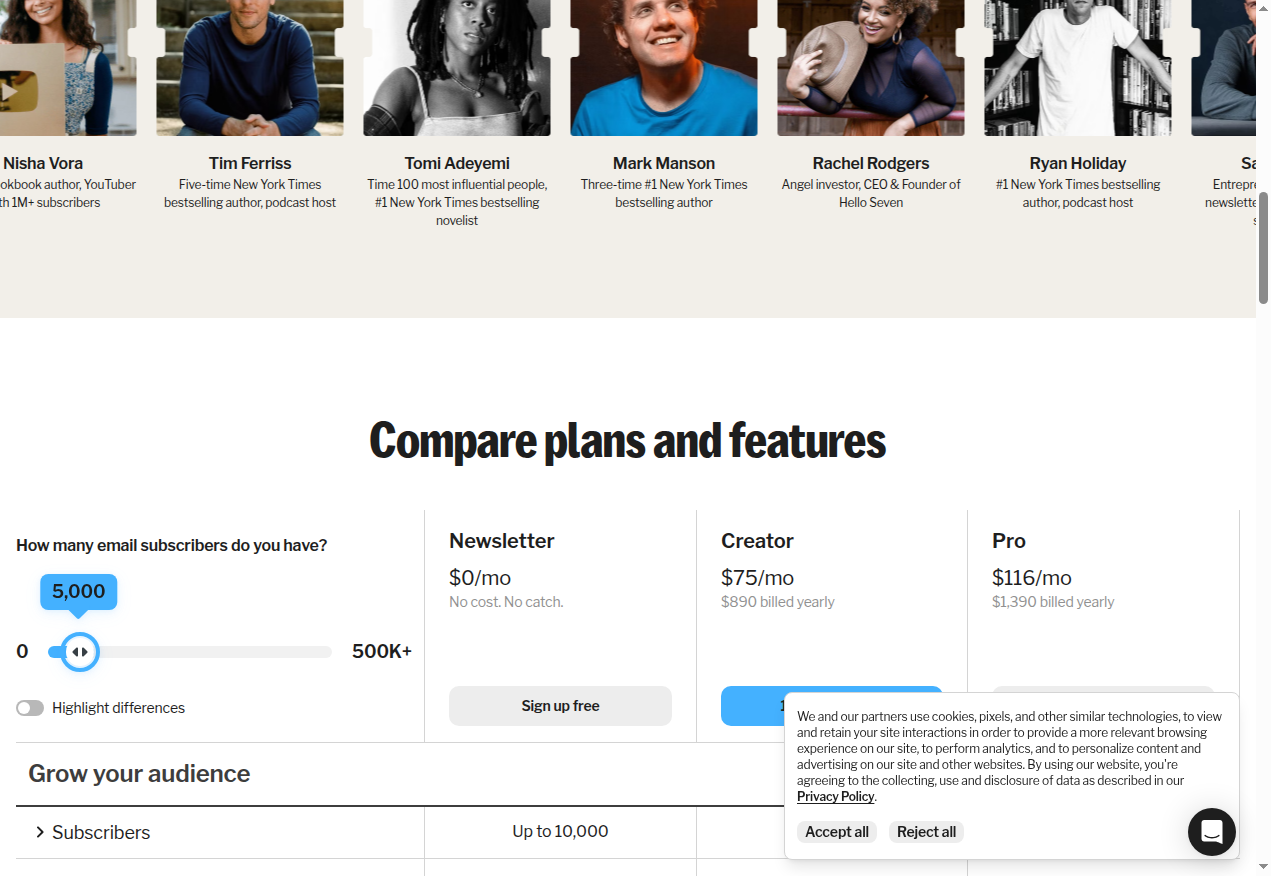
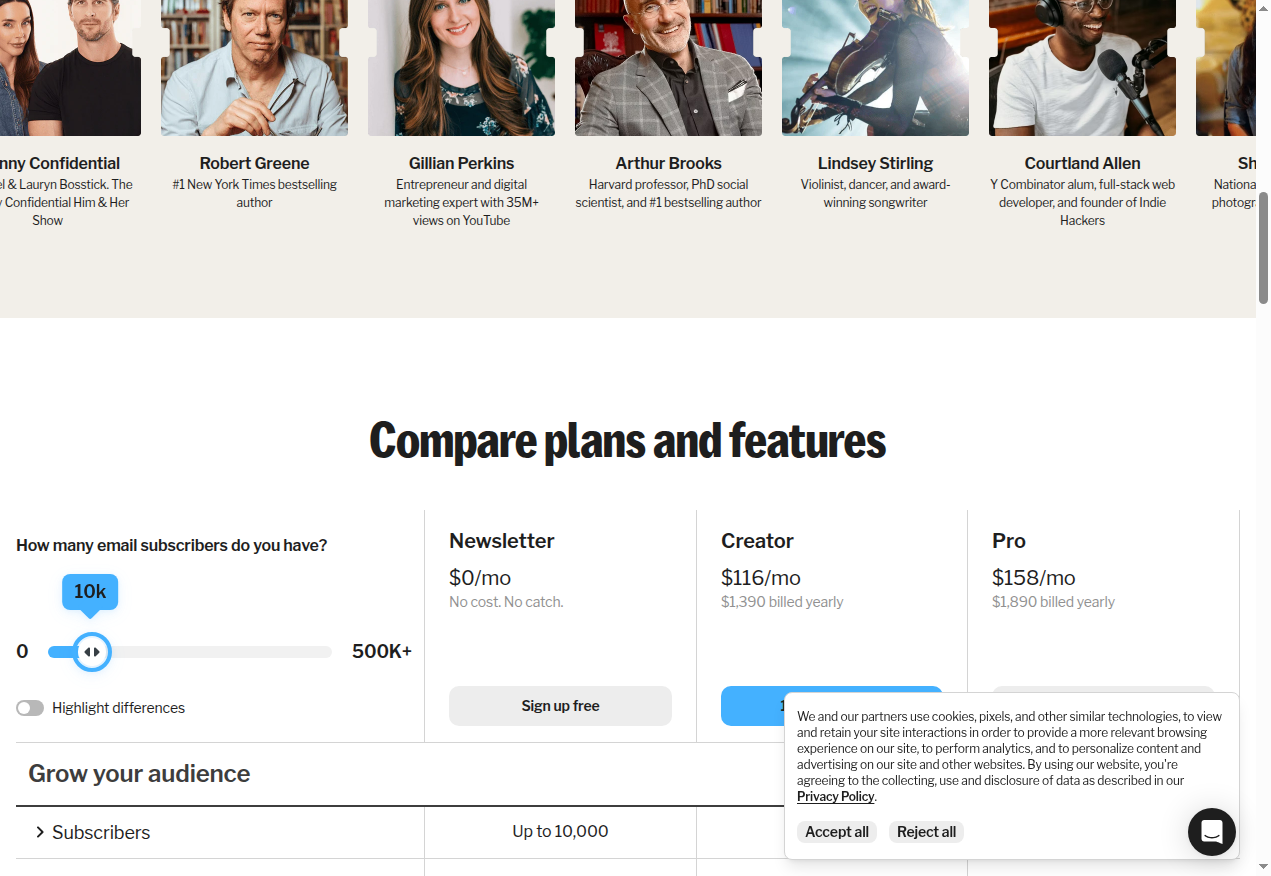
Kit uses subscriber-based pricing - you pay based on the number of unique active subscribers, not per list. One person on three lists counts once.
| Plan | Monthly | Yearly | Subscribers (entry tier) |
|---|---|---|---|
| Newsletter | $0 | - | Up to 10,000 |
| Creator | $33 | $390 ($32.50/mo) | 1,000 |
| Pro | $66 | $790 ($65.83/mo) | 1,000 |
All plans include unlimited email sends. The Newsletter free plan includes unlimited landing pages, unlimited email broadcasts, audience tagging and segmentation, the ability to sell digital products and paid subscriptions, and 1 basic Visual Automation. No credit card required. The subscriber slider adjusts pricing per tier (e.g., at 5,000 subscribers, Creator is $75/mo and Pro is $116/mo; at 10,000 subscribers, Creator is $116/mo and Pro is $158/mo). Annual billing saves roughly 2 months per year.
Mailchimp
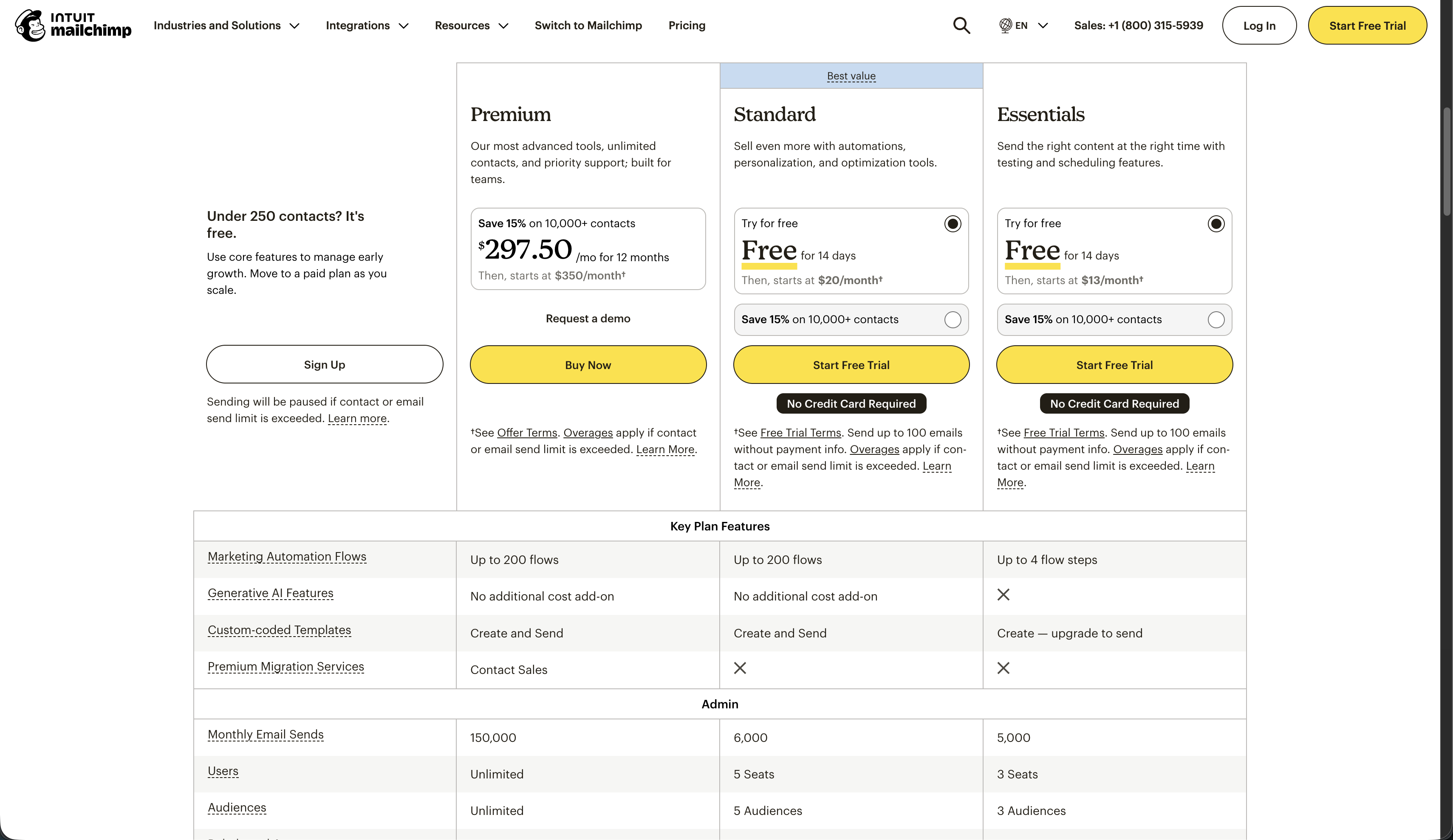
Mailchimp uses list-based pricing with email send limits. A contact on two audiences counts twice. You also get a monthly email send cap (e.g., 12x your contact count on Standard).
| Plan | Monthly (500 contacts) | Email Sends | Users | Audiences |
|---|---|---|---|---|
| Free | $0 | 500/mo (or 250/day) | 1 | 1 |
| Essentials | $13 | 10x contacts (5,000/mo) | 3 | 3 |
| Standard | $20 | 12x contacts (6,000/mo) | 5 | 5 |
| Premium | $350 | 15x contacts | Unlimited | Unlimited |
Prices accurate as of May 2026; check vendor sites for current rates. Mailchimp’s Free plan is capped at 250 contacts and stripped of automations, A/B testing, and the ability to remove Mailchimp branding. Essentials and Standard offer 14-day free trials with no credit card required (limited to 100 sends until you add a payment method). Premium pricing shown at 10,000 contacts is $350/mo.

Pricing Model: The Core Difference
This is the single biggest factor in the comparison.
- Kit: Subscriber-based. Pay for each unique, active subscriber - once. Subscriber A on three lists? Still counts as one. Pricing is transparent and grows linearly.
- Mailchimp: List-based. Pay per contact, and the same person on two audiences counts twice. Pricing multiplies when you segment, and email send overages add extra charges.
If you have 1,000 subscribers but segment them across three audiences, Mailchimp bills you for up to 3,000 contacts. Kit bills you for 1,000. Over time, this difference compounds.
Feature Comparison
| Feature | Kit | Mailchimp |
|---|---|---|
| Free tier subscribers | Up to 10,000 | 250 |
| Email sends | Unlimited on all plans | Capped (10x–15x contact count) |
| Visual automations | Unlimited (paid plans) | Up to 200 flows (Standard+); Essentials limited to 4-step flows |
| A/B testing | Subject lines + content (Pro) | Subject, content, from name, send time |
| Native commerce | Sell digital products, paid newsletters, subscriptions, tip jars | No native commerce; requires third-party |
| Creator recommendations | Free cross-promotion network | None |
| SMS marketing | None | Add-on (paid plans, select countries) |
| Transactional email | None | Yes (Mandrill) |
| Native integrations | 100+ | 300+ |
| AI features | Kit + AI (limited) | Intuit Assist (generative AI, predictive segments) |
| Free migrations | Included with paid plans | Not included (paid migration services on Premium) |
| Remove branding | Paid plans (Creator+) | Paid plans |
Where Kit Wins
1. Free Tier That Actually Works
Kit’s Newsletter plan supports up to 10,000 subscribers for $0. That’s 40x Mailchimp’s 250-contact free tier. You get unlimited email broadcasts, unlimited landing pages, audience segmentation, and even the ability to sell digital products - all without a credit card. (If you need more advanced landing pages than the built-ins, see our Instapage vs Unbounce breakdown.)
Mailchimp’s free plan is barely a trial. At 250 contacts with no automations, it’s adequate for testing the interface but not for growing a real audience.
2. Built-In Commerce for Creators
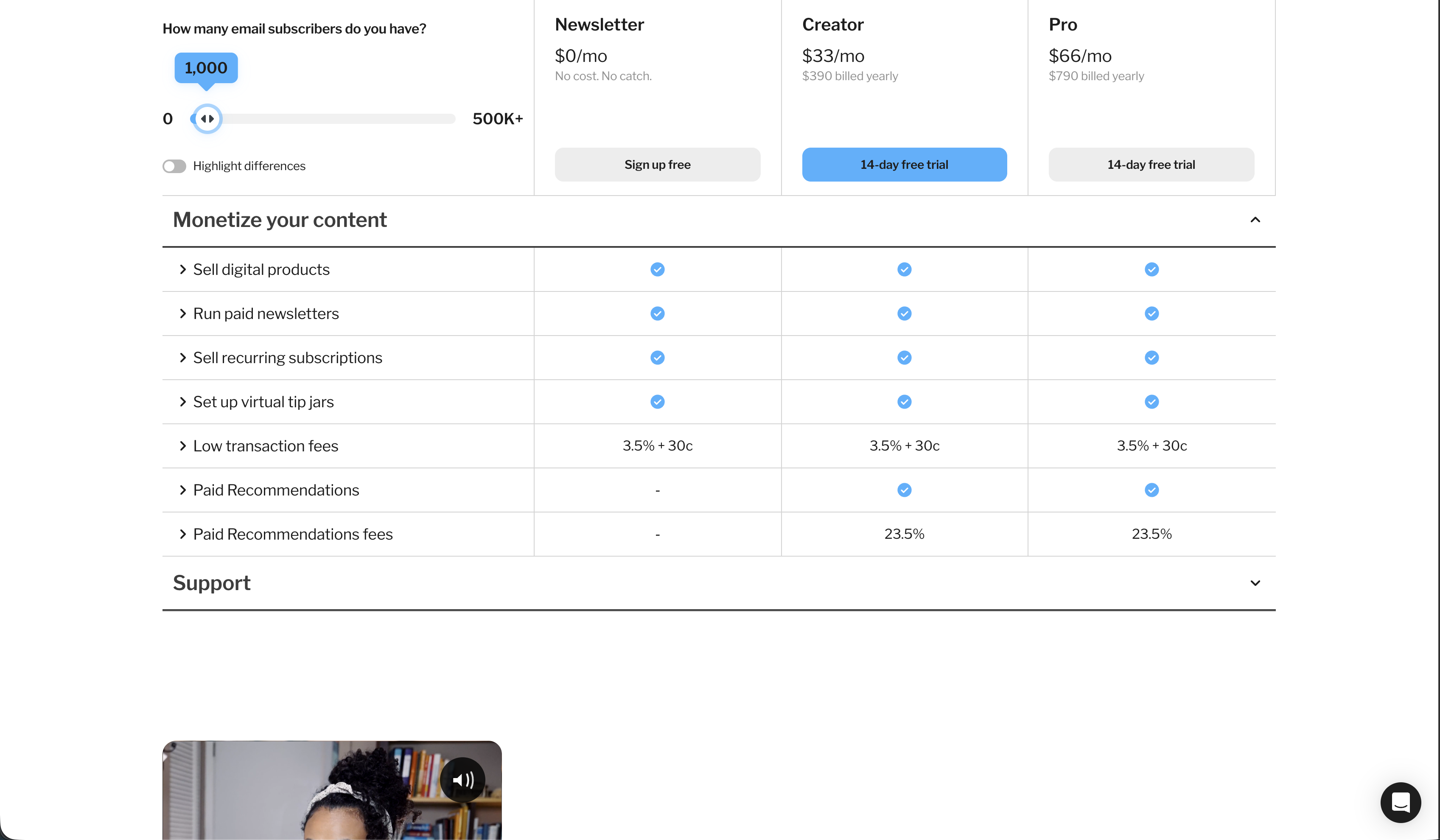
Kit lets you sell digital products, paid newsletter subscriptions, recurring memberships, and even set up a virtual tip jar - all natively inside the platform. Payment processing runs through Stripe, and the total transaction cost is approximately 3.5% + $0.30 (Kit’s platform fee is 0.6% of that total; the rest is Stripe’s standard processing).
Mailchimp has no native commerce. To sell products, you integrate with Shopify, WooCommerce, or Stripe - adding another tool and another fee to your stack.
3. Subscriber-Based Pricing (Not List-Based)
This deserves repeating because it’s the main reason creators with growing audiences leave Mailchimp. With Kit, you pay per unique subscriber. Segment into 10 lists or tags - it doesn’t matter. Mailchimp counts contacts per audience, so the same person on three audiences costs you three times. When your list crosses into the thousands, this difference is hundreds of dollars per month.
4. Creator Recommendations Network
Kit’s Recommendations feature is a cross-promotion network where creators promote each other’s newsletters to their audiences. It’s built into the free plan. When someone signs up for your newsletter, they see recommendations for other creators - and vice versa. Some creators report thousands of subscribers gained through this network alone.
Mailchimp has nothing like this. No cross-promotion, no creator network.

5. Unlimited Email Sends and Automations
Every Kit plan - including free - has unlimited email broadcasts. Paid plans have unlimited Visual Automations with no step or flow limits. Mailchimp caps sends at 10x–15x your contact count and limits automations to 200 flows even on Premium. If you send weekly newsletters to a 5,000-person list, Mailchimp’s Standard plan (12x sends = 60,000/month) might work for now, but grow to 10,000 subscribers mailing twice a week and you’re over the limit and paying overages.

6. Free Migration from Mailchimp
Kit’s paid plans include a done-for-you migration - their team imports your subscribers, rebuilds your landing pages, and transfers your content. Mailchimp charges for migration assistance on its Premium plan and doesn’t include it on lower tiers.
Where Mailchimp Wins
1. It’s a Full Marketing Suite
Mailchimp is email + SMS + social media + ads + CRM + transactional email + AI in one platform. If your business needs all of these channels coordinated in one place, Mailchimp is the only tool on this list that does it. Kit is an email-first tool for creators; it doesn’t do SMS, ads, or social.
2. SMS Marketing
Mailchimp offers SMS as an add-on to paid plans in select countries. Kit has no SMS capability at all. If text-message marketing is part of your strategy, Mailchimp has it covered.
3. 300+ Integrations
Mailchimp’s integration ecosystem is the largest in email marketing - Shopify, WooCommerce, Salesforce, Square, Canva, Stripe, QuickBooks, and hundreds more are native. Kit has 100+ integrations, which is solid but smaller. For businesses with complex tech stacks, Mailchimp fits into more workflows without Zapier or custom API work.
4. AI Depth
Mailchimp’s Intuit Assist offers generative AI for email copy, predictive segmentation, send-time optimization, and subject-line helpers. Kit has some AI features (branded as Kit + AI) but they’re less mature. If AI-driven personalization matters to your strategy, Mailchimp is ahead.
5. Transactional Email (Mandrill)
Mailchimp owns Mandrill, a dedicated transactional email API for receipts, password resets, order confirmations, and system notifications. Kit doesn’t offer transactional email. If your business needs both marketing and transactional email from one provider, Mailchimp is the only option here.
6. E-Commerce Depth
Mailchimp’s Shopify and WooCommerce integrations go deep - abandoned cart recovery, product retargeting, purchase-based segmentation, and predictive demographics. Kit connects to e-commerce platforms but wasn’t built for that use case. For online stores, Mailchimp is the better fit.
Where Kit Loses
- No SMS. If text marketing is part of your strategy, Kit can’t do it. You’ll need a separate tool.
- No transactional email. Kit handles marketing emails but doesn’t do system emails like receipts or password resets.
- Smaller integration ecosystem. 100+ integrations vs Mailchimp’s 300+. Some niche tools won’t have a native Kit connection.
- No social media or ad tools. Kit is pure email and commerce. If you want to run Facebook ads or schedule Instagram posts, you need separate tools.
- Commerce fees add up. Kit’s total transaction cost is approximately 3.5% + $0.30 (Kit takes 0.6%; the rest is Stripe’s standard processing). If you sell a lot of products, this is a real cost - though comparable to most payment processors.
- Less AI depth. If you want AI to write your emails, predict your best segments, and optimize send times, Mailchimp’s Intuit Assist is more advanced.
- Not built for e-commerce. If you run a Shopify store with 5,000+ products, Kit isn’t the tool. The integrations exist but aren’t as deep as Mailchimp’s.
Where Mailchimp Loses
- List-based pricing penalizes growth. Paying for the same subscriber on multiple audiences is a compounding cost. As you segment your list, your bill grows faster than your audience.
- Free tier is essentially useless. 250 contacts, no automations, mandatory branding, one audience, one user. It’s a trial, not a growth tool.
- Email send caps. Every plan limits how many emails you can send per month. Cross the limit and you pay overages. Kit is unlimited.
- No native creator monetization. Can’t sell digital products, paid newsletters, or subscriptions without third-party tools.
- UI complexity. Mailchimp’s interface is notoriously bloated. Solo creators often spend more time navigating menus than writing newsletters. The tool was built for marketing teams, not individuals.
- No creator cross-promotion. No Recommendations network. No way to grow your list through peer creators inside the platform.
- Intuit ownership concerns. Since the 2021 acquisition, some creators have reported pricing increases and feature changes that favor larger businesses over solo operators.
Credible Alternatives Worth Knowing
beehiiv
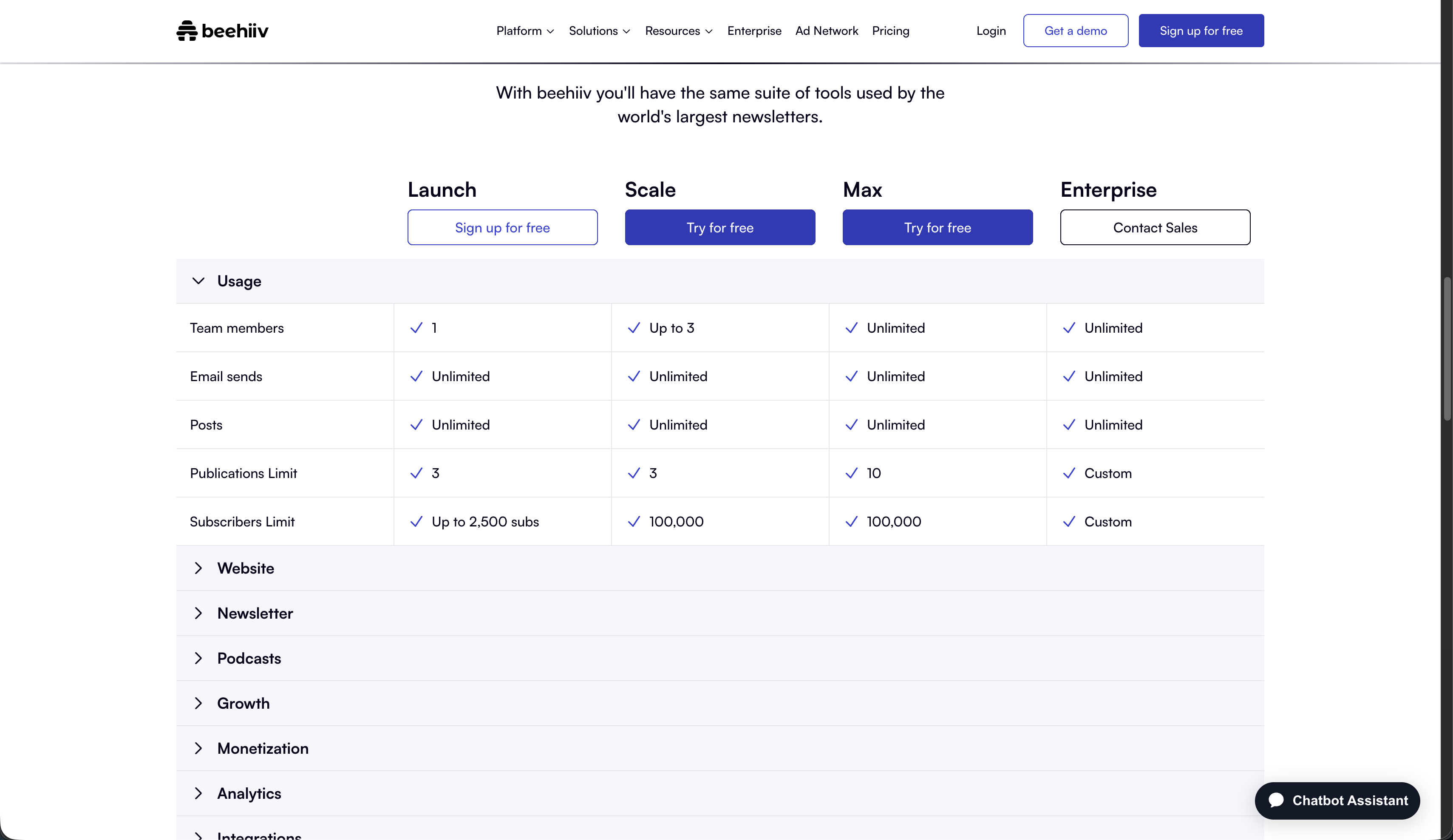
The newsletter-first platform built for growth. Free Launch plan for up to 2,500 subscribers with unlimited email sends. Scale plan at $43/mo ($517/yr), Max at $96/mo ($1,151/yr). Has the largest built-in ad network in the newsletter space and takes 0% of paid subscription revenue. Better than both Kit and Mailchimp if your entire business model is a monetized newsletter. Weaker on automations and doesn’t serve traditional businesses.
MailerLite
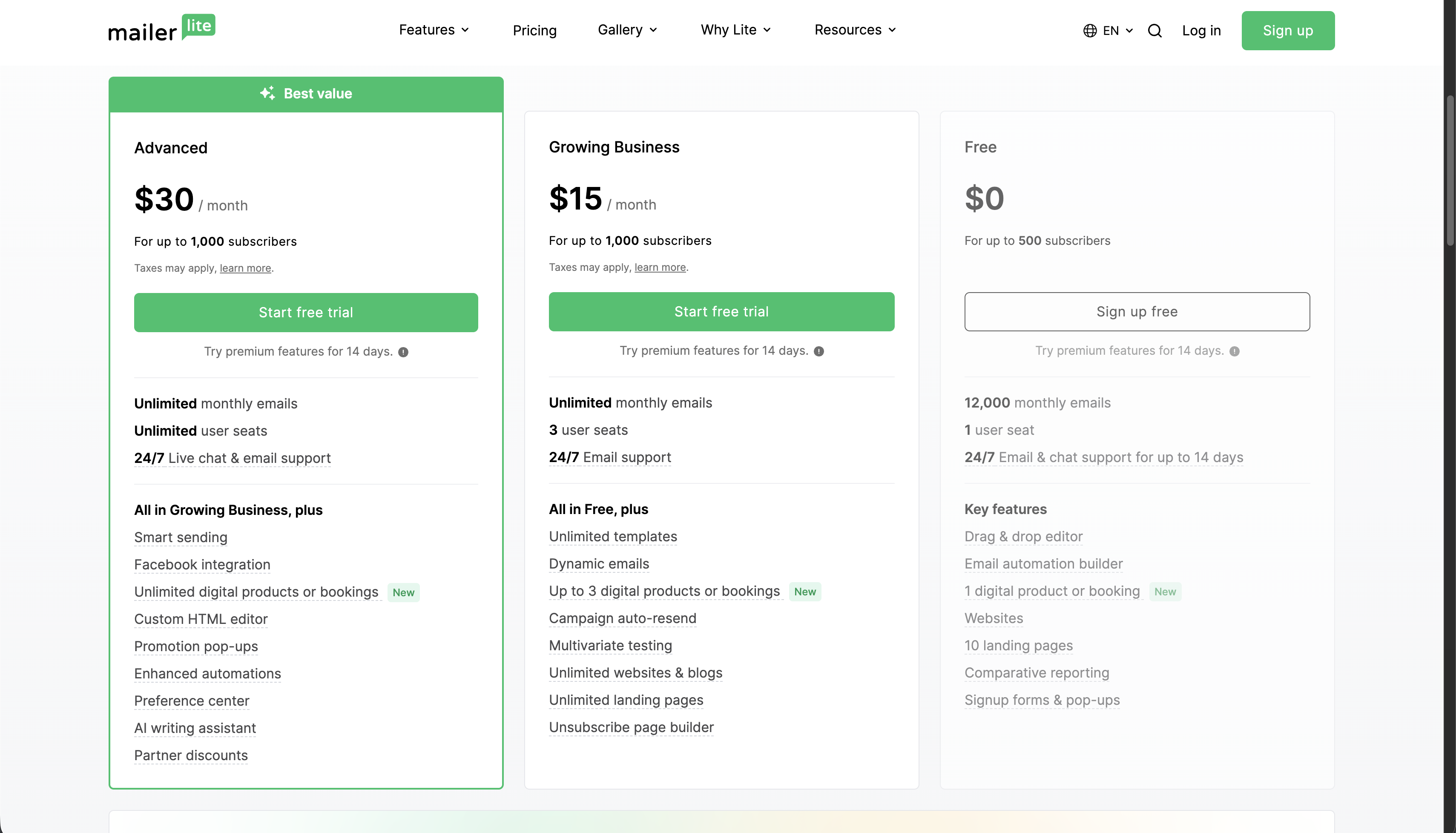
The budget pick. Free for up to 500 subscribers with 12,000 emails/month. Growing Business plan at $10/mo ($9/mo billed yearly) at 500 subscribers, with unlimited monthly emails. Advanced plan at $20/mo ($18/yr). Excellent UI, solid deliverability, and includes a website builder. No ad network, no creator cross-promotion, and fewer integrations than Mailchimp. Best for budget-conscious creators who want simplicity above all.
Bottom Line
Kit is the right pick for most newsletter creators and solo operators. The free tier alone - 10,000 subscribers with unlimited sends, commerce, and automations - makes it the best starting point. Add subscriber-based pricing, built-in monetization, and the Recommendations network, and Kit is the platform that aligns with how creators actually build businesses: one audience at a time.
Mailchimp is the right pick for established businesses with multi-channel needs. If you need SMS, transactional email, deep e-commerce integrations, and AI-powered segmentation, Mailchimp’s breadth is unmatched. But you’ll pay more as you grow, and the list-based pricing is genuinely punishing for highly segmented audiences.
Kit is wrong for you if you need SMS, transactional email, or run a product-heavy e-commerce store. It’s also wrong if you want your email tool to handle social media and ads.
Mailchimp is wrong for you if you’re a solo creator who wants to sell products directly, grow through peer recommendations, or scale your newsletter without watching your bill multiply.
If you’re ready to try Kit, their 14-day free trial requires no credit card and includes free migration support. Check Kit’s current pricing →
See all our tool comparisons and tutorials →