31 July 2026 · Comparison
Lightfield vs HubSpot: AI-Native CRM or the Legacy Default?
The short answer
if you're a founder-led team of 3-50 people who want a CRM that populates itself from your actual conversations.
if you need a mature, all-in-one platform with marketing, CMS, service desk, and 2,000+ integrations that scales to enterprise.
Pick Lightfield if you’re a founder or small sales team who can’t afford the overhead of CRM admin. Lightfield captures every email, call, and meeting automatically, then lets AI agents do actual GTM work — pipeline generation, meeting prep, follow-ups. You connect your inbox and calendar, and within minutes you have a populated pipeline. No fields to configure, no data entry required.
Pick HubSpot if your company needs more than a CRM. HubSpot is the genuine all-in-one platform: marketing automation, CMS, service desk, payments, operations, and 2,000+ integrations. It has 20 years of product maturity, a massive partner ecosystem, and proven scale at companies like DoorDash and Eventbrite. The free CRM is genuinely useful for tiny teams getting started.
Disclosure: This post may contain affiliate links. If you click through and sign up, we may earn a commission at no extra cost to you. This does not influence our analysis.
The Core Difference: Architecture
The real dividing line between these two isn’t features or price. It’s how the CRM fundamentally works.
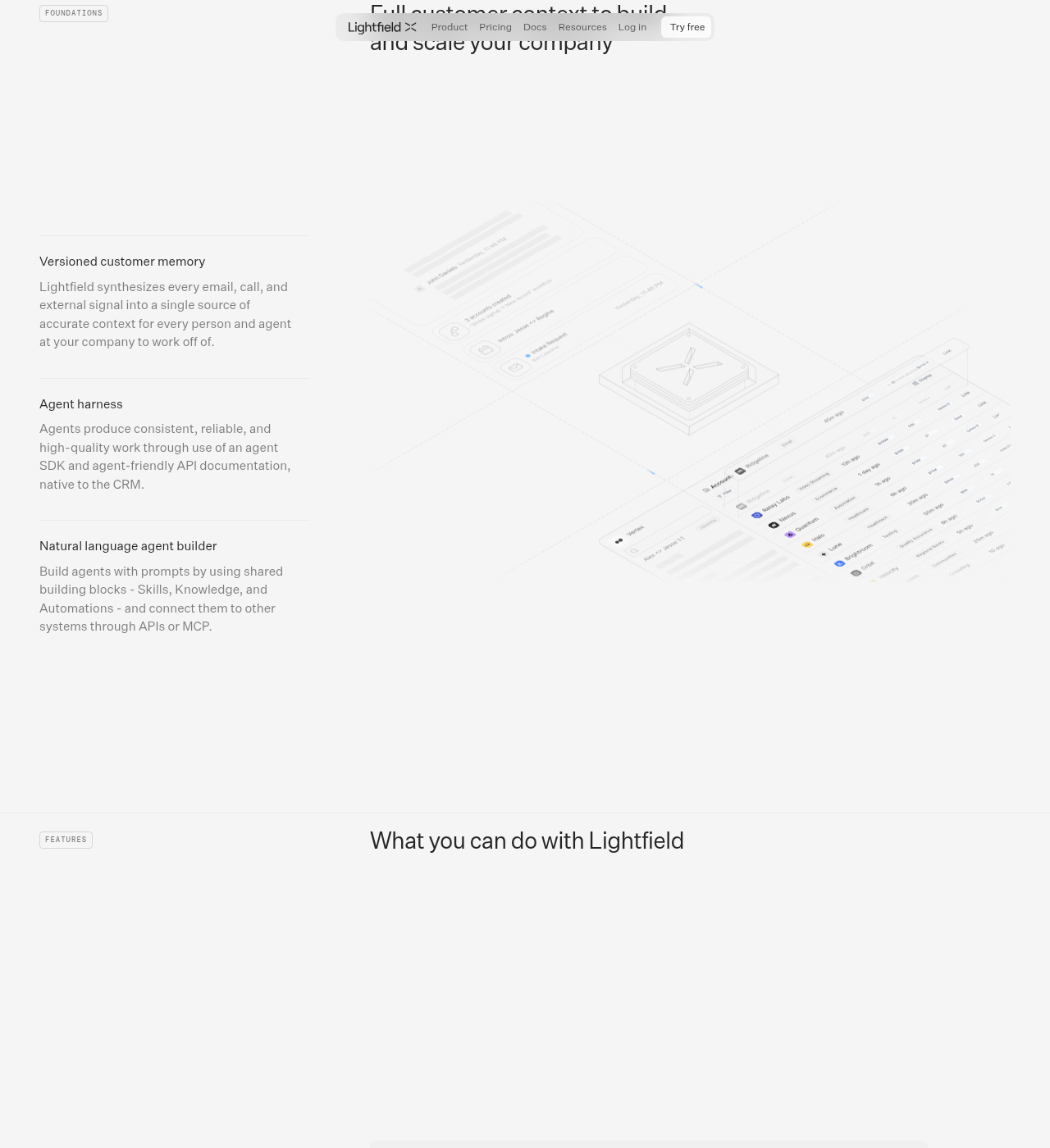
Lightfield is agent-native. AI isn’t a feature bolted onto a database. The AI is the operating core. When you connect your email and calendar, Lightfield ingests every conversation, builds a searchable customer memory, and populates your pipeline without anyone typing a field. The data model is schema-less: semantic key-value pairs that evolve as your business evolves, rather than fixed columns you must define upfront. AI agents — not just chatbots, but agents that do actual work — run on this full conversation context to generate pipeline, prep meetings, draft follow-ups, and surface deal risks.
HubSpot is structured-data-first. It’s built on the traditional CRM model: predefined fields, custom properties, pipeline stages. Humans (or integrations) populate this data. HubSpot’s AI — branded as Breeze — adds copilot features, prospecting agents, and conversation intelligence on top of this foundation. But the AI is operating on structured CRM data that may be incomplete because someone didn’t log a call or update a field. The core architecture is 20 years old, and AI is layered on, not built in.
This isn’t a minor design choice. It determines everything: setup time, data quality, what agents can actually do, and how much CRM admin your team endures.
How Each Tool Handles the Basics
Data Capture
- Lightfield: Auto-capture from email, calendar, and calls. Connect your inbox and the CRM populates itself. Enrichment from 10+ data providers fills in missing context — similar in spirit to the waterfall-enrichment approach we cover in Apollo.io vs Clay vs Lev8, though Lightfield applies it to your own pipeline data rather than as a standalone prospecting database. No manual data entry required.
- HubSpot: Manual entry is still the default. Reps log calls, update fields, move deals through stages. Integrations with tools like ZoomInfo can help with enrichment, but the base assumption is that humans maintain the data. This is why CRM data quality is a persistent problem for most HubSpot teams.
Setup Time
- Lightfield: About five minutes. Connect Gmail or Outlook, syncs up to two years of email and calendar history, then automatically creates accounts, contacts, and opportunities. No schema to design, no workflows to configure.
- HubSpot: Typically weeks to configure properly. Pipelines, properties, workflows, integrations, user permissions, templates, reports — each requires setup. Large-scale deployments can take months with dedicated admin resources.
AI Agents
- Lightfield: Agents are first-class citizens. They operate on complete conversation memory (~1M token context window, can reason across thousands of records simultaneously). They generate pipeline, prep meetings, draft follow-ups, surface warm intro paths from LinkedIn, and diagnose stalled deals. A natural-language agent builder lets you create custom agents with shared building blocks (Skills, Knowledge, Automations). Agents inherit human permissions — an AE’s agent can only do what the AE can. Version history on every field means you can see whether an agent or human made a change and roll it back.
- HubSpot: Breeze is HubSpot’s AI brand, rolling out features across the platform: Breeze Copilot, Breeze Prospecting Agent (beta), AI Customer Agent, AI Data Agent, AI-guided selling, and Smart Deal Progression (beta). These are promising but still being deployed. The Prospecting Agent can find accounts and execute personalized outreach, but it’s operating on the structured data in your CRM — which may be incomplete. (If prospecting automation is your main interest rather than the CRM underneath it, see our Fuzzy AI vs Apollo.io comparison for two dedicated tools built around that job.) Breeze is a layer on top of the existing architecture, not a rebuild of the foundation.
Email Sequencing & Outreach
- Lightfield: Multi-step outbound email and LinkedIn sequencing shipped June 2026. Sequences can include LinkedIn connection requests and messaging. Automations in open beta with a natural-language workflow builder.
- HubSpot: Sequences are a mature feature in Sales Hub (Professional tier and above). Multi-channel outreach that adapts based on engagement. Deep integration with the rest of the HubSpot platform.
Call Intelligence
- Lightfield: Built-in call recorder with transcription, meeting prep, and follow-up generation. No separate tool needed.
- HubSpot: Conversation intelligence with call recording, transcription, and coaching is included starting on the Professional tier (from $54/seat/month, billed annually). Otherwise you need a separate tool like Gong or Chorus.
Comparison Table
| Lightfield | HubSpot | |
|---|---|---|
| Architecture | Agent-native, schema-less | Structured-data-first, AI layered on |
| Data capture | Automatic from email, calendar, calls | Manual entry + integrations |
| Setup time | ~5 minutes | Days to weeks |
| AI agents | Native GTM agents with full conversation context | Breeze AI layered on structured data (rolling out) |
| Call intelligence | Built-in (all plans) | Built-in (Professional+) |
| Sequences | Shipped June 2026, includes LinkedIn | Mature, multi-channel |
| CMS / Website | None | Full CMS with SEO tools |
| Marketing automation | None | Full Marketing Hub |
| Service desk | None | Full Service Hub |
| Integrations | API, MCP, webhooks, growing | 2,000+ marketplace apps |
| Pricing (entry) | $89/seat/mo (Starter, up to 3 seats) | Free (up to 2 users) |
| Pricing (full sales) | $899/workspace/mo + $250/full seat | From $54/seat/mo (Professional, billed annually) |
| Best for | Founder-led teams (3-50 people) | Any size team, from startup to enterprise |
Pricing: What You’ll Actually Pay
Prices accurate as of July 2026; check vendor sites for current rates.
Lightfield
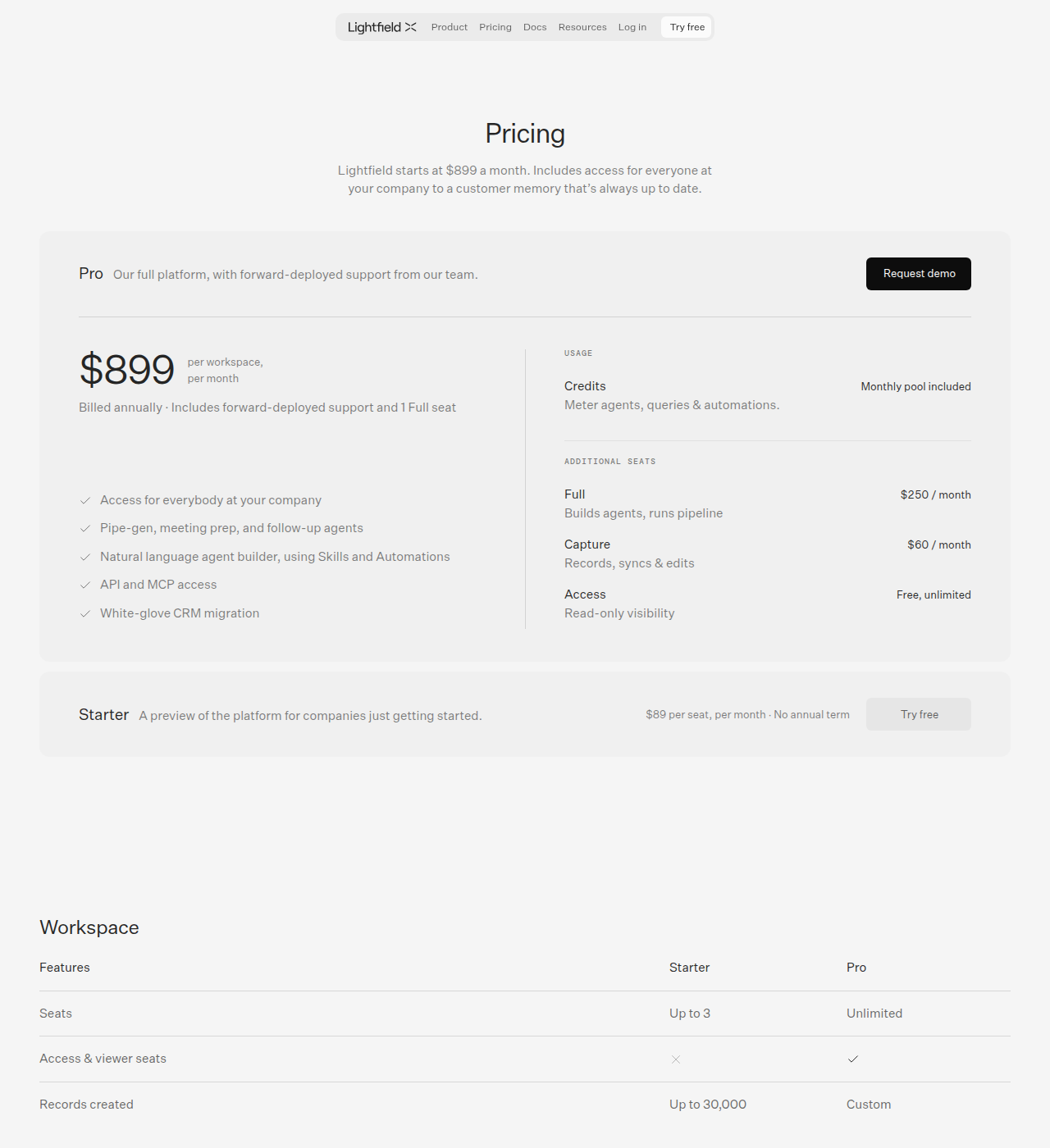
- Starter: $89/seat/month, no annual term. Up to 3 seats, 30,000 records. Monthly billing via credit card.
- Pro: $899/workspace/month, billed annually. Includes forward-deployed support and 1 Full seat. Unlimited access/viewer seats. Custom record limits.
- Additional Full seats: $250/month (builds agents, runs pipeline)
- Additional Capture seats: $60/month (records, syncs, edits)
- Access seats: Free, unlimited (read-only visibility)
- Credits: Monthly pool included. Meters agents, queries, and automations. Sized to team during demo.
- Note: Earlier articles (February 2026) mentioned a free tier and lower-priced plans. The current pricing page shows Starter at $89/seat as the entry point, with no free tier listed.
HubSpot
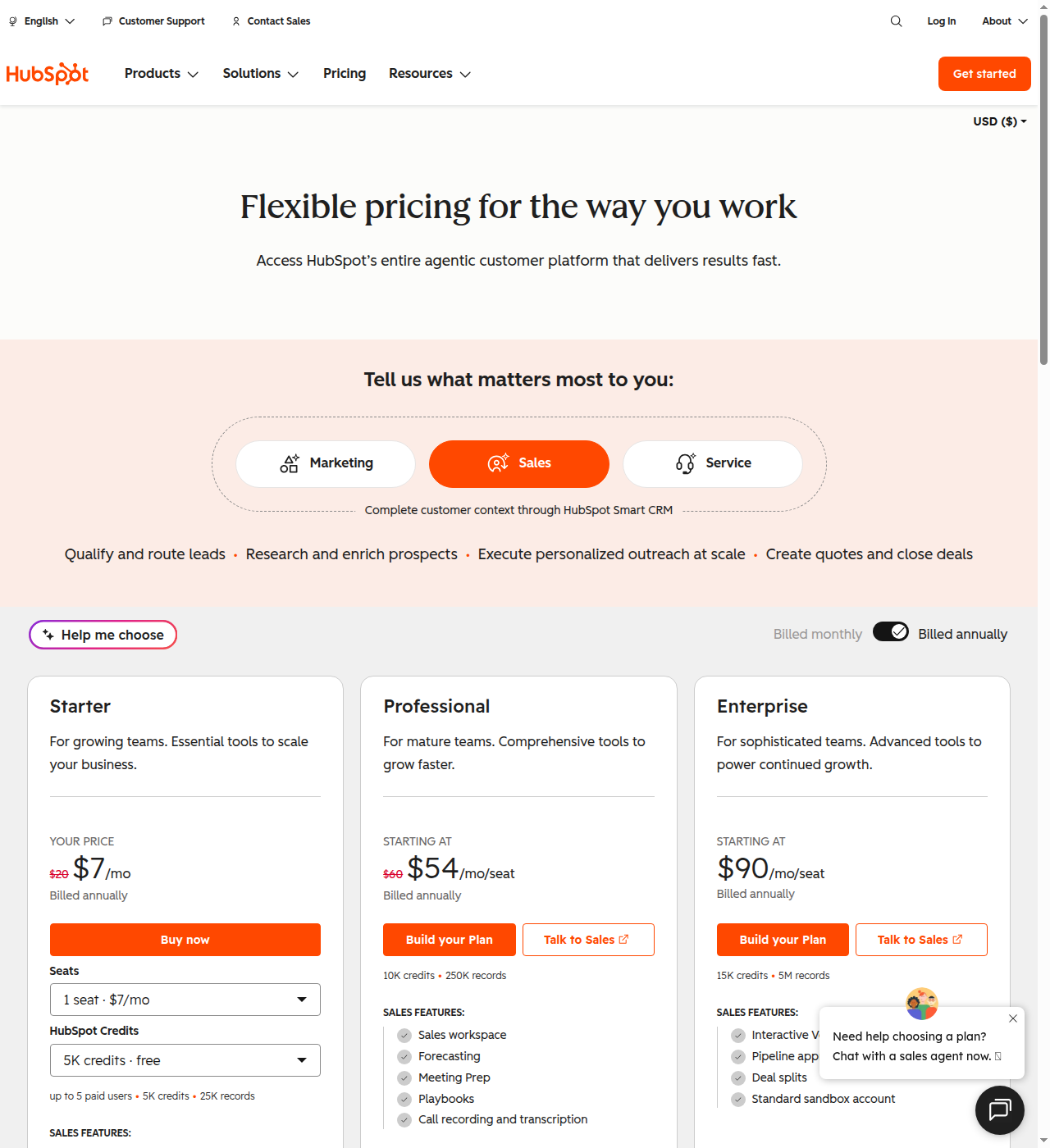
HubSpot restructured its pricing since earlier coverage: it no longer sells separate Smart CRM and Sales Hub price lists. Pricing is now unified under one “agentic customer platform” ladder with a Marketing/Sales/Service toggle, priced by seat plus a monthly pool of usage credits and a record cap. For the Sales toggle:
- Free: $0 — for up to 2 users, no credit card required. Covers deal tracking, meeting scheduling, and the Breeze AI assistant.
- Starter: $7/seat/month billed annually (discounted from a $20 list price at time of writing). Up to 5 paid users, 5K credits, 25K records included.
- Professional: starting at $54/seat/month billed annually (discounted from $60). Includes 10K credits, 250K records, sales workspace, forecasting, meeting prep, playbooks, and call recording/transcription.
- Enterprise: starting at $90/seat/month billed annually. Includes 15K credits, 5M records, interactive voice response, deal splits, and a standard sandbox account.
Key pricing caveats with HubSpot:
- Conversation intelligence (call recording/transcription) requires the Professional tier or a separate tool like Gong.
- The Prospecting Agent, advanced sequences, and forecasting are gated behind Professional tier.
- Marketing automation, CMS, and service desk each require separate Hub subscriptions.
- The free tier caps at 2 users; HubSpot’s current pricing page does not publish a contact limit for it.
- Professional and Enterprise prices shown are “starting at” figures that scale with seats, credits, and records — a growing team will pay more per seat than the sticker price as usage climbs.
- Enterprise onboarding is often a paid service engagement.
Real-World Cost Comparison: A 5-Rep Startup Team
For a 5-person sales team that needs CRM + call recording + sequencing + enrichment:
- Lightfield Pro: $899/month (includes 1 full seat) + 4 Capture seats at $60/ea = ~$1,139/month (plus any additional full seats needed). Includes call intelligence, sequences, enrichment, and pipeline generation.
- HubSpot Professional: 5 seats starting at $54/seat = ~$270/month for CRM + sequences + forecasting + conversation intelligence, before credits or records push you past what’s included. But if you also need Marketing Hub for email marketing, that’s another hub subscription. And if you want the full Breeze Prospecting Agent and AI features, those are additive. Total costs often exceed the sticker price.
The comparison isn’t straightforward because the products bundle differently. Lightfield bundles more into the base price; HubSpot’s lower per-seat cost can balloon as you add hubs and upgrade tiers.
Where Lightfield Wins
Other than the fundamental architecture advantage — AI built into the core rather than layered on top — Lightfield wins on:
- Zero manual data entry: The single biggest time-saver. CRM populates itself.
- Complete conversation memory: Every email, call, and meeting is searchable with citations to original conversations. You can ask “what did the VP at Acme say about budget?” and get the exact moment from the call.
- AI agents that do real work: Pipeline generation, meeting prep, follow-ups, deal diagnosis — not just summarization. Agents operate on the full customer context, not just structured fields.
- Schema-less adaptability: No rebuilding your CRM when your GTM shifts. Data model evolves with your business.
- All-in-one replacement: CRM + call recorder + sequencer + enrichment + workflow builder in one platform. No separate Gong, Outreach, or ZoomInfo subscription needed.
- Version history on everything: Every field change is tracked. You can see whether an agent or human made the change and roll it back. This makes autonomous agents auditable and safe.
- Fast migration: CSV import. Lightfield’s own migration page advertises switching “in under an hour,” with the agent handling deduplication and relationship mapping across accounts, contacts, and opportunities automatically.
Where Lightfield Loses
Lightfield isn’t the right call for every team. Here’s where it falls short:
- Very new. Launched late 2025/early 2026. The product is still maturing. Features like sequences shipped June 2026; automations are in open beta. If you need a battle-tested platform with a 20-year track record, this isn’t it.
- Smaller ecosystem. Lightfield’s own site puts it at “+2,000 companies” as of this writing. HubSpot has 299,000 customers, 2,000+ integrations, and a massive partner and consultant network. If you rely on deep integrations with niche tools, Lightfield may not have them yet.
- No marketing, CMS, or service desk. Lightfield is a sales CRM. Period. If you need marketing automation, a website builder, a help desk, or a ticketing system, you’ll need separate tools. HubSpot bundles all of these.
- Pricing at Pro level is significant. $899/month + $250 per full seat isn’t cheaper than HubSpot for teams who need sales features. The value proposition is about what’s included (call intelligence, sequences, enrichment) not about being the cheapest option.
- Limited channels. Email, calendar, Slack — but no native SMS, WhatsApp, or other communication channels. If your sales motion relies on channels beyond email, you’ll need additional tools.
- No quoting, billing, or payments. No CPQ, no multi-currency, no built-in billing or payment processing. HubSpot has Revenue Hub for this.
- 50-employee ceiling. Not built for enterprise sales orgs with hundreds of reps. The forward-deployed support model is a cost center that may not scale to enterprise-level demands.
- No pre-built templates. The schema-less model is powerful but means no industry-standard reporting frameworks or pre-built templates. Every company essentially builds its own data model from scratch.
Where HubSpot Wins
HubSpot’s advantages go beyond brand recognition:
- True all-in-one platform. CRM + marketing + sales + service + CMS + payments + operations. If you want one platform that runs your entire customer-facing operation, nothing else comes close.
- Massive ecosystem. 299,000 customers, 2,000+ integrations, huge partner network, certified consultants, extensive documentation. You can find a HubSpot expert for any specialization.
- 20 years of maturity. The product is deeply polished, well-documented, and battle-tested. Enterprise features like SSO, field-level permissions, and global compliance (multi-currency, multi-language) are built in.
- Free CRM is genuinely useful. For a 2-person startup, HubSpot’s free CRM gives you deal tracking, meeting scheduling, email tracking, and live chat at zero cost — no credit card required.
- AI features rolling out fast. Breeze Copilot, Prospecting Agent, Customer Agent, Data Agent, AI-guided selling — HubSpot is adding AI capabilities aggressively across the platform.
- Proven at scale. Used by enterprises like DoorDash, Eventbrite, and GoFundMe. If you’re growing toward a 500-person sales org, HubSpot can scale with you.
- Marketing and SEO tools. Content Hub, blogging, SEO tools, AEO tools, social media management — HubSpot is a legitimate marketing platform, not just a CRM.
- Pre-built frameworks. Industry templates, standardized reporting, best-practice workflows. You don’t need to invent your sales process from scratch.
Where HubSpot Loses
HubSpot’s weaknesses are structural, not cosmetic:
- Core architecture is 20 years old. Structured fields require humans or integrations to populate data. AI is layered on top of a legacy foundation, not built into it. The result: Breeze agents can only work with the data that made it into the CRM, which is often incomplete.
- CRM data quality is a constant battle. Reps don’t log calls. Pipeline stages go stale. Fields are out of date. This isn’t a HubSpot-specific problem — it’s a structural problem with any CRM that depends on manual data entry. But it means the AI features can only be as good as the data humans bothered to enter.
- Pricing escalates dramatically. What starts as “free” can quickly become $54-90+/seat/month per hub once you’re past the discounted starting price and included credits/records, plus onboarding fees, plus integration costs, plus add-on hubs. A fully-loaded HubSpot instance for a growing team is not cheap.
- Aggressive feature gating. Conversation intelligence, sequences, forecasting, custom objects, and the Prospecting Agent are all locked behind Professional or Enterprise tiers. To get the full sales feature set, you’re paying $54/seat and up, scaling with usage.
- Customization complexity. Deeply customized instances require dedicated admin resources — essentially a Salesforce-style admin role. This is fine for large orgs but overkill for a 10-person startup.
- Setup takes weeks or months. Configuring pipelines, properties, workflows, integrations, user permissions, templates, and reports is a significant upfront investment. Compare that to Lightfield’s 5-minute setup and the difference is stark.
- The AI experience isn’t seamless yet. Breeze features are still rolling out. Some are beta. The experience varies across hubs. It’s a work in progress, not a finished product.
The “Follow the Agents” Decision
Jason Lemkin at SaaStr has a useful framing: the CRM decision is no longer “Salesforce vs HubSpot.” It’s “pick the platform where your AI agents do the most work.”
For HubSpot, that means Breeze agents operating on structured CRM data — which is only as complete as what humans entered. For Lightfield, that means agents operating on the full conversation memory of every customer interaction, with auto-capture ensuring the data is always current.
This doesn’t mean Lightfield always wins. It means the deciding factor isn’t features or price — it’s whether your team can afford the overhead of CRM admin and whether the quality of your CRM data is good enough for AI agents to be useful.
Bottom Line
If you’re a founder or a small team (3-50 people) who wants a CRM that doesn’t require constant data entry and where AI agents can actually do GTM work, Lightfield is the better fit. The auto-capture alone eliminates the biggest time-sink in traditional CRMs. The agent-native architecture means the AI features aren’t constrained by incomplete data. And the all-in-one bundling (CRM + call intelligence + sequences + enrichment) simplifies your tool stack.
If your company needs more than a sales CRM — marketing automation, a CMS, a service desk, payments, global compliance — or if you have a large sales org that needs the maturity of a 20-year platform with a massive partner ecosystem, HubSpot is the better choice. The free CRM is a genuine on-ramp for tiny teams, and the platform scales all the way to enterprise. Just budget for the price escalations and the ongoing cost of CRM data maintenance.
Lightfield is wrong for you if you need a marketing platform alongside your CRM, if you have more than 50 sales reps, or if you rely on deep integrations with niche tools that Lightfield doesn’t support yet.
HubSpot is wrong for you if CRM data entry is consuming hours of your team’s week, if you want AI agents that have full conversation context rather than just structured fields, or if you’re a small team that wants to be up and running in minutes rather than weeks.