26 July 2026 · Comparison
Framer vs WordPress: Which Wins in 2026?
The short answer
Framer kills maintenance, plugins, and hosting headaches. WordPress gives you 60,000+ plugins and no vendor lock-in. It depends what you're building.
Affiliate disclosure: This post contains affiliate links. If you click through and make a purchase, we may earn a commission at no extra cost to you. Our opinions are our own, based on hands-on testing and live vendor research.
Verdict: Who picks what
WordPress powers 43% of the web. That number sounds reassuring until you’re the one doing the monthly updates, troubleshooting plugin conflicts, and wondering why your hosting bill doubled. Framer is the managed alternative that’s winning over people tired of that grind.
Pick Framer if you want a pixel-perfect visual canvas, zero maintenance, built-in performance, and AI agents that actually work on your site rather than generating text in a sidebar. Best for marketing sites, landing pages, portfolios, and startup sites.
Pick WordPress if you need unlimited content scale (100k+ posts), ecommerce via WooCommerce, custom backend logic, or complete freedom to self-host and own your stack. Best for content-heavy blogs, complex stores, membership sites, and platforms.
If you want the managed-ecosystem experience of Framer but need more CMS depth, Webflow sits in the middle and is worth a look. If you want a simpler drag-and-drop managed platform without the freeform canvas, Squarespace or Wix are closer to Framer’s managed-hosting convenience but with more template constraints.
Design freedom vs themes
Framer gives you a freeform canvas that behaves like Figma. You place elements anywhere, adjust things to the pixel, and control breakpoints for desktop, tablet, and mobile visually. There are no theme constraints because there are no themes. Components and variants let you reuse design elements without duplicating work.
WordPress gives you the block editor (Gutenberg) which has improved significantly but still operates inside a content column. Your design freedom depends on which theme you picked and whether you added a page builder like Elementor. Get the theme + builder combo right and you can design freely. Get it wrong and you’re fighting invisible margins for an afternoon.
Where WordPress wins: If you already have a theme you love and a page builder workflow that works, you can produce good-looking pages quickly. The block pattern ecosystem means you can drop in pre-designed sections.
Where Framer wins: The canvas is genuinely freeform. Components are built-in, not added via a plugin. Responsive breakpoints work the same way designers expect them to work.
AI Agents: Framer’s native advantage vs WordPress’s plugin approach
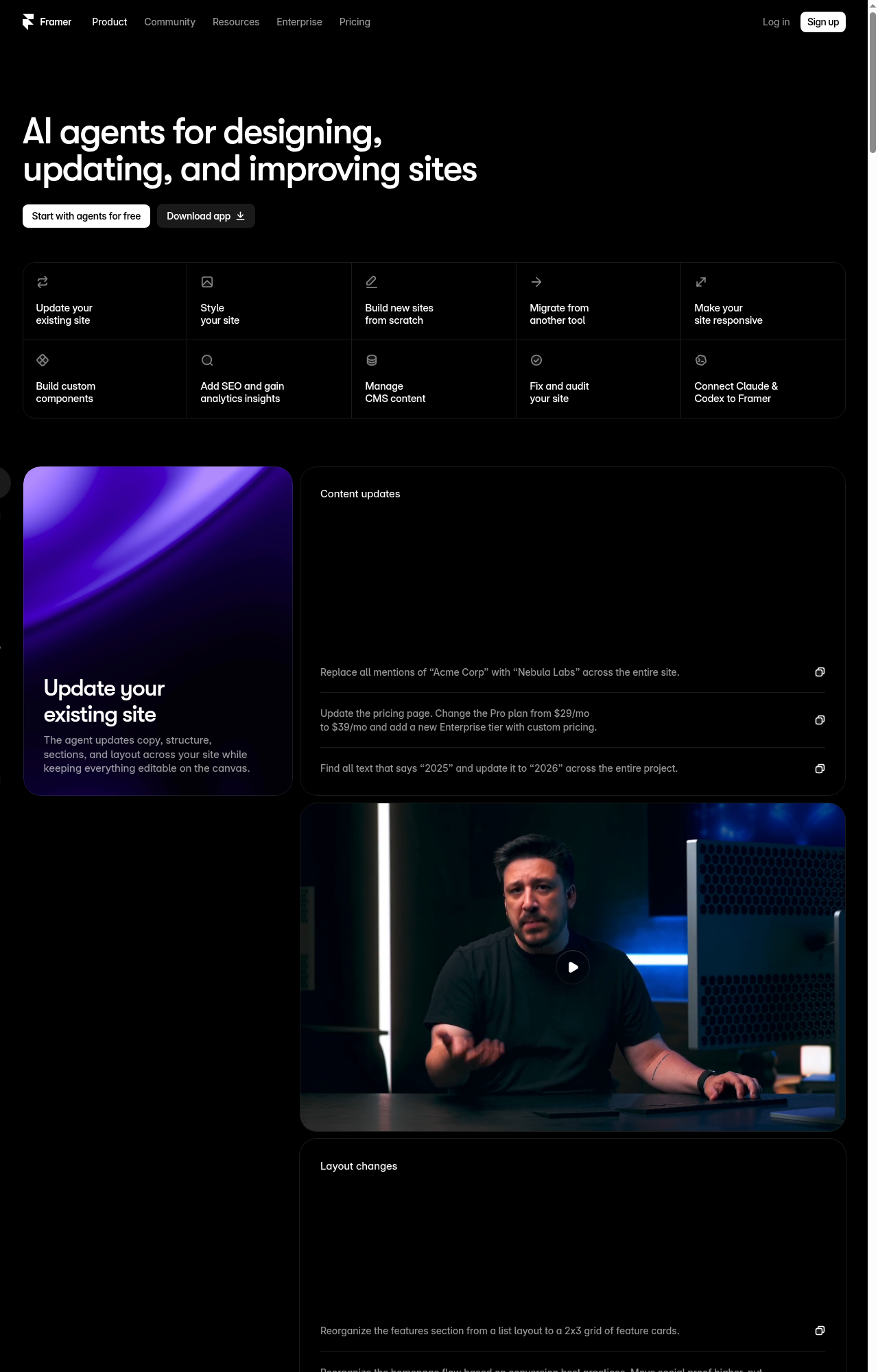
Framer’s AI agents aren’t a chatbot bolted to the sidebar. They work directly on the canvas: creating pages, styling sections, managing CMS collections, writing code components, auditing SEO, and analyzing traffic. You describe what you want in plain English and the agent does it on your actual site.
The agents available in Framer 3.0 include:
- Design Agent: Creates and refines pages, sections, and layouts on the canvas
- CMS Agent: Creates collections, populates content, imports from CSV or live URLs
- Code Agent: Builds custom code components with interactions and animations
- SEO Agent: Audits pages, suggests fixes, applies metadata
- Analytics Agent: Answers natural-language questions about your traffic
- Audit Agent: Scans for broken links, accessibility issues, and consistency problems
- External Agent connector: Links Claude Code, Cursor, Codex, and Antigravity directly to your Framer project via
npx @framer/agent setup
WordPress.com includes a built-in AI site assistant on Business plans and above, but it’s a content and design suggestion tool. Self-hosted WordPress has no native AI agents. You can add AI via plugins (AI writing assistants, page builders with AI features), but nothing coordinates AI across design, CMS, SEO, and code in one workflow.
Where WordPress wins: If you only need AI for content writing, WordPress.com’s assistant handles that. And the plugin ecosystem means you can add specialized AI tools for specific tasks.
Where Framer wins: The agents work on the actual canvas. “Migrate our WordPress blog posts into a Framer CMS Blog collection” is a prompt that runs, not a feature request. The External Agent connector means Claude Code can directly read and edit your Framer project.
CMS & blogging: Where WordPress still owns the crown
Framer’s visual CMS is genuinely good for what it does. You create collections with fields (text, images, rich text, dates, references, toggles, colors, files, links), connect them to dynamic pages, and the content renders across your site. You can import from CSV, sync with Google Sheets or Airtable, and edit content directly on the page.
But the ceiling is real. The Pro plan gives you 10 CMS collections and 2,500 items. Add-ons can push that to a maximum of 40 collections and 40,000 items. That’s enough for most marketing sites, but it’s a hard limit.
WordPress has no such limits. You can have unlimited posts, pages, custom post types, categories, and tags. You can build complex content relationships with custom taxonomies. You get revision history, user roles, RSS feeds, and a comments system built in. For a serious publication, WordPress still sets the standard.
Where WordPress wins: Custom post types, unlimited taxonomy depth, revision history, comments, RSS, user roles. If you’re publishing 10+ articles a week with multiple authors and complex content hierarchies, Framer can’t touch WordPress here.
Where Framer wins: The visual CMS is faster to set up. On-page editing (click text on your actual page to edit) is smoother than switching between WordPress admin and the front end. For a marketing site with a blog of a few hundred posts, Framer’s CMS is cleaner and easier.
Performance & hosting
Framer includes hosting on a global CDN with 300+ locations on Pro plans and 20 on Basic. The platform scores “GOOD” on all Core Web Vitals out of the box: LCP 1.1s, INP 95ms, CLS 0.01. No caching plugins, no CDN configuration, no image optimization setup.
WordPress performance depends entirely on your hosting and your optimization stack. On WordPress.com’s managed hosting, you get a global CDN, high-frequency CPUs, and built-in caching. On self-hosted WordPress with cheap shared hosting, you get whatever the server gives you unless you add caching (WP Rocket, W3 Total Cache), a CDN, image optimization, and code minification.
Where WordPress wins: On good managed hosting (WP Engine, Kinsta, WordPress.com Business+), WordPress can match Framer’s performance. And you control the server if you need custom optimization.
Where Framer wins: Performance is automatic. There is no optimization checklist. You don’t need to know what LCP, INP, or CLS mean for your site to score well.
Maintenance & security: The real cost
This is where the argument for Framer is strongest. Framer handles all updates, patches, and security. There are no plugins to update, no PHP versions to manage, no theme compatibility to check. The platform has SOC 2 Type II certification, ISO 27001 compliance, TLS 1.3, automatic SSL, and DDoS protection.
WordPress maintenance is active work. Core updates, plugin updates (a typical site has 10-30 plugins), theme updates, PHP version upgrades. Every update carries a non-zero risk of breaking something. Security is your responsibility on self-hosted installs: you need a security plugin (Wordfence, Sucuri), malware scanning, backup plugin, and a plan for what happens when something goes wrong.
WordPress.com’s managed hosting handles much of this: automated updates, malware scanning, WAF, DDoS protection, real-time backups, one-click restores. But you pay for it: these features require the Business plan (€25/mo on annual billing) or higher.
Where WordPress wins: WordPress.com Business+ plans eliminate most maintenance and security headaches while keeping the plugin ecosystem. Self-hosted WordPress gives you full control if you’re willing to manage it.
Where Framer wins: Zero maintenance is real. No plugin updates, no version compatibility checks, no security scanning. For a marketing team that wants their site to just work, this is the headline feature.
Pricing: Total cost of ownership
Framer’s pricing is straightforward. On annual billing:
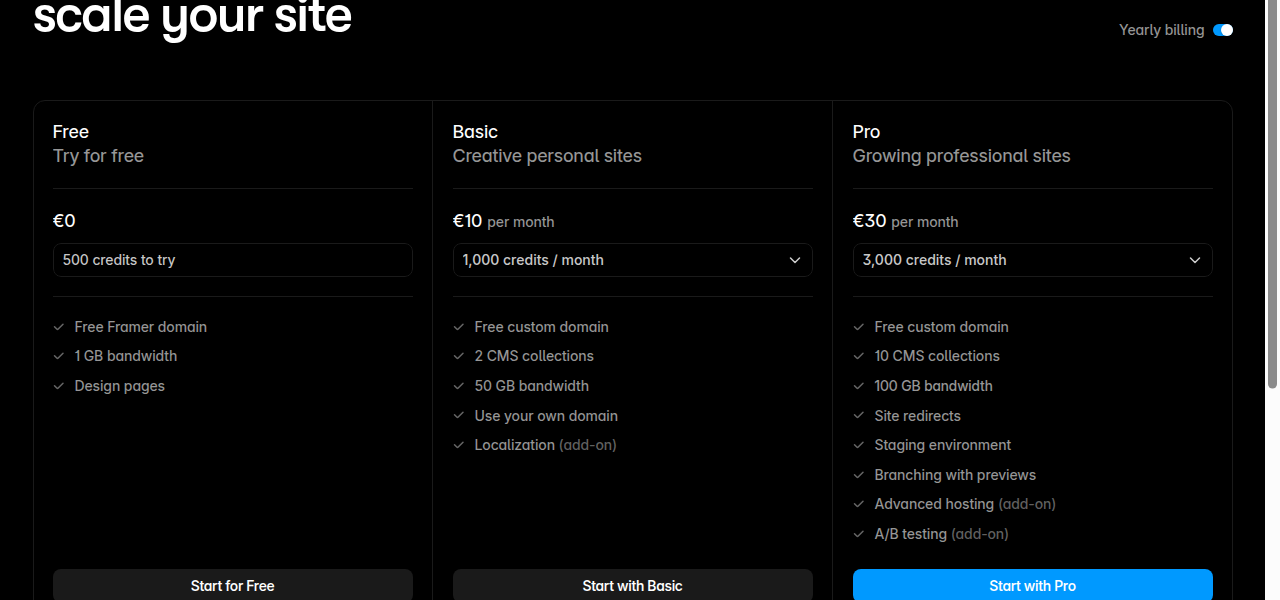
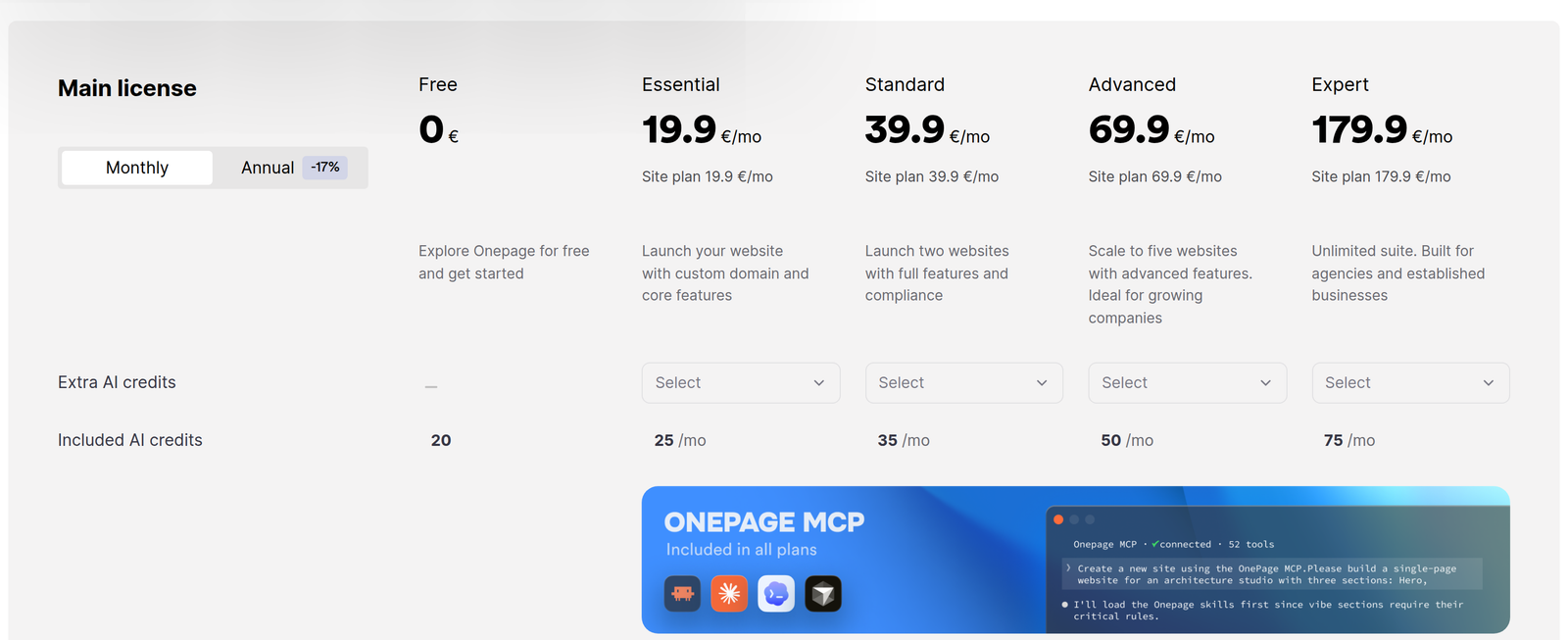
- Free: €0/mo. Framer domain, 1GB bandwidth, 500 AI credits.
- Basic: €10/mo on annual billing. Custom domain, 2 CMS collections, 50GB bandwidth, built-in SEO.
- Pro: €30/mo on annual billing. 10 CMS collections, 100GB bandwidth, staging, branching, redirects, site search.
- Enterprise: Custom pricing.
Add-ons for the Pro plan: editors (€20/mo each), content editors (€10/mo each), localization (€20/locale), A/B testing with Convert (€50 per 500K events), Advanced Hosting with multi-site rewrites (€200/mo), extra CMS collections (€40 per 10), extra CMS items (€20 per 10,000), extra bandwidth (€40 per 100GB).
A typical professional Framer site on Pro costs €30/mo plus any editor seats you need. Total: €30-70/mo for a fully functional marketing site with AI agents, CMS, hosting, SEO, and security.
WordPress.com pricing on annual billing:
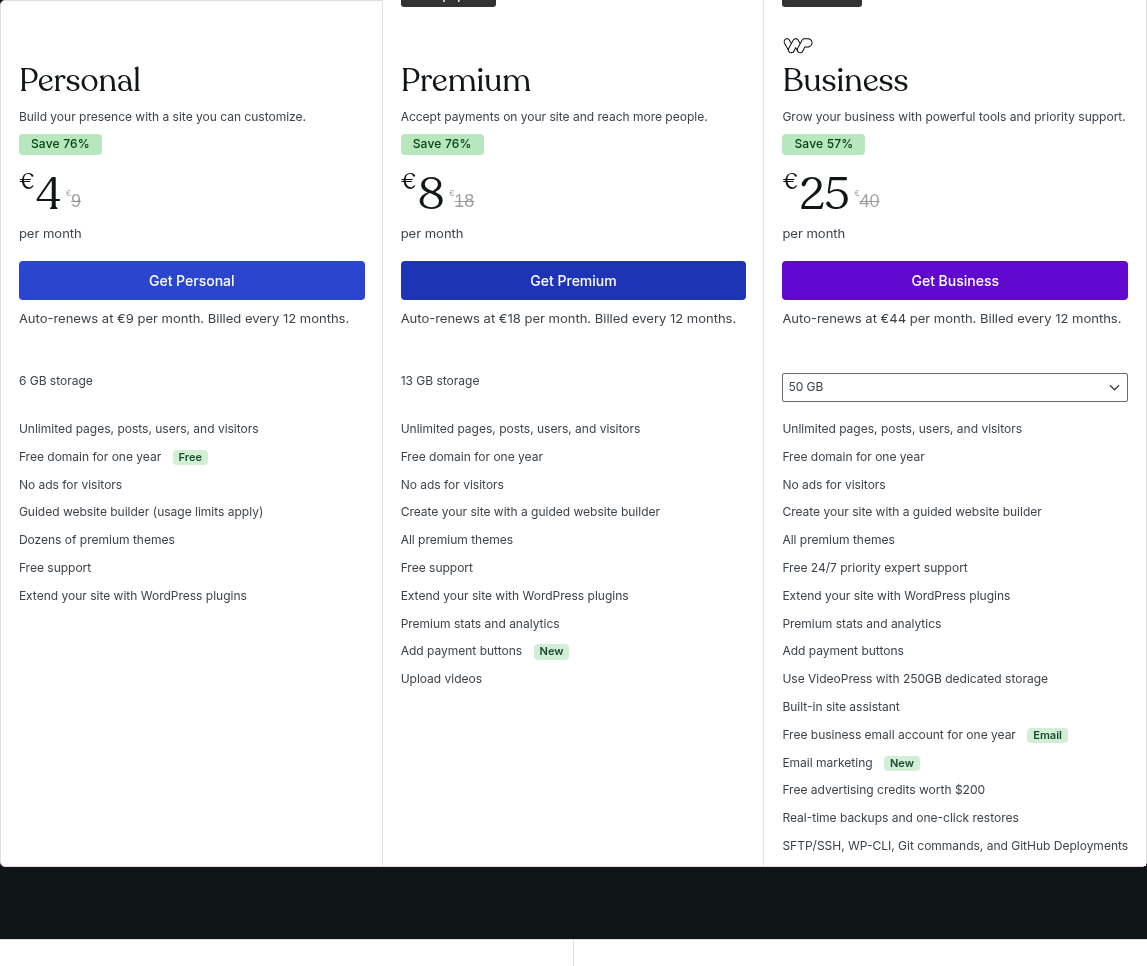
- Free: €0/mo. WordPress.com subdomain, 1GB storage, ads displayed.
- Personal: €4/mo annual. Custom domain, 6GB storage, remove ads.
- Premium: €8/mo annual. 13GB storage, premium themes, payment buttons.
- Business: €25/mo annual. 50GB storage, plugins, SEO tools, backups, SFTP/SSH, staging, email marketing.
- Commerce: €45/mo annual. All Business features plus WooCommerce, 0% transaction fees.
Self-hosted WordPress costs depend on your hosting provider and plan length. For example:
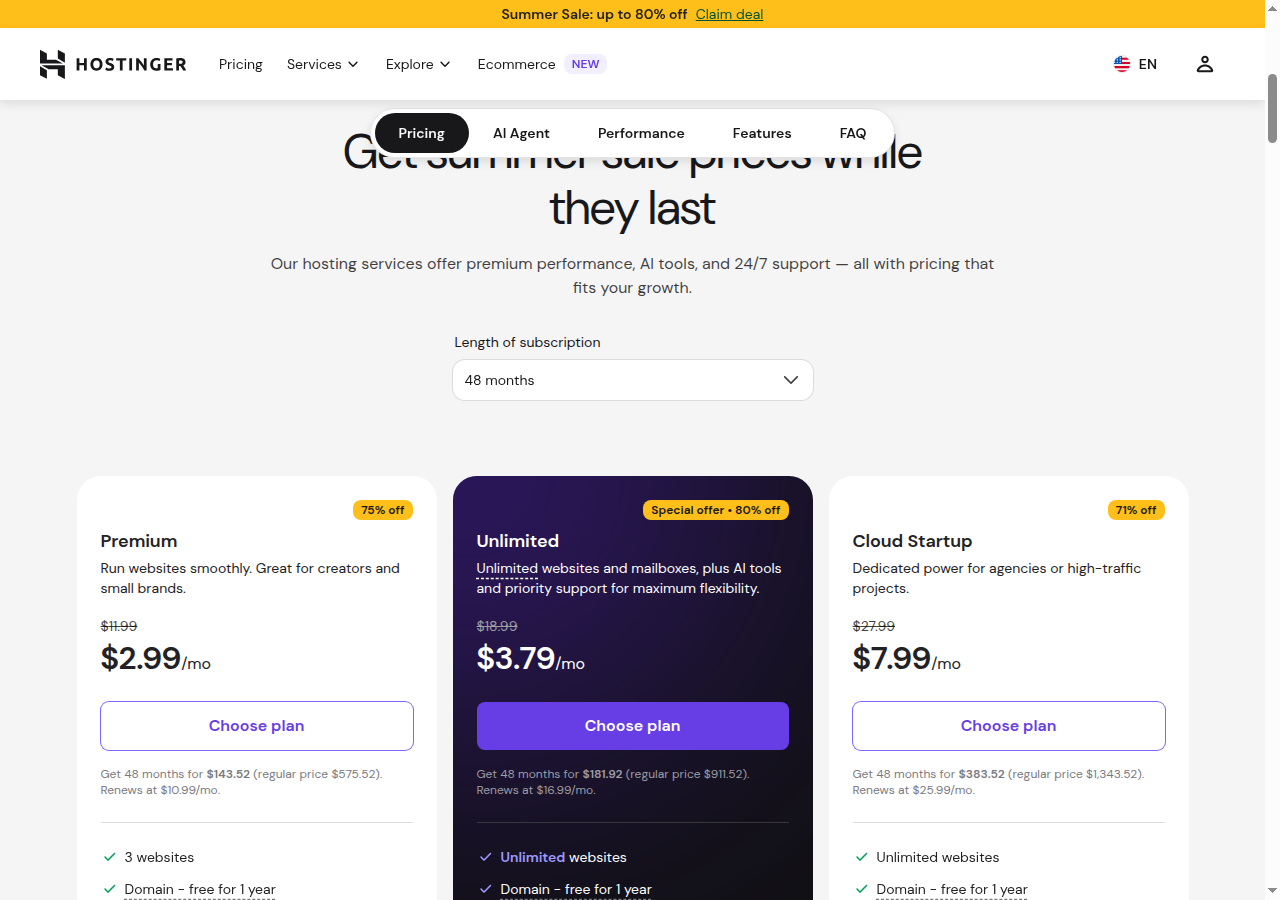
These are introductory prices requiring a multi-year commitment. Monthly billing or shorter terms cost more, and renewal rates are significantly higher than intro rates across most hosts. Beyond hosting, you may add a premium theme, premium plugins, a security tool, and a backup service. Total costs add up fast once you stack everything together.
Where WordPress wins: The free tier exists and works. If you’re on a tight budget and just need a simple blog or brochure site, WordPress.com’s Free or Personal plan is cheaper than Framer Basic. And self-hosted WordPress can be cheaper than Framer Pro if you’re comfortable managing it yourself and you don’t add many paid plugins.
Where Framer wins: Predictable, all-in pricing. No surprise renewal hikes, no plugin subscriptions stacking up, no “your bill doubled because the hosting promo ended.” For a professional marketing site, Framer Pro at €30/mo is typically cheaper than a comparable managed WordPress setup.
Prices accurate as of July 2026; check the vendor’s site for current rates.
How to migrate from WordPress to Framer
Framer offers two migration paths: the Switch service and the Claude Code connector.
Option 1: Framer Switch
The Switch service pairs you with a vetted Framer Expert who builds your new site. The process: schedule a kickoff to align on scope, collaborate in real-time as the Expert builds your site on a Scale plan, review and request edits, then go live. The service promises days, not weeks.
This is the hands-off option. You pay for the service and the Scale plan, and someone else handles the migration. Best if you want a professional redesign alongside the migration, not just a one-to-one port.
Option 2: Claude Code connector (DIY)
Framer’s External Agent connector lets Claude Code (or Cursor, Codex, etc.) work directly on your Framer project. The setup is npx @framer/agent setup, then the agent can import WordPress blog posts via the WP REST API into a Framer CMS collection. Framer’s own demo shows 47 posts imported with titles, slugs, authors, dates, and cover images.
You can also prompt the agent to rebuild pages from your current WordPress site: “Our WordPress site is at this URL. Rebuild the homepage and services page in Framer.” The agent works on a branch, so you can review everything before merging.
What transfers cleanly
- Blog posts into CMS collection items (title, body, date, author, featured image)
- Basic pages into Framer pages
- Navigation structure
- Content imported from CSV, JSON, or live URLs
What breaks or needs manual work
- Custom post types and taxonomies need manual remapping
- Plugin-dependent functionality (forms, ecommerce, memberships) must be rebuilt or replaced with Framer equivalents or third-party embeds
- URL structure changes unless redirects are carefully planned
- SEO rankings are at risk during any migration: you need comprehensive 301 redirects
- Comments cannot transfer (Framer has no native comments)
- User accounts cannot transfer (Framer has no public user registration)
Migration checklist
- Export your WordPress content (Tools > Export in the WordPress admin)
- Map your URL structure and prepare 301 redirects
- Choose your migration path (Switch or Claude Code connector)
- Set up equivalent functionality: forms via Framer’s form builder or embedded third-party tools, email capture via embedded newsletter forms
- Test everything on a staging branch before publishing
- Implement 301 redirects in Framer before or at the moment of launch
- Submit your new sitemap to Google Search Console
Honest downsides: where each tool loses
Where Framer loses
- No ecommerce. No shopping cart, payment processing, or product management. If you need to sell anything beyond a payment button, you need something else.
- CMS ceiling is real. 40,000 items and 40 collections is the hard maximum. WordPress has no such limits.
- Vendor lock-in. Closed platform. You can’t export your site’s source code or self-host. Moving away means rebuilding.
- No user registration or memberships. Public user accounts, member areas, and gated content don’t exist natively.
- No native comments. Blog posts can’t have reader comments without embedding a third-party tool.
- Multi-language is paid. Localization costs €20 per locale as an add-on. WordPress has free multi-language plugins.
- Blogging lacks depth. No traditional categories or tags, no date archives, no RSS feeds.
- Page and bandwidth caps. Pro plan gives you 150 pages base (add-ons up to 700) and 100GB bandwidth (add-ons up to 2TB). WordPress has no such caps.
Where WordPress loses
- Maintenance is constant work. Core, plugin, theme, and PHP updates never stop. Each one risks breaking something.
- Performance requires effort. Achieving GOOD Core Web Vitals means configuring caching, CDN, image optimization, and code minification. Framer delivers this out of the box.
- Plugin sprawl is real. A typical WordPress site uses 10-30 plugins. Each is a potential security vulnerability, performance drag, and maintenance item.
- Security is your problem on self-hosted. You manage it or you pay a host to manage it for you.
- No native AI workflow. WordPress.com’s AI assistant is basic. Self-hosted WordPress has no native AI. Framer’s agents work on the actual canvas.
- Cost creep is sneaky. Premium themes, premium plugins, managed hosting markups, and introductory-to-renewal price jumps add up. A “cheap” WordPress site often costs more than Framer Pro.
- Editor fragmentation. Gutenberg, Classic Editor, Elementor, Divi, Beaver Builder. No single unified editing experience.
- Design freedom is conditional. It depends on your theme and whether you added a page builder.
Bottom line
Framer is the better tool for marketing sites, landing pages, portfolios, and startup websites. The visual canvas is genuinely freeform, the AI agents work on your actual site, and the zero-maintenance platform means your site just works. For a 5-50 page marketing site with a blog, Framer Pro at €30/mo is the cleaner, faster path.
WordPress is the better tool for content-heavy publications, complex ecommerce stores, membership sites, platforms with user accounts, and anything that needs custom backend logic. The plugin ecosystem (60,000+ options) means almost any feature has a ready-made solution. And open-source means you own your site completely.
If you’re on WordPress and the maintenance grind is wearing you down, Framer’s Switch service and Claude Code connector make migration practical. Most marketing sites and blogs with under a few hundred posts can move cleanly. But be honest about what breaks: comments, user accounts, and plugin-dependent features won’t transfer.
For new projects, the decision is simpler: if you’re building a marketing site or portfolio, start with Framer. If you’re building a publication, store, or platform, start with WordPress.