NordPass vs LastPass: Which Password Manager Should You Trust in 2026?
Affiliate disclosure: SaaSpicious earns a commission if you purchase NordPass through links in this post. LastPass links are not affiliate links. We tested both tools first-hand before writing this comparison.
The Verdict in 100 Words
If you care about security above all else, pick NordPass. Its XChaCha20 encryption is more modern than LastPass’s AES-256, it has zero known breaches, and its admin features (customisable password policies, org-wide sharing visibility, data recovery on user deletion) are genuinely better. If you need the broadest feature set — SaaS app governance, employee family licenses, or passwordless vault login — pick LastPass Business Max. But be honest about what you’re trading: LastPass has been breached multiple times, including a catastrophic 2022 incident where customer vault backups were stolen. For most buyers in 2026, NordPass is the safer call.
Comparison Table
| Feature | NordPass | LastPass |
|---|---|---|
| Encryption | XChaCha20-Poly1305-IETF | AES-GCM-256 |
| Zero-knowledge | Yes | Yes |
| Key derivation | Argon2id + 16-byte salt | PBKDF2 SHA-256 (configurable iterations) |
| Passkeys | Yes | Yes |
| Built-in TOTP Authenticator | Yes, with biometric lock (patented; true 2FA separation) | Yes, but stored in same vault (single unlock exposes both factors) |
| Standalone authenticator app | No | Yes (LastPass Authenticator) |
| Email masking | Built-in | No |
| Customisable password policy | Yes (org-defined length/complexity/rotation) | No (static criteria only) |
| Org-wide sharing visibility | Full (Owner sees all shared items and folders) | Limited (admins can’t see peer-to-peer shares) |
| Time-limited sharing | Yes | No |
| Granular sharing permissions | Yes (per-item access levels) | Binary (view or hide password only) |
| Data recovery after user deletion | Yes (non-shared data recoverable by org) | No (non-shared data permanently lost) |
| Account recovery | Recovery code or Owner request (no pre-enrollment) | Recovery code, biometrics, SMS, security question (pre-config required) |
| SaaS monitoring/governance | No | Yes (Business Max only) |
| SaaS Protect | No | Yes (Business Max only) |
| Employee family licenses | No | Yes (Business plan includes 5 per employee) |
| MFA for workstations/VPNs | No | Yes (separate product) |
| SSO options | Google Workspace (Teams+); Entra ID, Okta, ADFS (Enterprise) | Multiple SSO across plans |
| Security certifications | ISO 27001, SOC 2 Type 2, HIPAA, GDPR | ISO 27001, SOC2 Type II, SOC3, BSI C5, TRUSTe |
| Independent audits | Yes (Cure53) | Yes |
| Major breach history | None known | Extensive (2011, 2015, 2017, 2021, 2022 catastrophic, 2024, 2025, 2026) |
| Platform support | Windows, macOS, Linux, Android, iOS, Chrome, Firefox, Edge, Opera, Safari | Same + additional browsers |
| Free plan multi-device | No (single device type — computer OR mobile, not both) | No (single device type — computer OR mobile, not both) |
| Parent company | Nord Security (cybersecurity company) | Francisco Partners / Elliott Management (private equity) |
Pricing
Both tools require live browser visits to see actual prices since the numbers load dynamically via JavaScript. The tables below reflect what we captured directly from each vendor’s public pricing page.
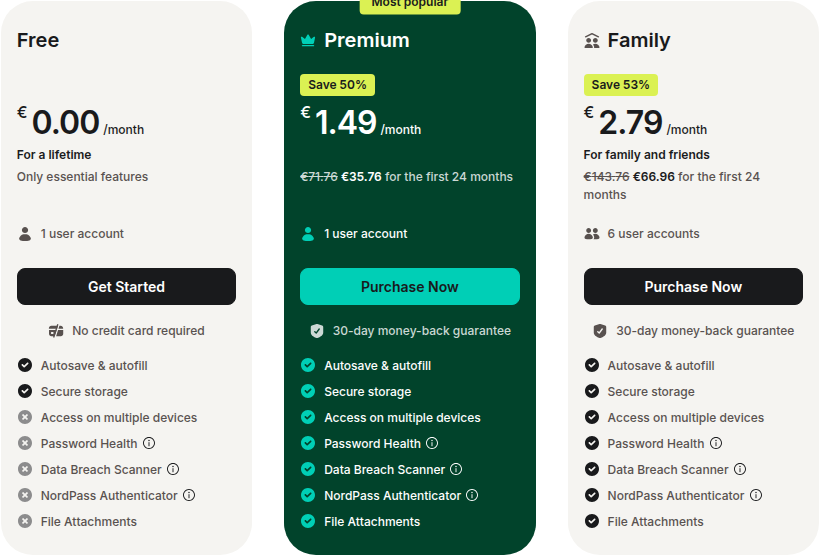
NordPass Personal Plans
- Free: €0.00/month — 1 user account, autosave & autofill, secure storage. Access on multiple devices is NOT included. No credit card required.
- Premium (2-year plan): €1.49/month (billed €35.76 for first 24 months, 50% discount). 1 user account. Includes: autosave & autofill, secure storage, access on multiple devices, Password Health, Data Breach Scanner, NordPass Authenticator, file attachments. 30-day money-back guarantee.
- Family (2-year plan): €2.79/month (billed €66.96 for first 24 months, 53% discount). 6 user accounts. 30-day money-back guarantee.
30-day money-back guarantee on paid plans. Prices exclude VAT.
NordPass Business Plans
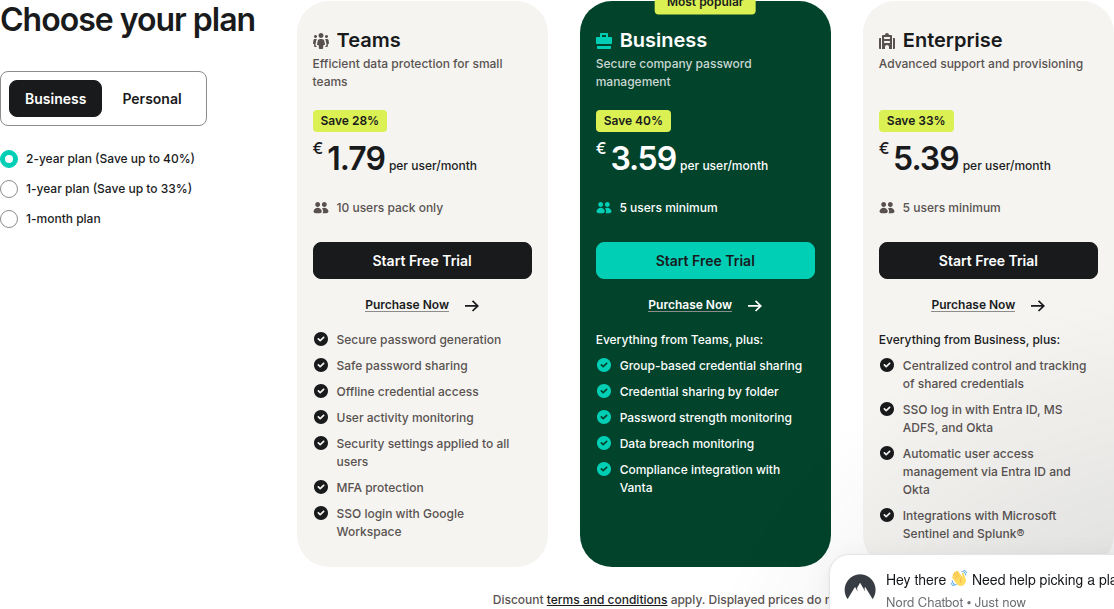
NordPass Business pricing is on a separate page. Prices below reflect the 2-year plan:
- Teams: €1.79/user/month (save 28%). 10 users pack only. Includes: secure password generation, safe password sharing, offline credential access, user activity monitoring, security settings applied to all users, MFA protection, SSO login with Google Workspace. Start free trial.
- Business: €3.59/user/month (save 40%). 5 users minimum. Everything from Teams, plus: group-based credential sharing, credential sharing by folder, password strength monitoring, data breach monitoring, compliance integration with Vanta. Start free trial.
- Enterprise: €5.39/user/month (save 33%). 5 users minimum. Everything from Business, plus: centralized control and tracking of shared credentials, SSO login with Entra ID, MS ADFS, and Okta, automatic user access management via Entra ID and Okta, integrations with Microsoft Sentinel and Splunk. Start free trial.
Free trial available on all business plans. Prices exclude VAT.
LastPass Plans
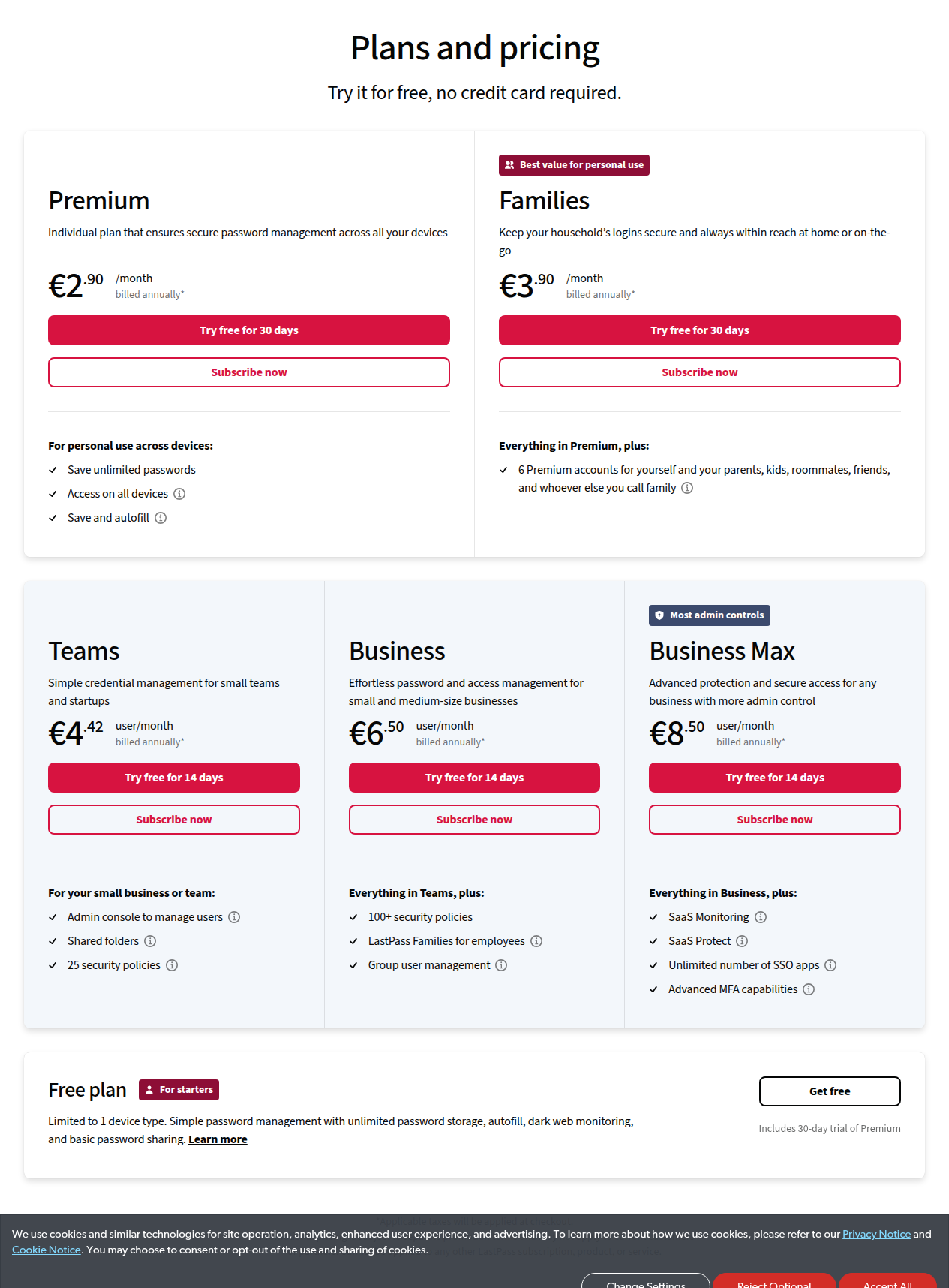
- Free: Free — limited to 1 device type. Unlimited password storage, autofill, dark web monitoring, basic password sharing. Includes 30-day trial of Premium.
- Premium: €2.90/month (billed annually). Access on all devices. Save unlimited passwords. Save and autofill. Try free for 30 days.
- Families: €3.90/month (billed annually). Everything in Premium, plus: 6 Premium accounts. Try free for 30 days.
- Teams: €4.42/user/month (billed annually). Admin console to manage users, shared folders, 25 security policies. Try free for 14 days.
- Business: €6.50/user/month (billed annually). Everything in Teams, plus: 100+ security policies, LastPass Families for employees, group user management. Try free for 14 days.
- Business Max: €8.50/user/month (billed annually). Everything in Business, plus: SaaS Monitoring, SaaS Protect, unlimited number of SSO apps, advanced MFA capabilities. Try free for 14 days.
Prices are shown in EUR as served to our European location. USD pricing may differ. Prices are accurate as of June 2026 and reflect 2-year plan rates where applicable. Check each vendor’s site for current pricing in your region.
Deep Dive: What Matters Most
1. Security and Trust
This is the single biggest differentiator between these two tools, and it’s where the comparison becomes genuinely uncomfortable for LastPass.
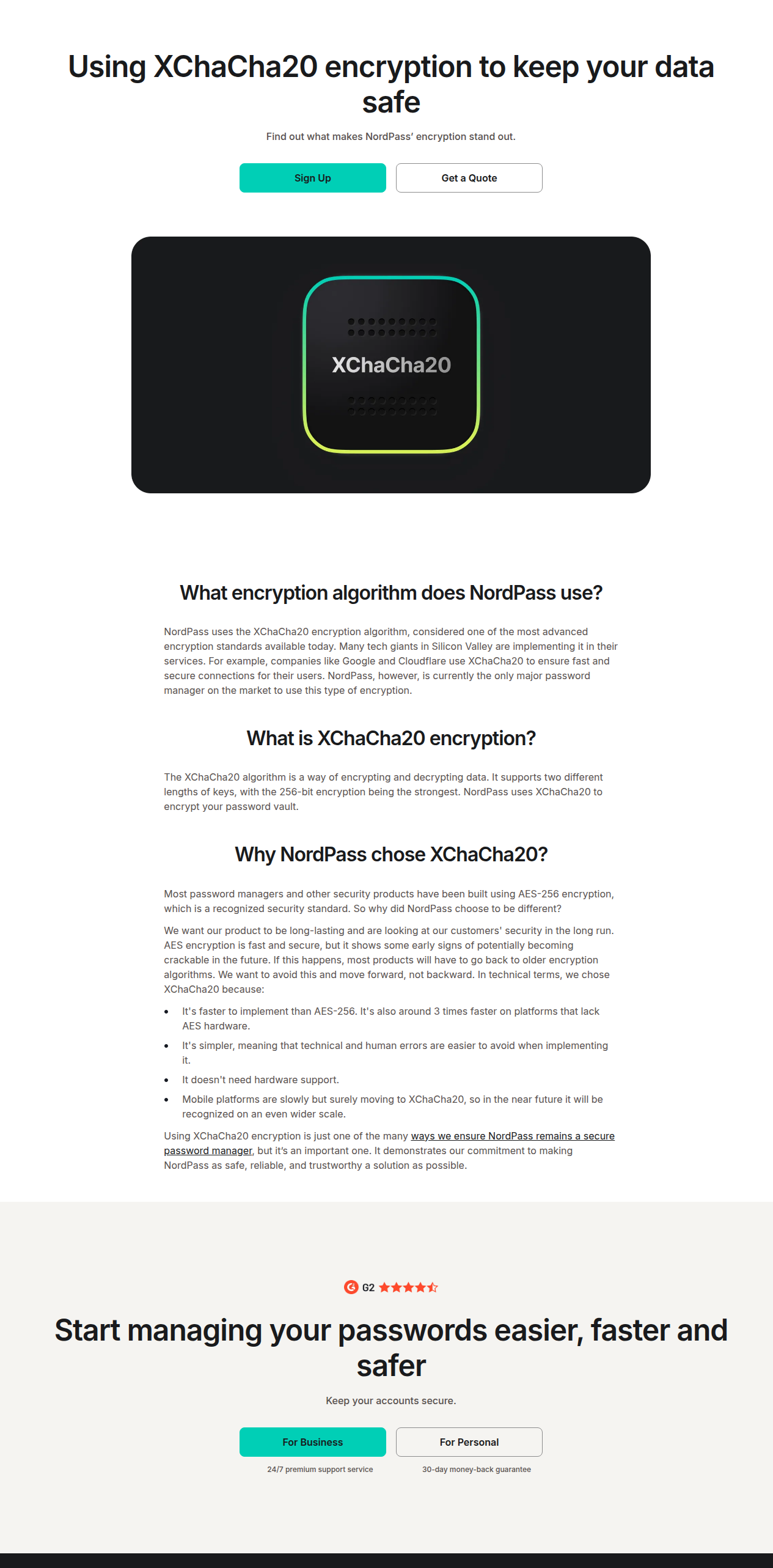
NordPass uses XChaCha20-Poly1305-IETF encryption, which is roughly 3x faster than AES on platforms without hardware acceleration and resistant to timing attacks. It’s simpler to implement correctly, which means fewer human-error risks. NordPass claims to be the only major password manager using this algorithm, and it’s the same approach Google and Cloudflare use for their secure connections.
More importantly: NordPass has no known breach history. Since launching in 2019, it has maintained a clean security record backed by ISO 27001, SOC 2 Type 2, HIPAA compliance, and regular Cure53 audits.
LastPass has the opposite story. The incidents stack up:
- 2022 (catastrophic): An attacker compromised a senior DevOps engineer’s personal computer via a keystroke logger, accessed LastPass’s internal vault, and exfiltrated customer vault backups. The UK Information Commissioner’s Office fined LastPass UK Ltd in November 2025 for failing to protect over 1 million UK data subjects. A $24.5 million class action settlement followed in 2025.
- 2024: Researchers demonstrated injection attack vulnerabilities.
- 2025: DOM-based extension clickjacking presented at DEF CON 33; the fix (v4.146.8) was found to still be vulnerable.
- 2026 (February): ETH Zurich researchers found 7 vulnerabilities and demonstrated that LastPass’s “zero-knowledge” encryption claim could be bypassed if a server is compromised, attributing the issues to complex code architecture and outdated cryptographic technologies.
Critically, LastPass did not encrypt URLs in vaults until November 2024. Before that, every stored URL was visible in plaintext in the exfiltrated backups.
LastPass uses AES-GCM-256, which is the industry standard and not broken. But when your encryption algorithm is sound but your operational security has failed repeatedly, the algorithm doesn’t matter as much as the trust it’s supposed to protect.
Winner: NordPass. Clean record beats catastrophic breach history every time.
2. Encryption Architecture
NordPass’s choice of XChaCha20 is a deliberate bet on the future. The company argues that AES-256 shows early signs of potentially becoming crackable, and moving to XChaCha20 now avoids having to retreat to older algorithms later. Whether you buy that argument or not, the technical properties are real: XChaCha20 doesn’t need hardware support, is faster on mobile, and is simpler to implement without introducing vulnerabilities.
Both tools use zero-knowledge architecture, meaning encryption and decryption happen locally on your device before data reaches the cloud. Neither NordPass nor LastPass can read your passwords.
Winner: NordPass, on forward-looking encryption design.
3. Built-in Authenticator and 2FA
NordPass’s built-in Authenticator stores TOTP codes in your vault but requires biometric verification (face or fingerprint) to access them. This preserves true two-factor separation: something you know (Master Password) plus something you are (biometric). The approach is patented (US Patent No. 11,528,130). Multiple users can each generate their own TOTP for shared accounts, eliminating single-person bottlenecks.
LastPass stores passwords and TOTP codes together in the same vault. A single vault unlock exposes both factors. For true separation, you need the separate LastPass Authenticator mobile app, which is a paid add-on requiring another device.
Winner: NordPass, by a significant margin on security design.
4. Admin and Enterprise Features
This category splits depending on what kind of admin you are.
NordPass wins on credential governance:
- Customisable password policies: Organisations set their own password requirements (length, complexity, rotation), and the password generator enforces them. LastPass applies its own static “weak password” criteria with no org customisation.
- Organisation-wide sharing visibility: The Owner sees and manages every shared item and folder across the organisation. Can grant, modify, or revoke any access. LastPass admins can’t see peer-to-peer shared items at all.
- Data recovery on user deletion: A deleted user’s non-shared vault data is recoverable by the organisation. On LastPass, non-shared data is permanently lost.
- Account recovery without pre-enrollment: Recovery via recovery code or Owner request. No need to configure anything beforehand. LastPass requires pre-setup of recovery methods or recovery may be impossible.
LastPass wins on broader IAM and governance:
- SaaS Monitoring (Business Max): Discovers shadow IT, scores app risk, blocks or restricts risky SaaS apps. NordPass has no equivalent.
- SaaS Protect (Business Max): Governs SaaS usage and addresses credential risk. NordPass has no equivalent.
- LastPass Families for Employees (Business): Every employee gets a personal LastPass account plus 5 family licenses free. This reduces credential risk across the work/personal boundary. NordPass has no equivalent perk.
- MFA for workstations/VPNs: LastPass MFA can be bought as a standalone product for workstation and VPN protection. NordPass has no equivalent.
- Broader SSO options and passwordless vault login.
Winner: Split. For pure credential governance, NordPass. For broader identity and access management, LastPass Business Max.
5. Personal and Family Features
For individuals, the choice comes down to what you value.
NordPass gives you email masking (built-in disposable email generation with no third-party service needed), the biometric-locked Authenticator, and clean modern apps. If you want a security-first tool that just works, NordPass is the better pick.
LastPass gives you a mature personal offering with shared folders, a family manager dashboard, and dark web monitoring even on the free tier. Its ecosystem is deeper and its apps have been refined over 17+ years.
Winner: NordPass for security-first individuals. LastPass for those who value ecosystem maturity and are comfortable with its breach history.
6. Platform and Ecosystem
LastPass has the larger ecosystem after 17+ years in the market: more browser integrations, more third-party tool compatibility, more community resources, and more IT teams that already know how to deploy it. If you’re joining an organisation that already uses LastPass, or you have niche browser requirements, LastPass has an edge.
NordPass supports the major browsers (Chrome, Firefox, Edge, Opera, Safari) and platforms (Windows, macOS, Linux, Android, iOS). For most users, this is plenty. But if you need support for legacy or niche browsers, LastPass has broader coverage.
NordPass benefits from being part of the Nord Security ecosystem. You can bundle it with NordVPN, NordLayer, or NordLocker. If you already use other Nord products, the bundle pricing makes NordPass even more attractive. (See our NordVPN vs ExpressVPN comparison for how Nord’s flagship product stacks up.)
Winner: LastPass on breadth. NordPass on ecosystem synergy if you use other Nord products.
Where NordPass Loses
No product is perfect, and NordPass has genuine gaps you should know about before buying:
-
No passwordless vault login. You still need to type your Master Password (plus optional biometric unlock). LastPass lets you access your vault without typing a password at all.
-
No SaaS monitoring or SaaS governance. LastPass Business Max can discover shadow IT, score app risk, and block risky SaaS apps. NordPass has nothing in this category. If SaaS governance matters to your organisation, NordPass can’t help.
-
No employee family licenses. LastPass Business gives every employee 5 free family accounts. NordPass has no equivalent benefit.
-
Younger product, smaller ecosystem. NordPass launched in 2019. LastPass has been around since 2008. Fewer third-party integrations, smaller community, and fewer IT teams that already know the tool.
-
No standalone authenticator app. NordPass’s TOTP authenticator is built into the vault and only works for NordPass-stored credentials. LastPass Authenticator is a separate app you can use for any service. If you want a single authenticator app for everything, NordPass isn’t it.
-
No separate MFA product for workstations or VPNs. LastPass MFA can be bought standalone. NordPass can’t protect your non-password endpoints.
Where LastPass Loses
LastPass has problems that go beyond feature gaps:
-
Catastrophic breach history. The 2022 breach was as bad as it gets for a password manager: customer vault backups were exfiltrated. URLs were unencrypted. The ICO fined them. They settled a $24.5M class action. This isn’t a minor incident; it’s the kind of event that should make any security-conscious buyer pause.
-
ETH Zurich bypass (2026). Researchers demonstrated that LastPass’s “zero-knowledge” architecture can be bypassed if a server is compromised. They attributed the vulnerabilities to complex code architecture and outdated cryptographic technologies.
-
Weaker TOTP security. Passwords and TOTP codes live in the same vault. One unlock exposes both factors. NordPass requires biometric verification to access TOTP codes, preserving true 2FA separation.
-
No customisable password policies. LastPass applies its own “weak password” criteria. Organisations can’t enforce their own length, complexity, or rotation rules.
-
Limited admin visibility. Admins can’t see or manage peer-to-peer shared items. If two employees share a credential outside of a shared folder, the admin has no visibility into it.
-
No email masking. No built-in disposable email tool. You need a separate service if you want this feature.
-
No time-limited sharing or granular permissions. Sharing is binary: view password or hide it. No expiration dates, no granular access levels.
-
Data permanently lost on user deletion. When a user is deleted, their non-shared vault items are gone forever. NordPass lets the organisation recover them.
-
Pre-config required for account recovery. If a user hasn’t set up recovery methods before they forget their Master Password, they may be locked out permanently.
-
Private equity ownership. LastPass was acquired by GoTo (LogMeIn) in 2015, which many users disliked, then spun off to private equity firms Francisco Partners and Elliott Management in 2024. Some buyers distrust PE ownership for a security product.
Who Should Pick NordPass
- Security-first buyers who won’t compromise on breach history. NordPass has a clean record; LastPass does not.
- IT admins who need customisable password policies, org-wide sharing visibility, and data recovery on user deletion.
- Organisations that want enforceable credential governance without gating the best features behind a top-tier plan.
- Anyone who wants email masking built into their password manager without paying for a separate service.
- Nord ecosystem users who already use NordVPN, NordLayer, or NordLocker and want bundle pricing.
Who Should Pick LastPass
- Organisations that need SaaS monitoring and governance (Business Max). NordPass has no answer here.
- Teams that want employee family licenses included in the business plan — it’s a genuine perk that reduces credential risk at home.
- IT teams that need workstation/VPN MFA as a separate product alongside their password manager.
- Organisations already using LastPass with significant deployment inertia. Migration is real work, and if you’re comfortable with the risk, staying put may be the pragmatic choice.
Who Should Pick Neither
- Open-source purists: Look at Bitwarden. It’s open source, audited, and has a generous free tier.
- Apple-only users: Apple Passwords is free, built into the OS, and good enough for basic use. No sharing controls or breach monitoring, but zero cost and zero setup.
- Proton ecosystem users: Proton Pass is open source, end-to-end encrypted, includes built-in email aliases via SimpleLogin, and integrates with Proton Mail and Proton VPN. (We compared the VPN side in NordVPN vs Proton VPN.)
Bottom Line
NordPass is the better password manager for most buyers in 2026. Its security architecture is more modern, its breach record is clean, and its admin features beat LastPass in the areas that actually affect credential governance. LastPass still wins on breadth (SaaS monitoring, employee family licenses, workstation MFA) and ecosystem maturity, but you have to accept that you’re trusting your passwords to a company with a catastrophic breach history.
If you’re picking a password manager for yourself or your business today and don’t have a specific LastPass-only feature you can’t live without, go with NordPass.
NordPass is wrong for you if: you need SaaS app governance or you’re an organisation with a large LastPass deployment you can’t practically migrate away from.