14 June 2026 · Comparison
Confluence vs SharePoint: Which Knowledge Tool Wins?
The short answer
if you build software and want documentation sitting next to your engineering tools.
if you already pay for Microsoft 365 and would rather use what you've got.
Verdict: Pick Confluence if you build software. Pick SharePoint if you already pay for Microsoft 365. Pick neither if you want simplicity.
Confluence is a knowledge-creation wiki built for engineering and agile teams. SharePoint is a content-management platform embedded in the Microsoft 365 ecosystem. They overlap on paper, but in practice, they serve fundamentally different workflows. If your team writes living docs, does sprint planning, and lives in Jira, Confluence is the obvious pick. If your org already uses Teams, Outlook, and OneDrive and needs a governed intranet with compliance guardrails, SharePoint comes at no extra cost beyond your M365 subscription.
We have also compared Confluence vs Notion if you are weighing a more modern, all-in-one alternative.
Disclosure: Some links in this post are affiliate links. If you click through and make a purchase, we may earn a commission at no additional cost to you.
Comparison at a Glance
| Dimension | Confluence | SharePoint |
|---|---|---|
| Core paradigm | Wiki/page-based knowledge creation | Document/site-based content management |
| AI | Rovo AI (search, agents, summarization, drafting) | Copilot (page/site creation, Work IQ, agents, workflows) |
| Ecosystem | Atlassian (Jira, Trello, Bitbucket, Loom) | Microsoft 365 (Teams, Office, OneDrive, Loop, Power Platform) |
| Best for | Software/engineering teams, agile orgs | Enterprise intranets, regulated industries, M365 shops |
| Entry price | $0 (free for up to 10 users) | $7.00/user/month (M365 Business Basic annual; no standalone SharePoint) |
| Storage | 2GB free, 250GB Standard, unlimited Premium | 1TB per user on all plans |
| Whiteboarding | Built-in (Confluence Whiteboards) | Separate app (Microsoft Whiteboard) |
| Intranet | Company Hub (Premium+) | Full intranet with branded hub, news, publishing, analytics |
| Customization | Marketplace apps, macros, automation rules | SPFx, PowerApps, Power Automate, site designs |
| Admin/governance | Permissions, analytics, IP allowlisting | Advanced Management, conditional access, Admin Agent, M365 Backup |
| Compliance certifications | SOC 2 Type II, ISO 27001, GDPR on Confluence Cloud; HIPAA available via BAA on Standard+ | SOC 2 Type II, ISO 27001/27017/27018, GDPR, HIPAA via BAA, PCI DSS on commercial M365 |
| FedRAMP | Only on Atlassian Government Cloud (separate product, Moderate-authorized) — not on regular Confluence Standard/Premium | Only on Microsoft’s Gov/DoD clouds — commercial M365 plans in this comparison are not FedRAMP-authorized |
Confluence: The Knowledge Creation Engine
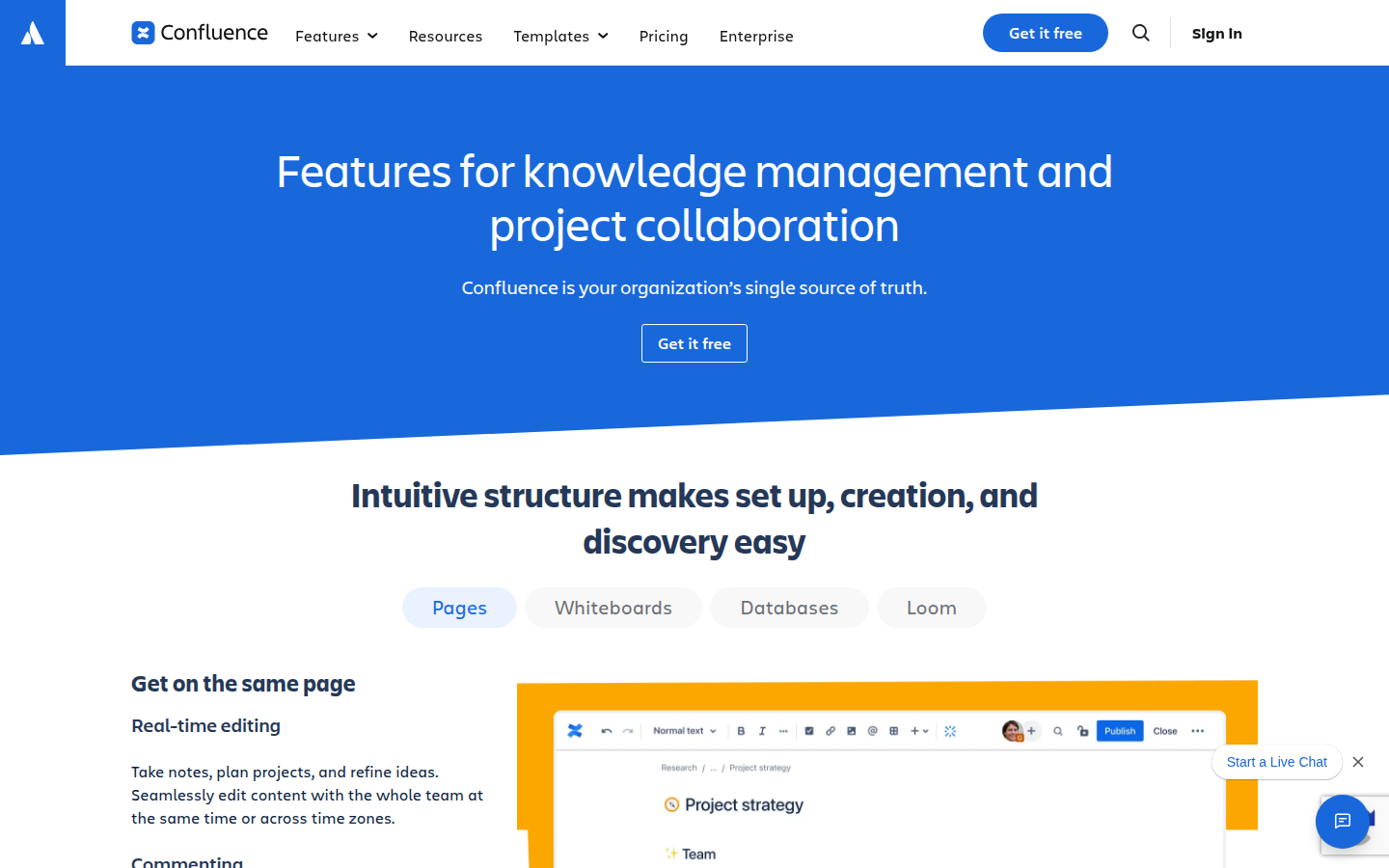
Confluence is Atlassian’s AI-powered workspace. It is built around the idea that teams should write things down, keep them alive, and connect them to the work they track in Jira. This isn’t a file repository, it’s a place where you create pages, whiteboards, databases, and embedded Loom videos that stay current because people are in there every sprint.
What Confluence Does Well
Real-time collaborative editing. Pages are living docs. Multiple people can edit at the same time, leave inline comments, tag teammates with @mentions, and assign tasks directly in the page. The version history lets you compare changes and revert, so nobody loses work.
Deep Jira integration. This is the killer feature. 76% of Confluence customers report shipping projects faster because Jira issues, sprints, and roadmaps connect directly to Confluence pages. You can create Jira issues from whiteboard stickies. You can embed Jira roadmaps in your sprint planning docs. If your team already uses Jira, this integration alone can justify Confluence.
Flexible content types. Beyond traditional pages, Confluence offers Whiteboards (infinite canvas for brainstorming, with Jira integration), Databases (structured content with table/card/board views), and Loom video embedding. This range means you are not locked into one format.
Rovo AI. Atlassian’s AI layer powers search across all your tools, not just Confluence. It can summarize pages, draft content, generate meeting note summaries, and provide audio briefings. On the Premium plan, AI agents handle repetitive tasks like content tagging and cleanup.
Strong template library. Hundreds of templates across marketing, product, HR, and engineering let teams start fast instead of staring at a blank page.
Confluence Pricing
All prices are per user per month, billed annually. Monthly billing costs more.
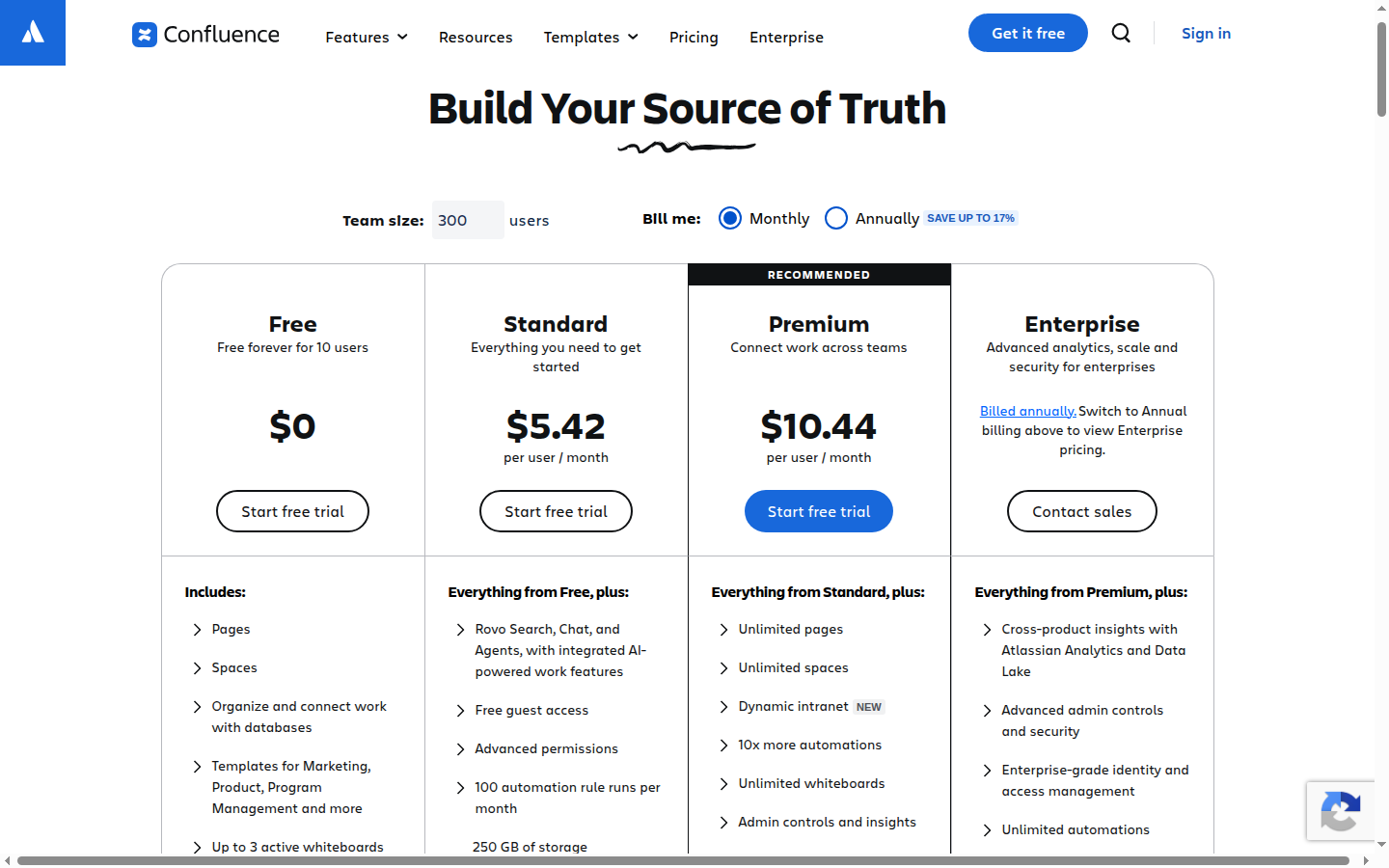
- Free: $0, up to 10 users, 2GB storage, 3 whiteboards/user, 10 automations/month, community support
- Standard: $5.42/user/month (billed monthly), 250GB storage, 100 automations/month, guest access, advanced permissions, 9/5 regional support, Rovo AI included
- Premium: $10.44/user/month (billed monthly), unlimited storage, unlimited whiteboards, 1,000 automations/user/month, analytics, team calendars, IP allowlisting, 24/7 support, 99.9% uptime SLA, Company Hub
- Enterprise: Contact sales; 99.95% uptime SLA, unlimited automations, multiple sites (up to 150), Atlassian Guard included, 24/7 support with 30-min critical response
Prices accurate as of June 2026; check the vendor’s site for current rates.
Where Confluence Loses
Cost at scale. Per-user pricing compounds. A 100-person team on Premium costs roughly $1,044/month ($12,528/year). If your org already pays for Microsoft 365, SharePoint is effectively “free” within your existing subscription, making Confluence a net new line item.
No native Office suite. Confluence does not replace Word, Excel, or PowerPoint. You will still need those tools (or Google Workspace). SharePoint lives inside the M365 ecosystem, where Word documents are native and co-authoring in Office apps is seamless.
Steeper learning curve for non-technical teams. Marketing, HR, and sales teams coming from Google Docs or Dropbox Paper often find Confluence’s space/page hierarchy and permissions model unintuitive at first. Notion’s learning curve is gentler by comparison, which is one reason we explored in our Confluence vs Notion comparison.
Storage caps on lower tiers. The free plan gives you only 2GB. Standard gives 250GB. If your team works with large media files (design assets, video, large PDFs), you will hit those caps. SharePoint gives every user 1TB out of the box.
Less suited as a full intranet. Confluence’s Company Hub (Premium+) is a step toward intranet functionality, but it is not a full intranet replacement. SharePoint’s branded hub experience with news, publishing, multichannel distribution, and analytics is far more mature.
SharePoint: The M365 Content Management Powerhouse
SharePoint is Microsoft’s content management and intranet platform, used by 200,000+ organizations and 190 million people. It is not a standalone product: it comes bundled inside Microsoft 365. SharePoint is where organizations store documents, build team sites, publish news, and govern content at scale.
What SharePoint Does Well
Deepest Microsoft 365 integration. SharePoint is the content backbone for Teams, Outlook, OneDrive, Word, Excel, PowerPoint, and Loop. When you attach a file in Teams, it lives in SharePoint. When you co-author a Word doc in real time, SharePoint handles the versioning. This integration is seamless because it is native, not bolted on via APIs.
Enterprise governance and compliance. SharePoint Advanced Management provides restricted access control, conditional access policies, data governance, and compliance tools. The SharePoint Admin Agent uses AI to govern M365 content at scale. Microsoft 365 Backup and Archive add ransomware protection and low-cost archival. For regulated industries (finance, healthcare, government), this governance layer is genuinely hard to replicate elsewhere.
Copilot AI across the suite. Microsoft’s Copilot is not limited to SharePoint. It works across Word, Excel, PowerPoint, Outlook, and Teams. Copilot can create SharePoint pages from natural-language descriptions, ground answers in your organization’s content (Work IQ), and power custom agents via Copilot Studio. The breadth of this AI integration across the M365 suite is a competitive moat.
1TB storage per user. Every M365 plan includes at least 1TB of OneDrive/SharePoint storage per user. There is no storage anxiety, and no pressure to upgrade for more space.
Full intranet capabilities. SharePoint offers branded hub sites, news publishing, multichannel distribution, page/site/ campaign analytics, and integration with Viva Connections for employee engagement. If you need a company intranet, SharePoint does this out of the box.
Custom development platform. SPFx (SharePoint Framework), PowerApps, and Power Automate give IT teams and citizen developers tools to customize sites, build apps, and automate workflows without writing much code.
SharePoint/M365 Pricing
SharePoint has no standalone price: you pay for Microsoft 365, and SharePoint comes with it. Here are the key Business plans (annual pricing, with Teams):
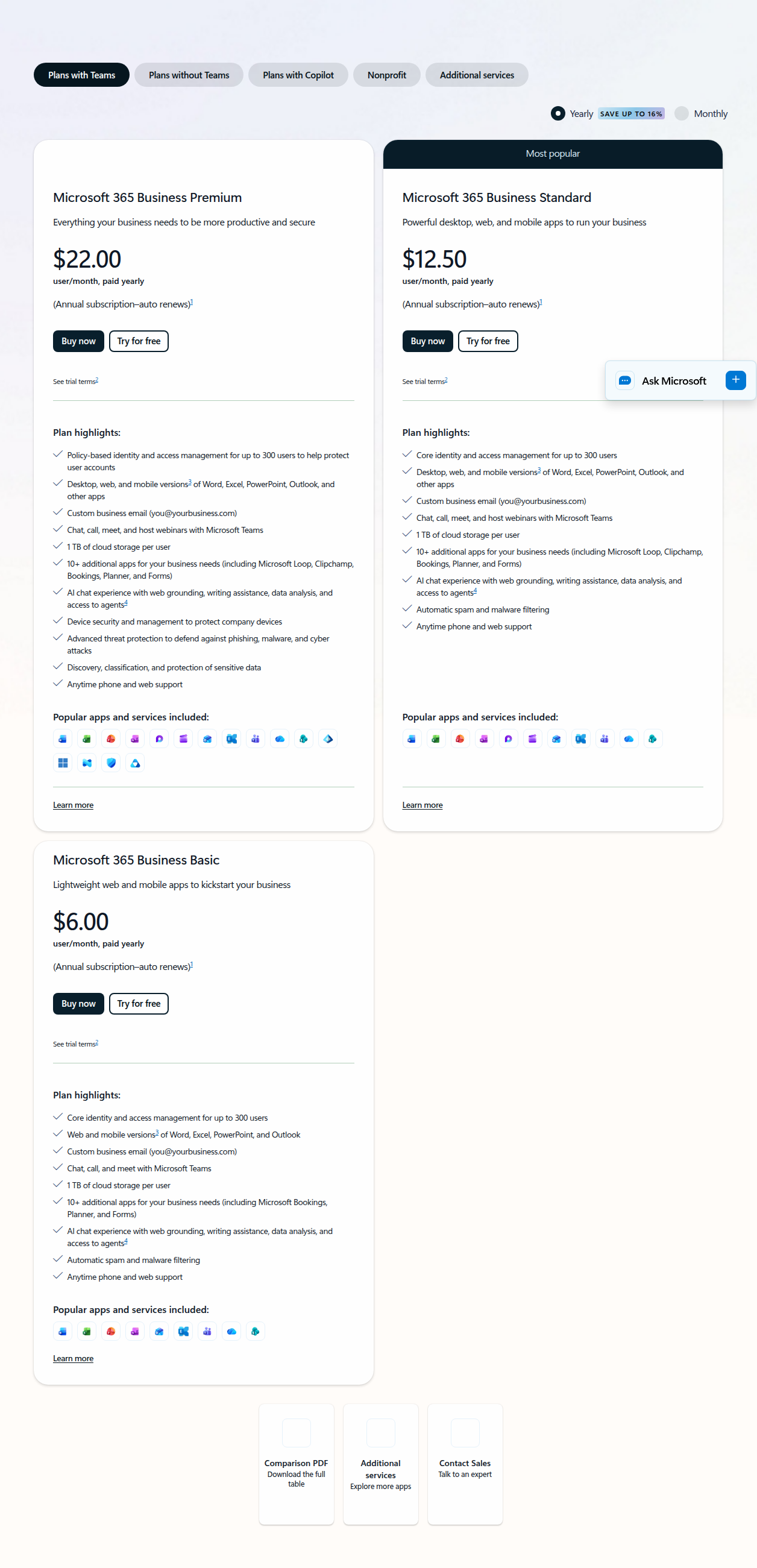
- M365 Business Basic: $7.00/user/month (annual, paid yearly), 1TB storage, Teams, SharePoint, web/mobile Office apps only
- M365 Business Standard with Copilot: $23.50/user/month (annual, paid yearly). Desktop Office apps, 1TB storage, Teams, SharePoint, Copilot bundled in
- M365 Business Premium with Copilot: $32.00/user/month (annual, paid yearly). Everything in Standard plus advanced security (Intune, Defender, Purview), Entra ID
- Copilot as a standalone add-on: $18.00/user/month promotional (regularly $21.00), for teams who want it layered onto Basic instead of buying one of the bundled plans above; promo runs through September 30, 2026
This changed since we first published. Microsoft repriced and restructured mid-2026: Business Basic moved from $6.00 to $7.00/user/month, and what used to be separate “Business Standard” ($12.50) and “Business Premium” ($22.00) plans without Copilot are gone from the public pricing page — Copilot is now bundled into Standard and Premium by default, at $23.50 and $32.00/user/month. If you don’t want to pay for Copilot at all, Basic at $7.00/user/month plus SharePoint is the only bundle left that excludes it. (Re-verified live on microsoft.com/en-us/microsoft-365/business, 2026-09-10.)
Where SharePoint Loses
Overwhelming complexity. SharePoint’s feature set is enormous: team sites, communication sites, hub sites, document libraries, lists, pages, news, web parts, Power Automate, PowerApps, SPFx. Most teams use 10-20% of what SharePoint can do. Configuring it well requires dedicated IT or admin resources, which many small and mid-size teams do not have.
Rigid, document-centric model. SharePoint’s architecture is built around document libraries and sites, not freeform pages. Creating a wiki-style knowledge base in SharePoint feels clunky compared to Confluence’s page editor. The experience is closer to a shared drive with a web frontend than a modern collaborative workspace.
No standalone option. You cannot buy SharePoint by itself. You must subscribe to Microsoft 365, which means you are also paying for Teams, Outlook, Word, Excel, and a dozen other apps whether you need them or not. If all you want is an intranet or knowledge base, the minimum entry is $7/user/month with the rest of M365 included.
Vendor lock-in. Migrating content out of SharePoint is time-consuming. If you leave Microsoft 365, you lose not just SharePoint but the entire Office suite, Teams history, OneDrive files, and any Power Platform automation built on top of SharePoint. This deep integration is both a strength and a cage.
The “document dump” reputation. Many organizations treat SharePoint as a dumping ground for files with inconsistent metadata, broken search, and zero content maintenance. SharePoint now has AI tools to address this (content freshness detection, metadata enrichment), but the cultural problem persists. Confluence’s wiki model naturally encourages more structured, maintained content.
No native whiteboarding. SharePoint has no built-in whiteboard tool. Microsoft Whiteboard is a separate app, and the integration is not seamless. Confluence Whiteboards are native and connect directly to Jira issues.
Collaboration UX feels dated. While Microsoft has modernized SharePoint’s interface, the editing and collaboration experience still feels less fluid than Confluence, Notion, or Slab. Real-time co-authoring works well in the Office apps, but page editing in SharePoint can feel like a 2015 CMS.
Confluence vs SharePoint: FAQ
Can you migrate directly between Confluence and SharePoint?
Not cleanly in either direction. Confluence’s pages are organized as a wiki hierarchy (spaces and pages); SharePoint is organized as document libraries and sites, so there’s no one-to-one mapping between the two structures — a migration is really a re-platforming project, not a file transfer. Atlassian’s own comparison guide points to a connector for pulling content out of SharePoint into Confluence; going the other way typically means a marketplace migration app rather than a native importer. Either direction, expect to re-check formatting, permissions, and anything embedded (Jira issues, web parts) after the move, and budget time for a pilot migration on a subset of content before moving everything.
Which has more compliance certifications, Confluence or SharePoint?
Confluence (Atlassian) holds SOC 2 Type II, ISO 27001, and GDPR compliance on the regular Confluence Cloud product, with HIPAA available via a signed BAA on Standard and above; FedRAMP only applies to the separate Atlassian Government Cloud, not the Standard/Premium plans compared on this page. SharePoint runs under the Microsoft 365 compliance umbrella, which is broader on paper for commercial customers — ISO 27001/27017/27018, GDPR, HIPAA via BAA, and PCI DSS — but the same rule applies: FedRAMP authorization sits on Microsoft’s separate Gov/DoD clouds, not the commercial Business plans priced above (checked on Atlassian’s and Microsoft’s own compliance documentation, 2026-09-10). In practice this mostly matters if you’re in a regulated industry with a specific certification requirement — check that the exact one you need is covered by the specific plan you’re buying, not just the vendor’s brand name.
Which has better search?
Confluence’s search is generally considered the more reliable of the two for finding a specific page or comment inside the tool itself — independent comparisons (Nuclino among them) note Confluence’s search as more consistent, while SharePoint’s file-and-folder structure can bury older documents unless metadata and naming are kept disciplined. SharePoint’s advantage is breadth, not precision: Copilot’s Work IQ can surface answers grounded across your whole M365 estate (email, Teams messages, files), not just what lives in SharePoint itself. If the job is “find the right wiki page,” Confluence tends to win; if it’s “find anything related to this topic anywhere in our Microsoft stack,” SharePoint’s reach is wider.
Alternatives Worth Considering
Confluence and SharePoint are not the only options. Depending on your team size, budget, and priorities, these alternatives might be a better fit:
- Notion: The all-in-one AI workspace. Docs, databases, wikis, projects, and AI agents in one tool. Better UX than both Confluence and SharePoint. Free for individuals; paid plans from $9.50/seat/month. Best for teams that want one flexible tool instead of a suite. Weak on enterprise governance and Jira-level dev integration.
- Slab: A clean, fast knowledge base with excellent search and content verification workflows. Free for up to 10 users; paid from $6.67/user/month. Best for teams that just want a wiki without the complexity. Lacks whiteboarding and database features.
- Nuclino: Extremely lightweight and fast team wiki. Free for up to 50 items; paid from $5/user/month. Best for small teams that want zero setup friction. Very limited feature set beyond basic docs.
- Guru: Enterprise AI knowledge platform with verification workflows, expiration/review cycles, and 100+ integrations. Custom-priced; must talk to sales. Best for orgs prioritizing knowledge quality and accuracy over collaboration features. Overkill for smaller teams.
- ClickUp: Project management with built-in Docs, Wikis, whiteboards, and AI. Paid from $7/user/month. Best for teams that want project management and docs in one platform. Docs/wiki features are secondary to project management.
Bottom Line: Who Should Pick What
Pick Confluence if:
- Your team already uses Jira (the integration alone is worth the price)
- You build living docs, sprint plans, and async written updates
- You need flexible content types (whiteboards, databases, video)
- You want to start free with up to 10 users and scale from there
- Your team is technical and comfortable with a wiki/page hierarchy model
But do not pick Confluence if you already pay for Microsoft 365 and need a governed intranet, or if your team wants simplicity above all else.
Pick SharePoint if:
- Your org is already on Microsoft 365 (you are already paying for it)
- You need enterprise governance, compliance, and security at scale
- You want a full company intranet with branded hubs, news, and publishing
- You want Copilot AI integrated across Office, Teams, and SharePoint
- You have IT/admin resources to configure and maintain it properly
But do not pick SharePoint if you need a lightweight, modern wiki experience, or if your team is small and does not need the M365 ecosystem’s overhead.
Pick neither if:
- You are a small team (under 25) that wants simplicity: try Notion or Nuclino
- You prioritize knowledge verification and accuracy workflows: try Guru
- You want project management plus docs in one platform: try ClickUp
See all our SaaS tool comparisons for more head-to-head breakdowns.