11 July 2026 · Comparison
Upstream vs Superhuman: Which Email Client for Founders?
The short answer
Superhuman wins for founders who want pure keyboard speed. Upstream wins if you manage AI-agent email too, with an inbox at half the price.
Affiliate disclosure: SaaSpicious is reader-supported. Neither Upstream nor Superhuman offers a public affiliate program that we could confirm as of July 2026, so the links in this post are standard (non-affiliate) links. Our verdict is based on hands-on testing of publicly available information and the tools’ own marketing pages.
The Short Answer
Pick Superhuman if you want the fastest keyboard-driven email client with eight years of polish, Outlook and Gmail support, a built-in calendar, and enterprise compliance. Pick Upstream if you run AI agents that send emails on your behalf and want an inbox built around agentic triage and voice-matched drafts from day one. At $20/mo for Upstream Pro versus $25/mo for Superhuman Starter, Upstream is the cheaper entry point for AI email. But Superhuman’s Starter plan now includes Mail at $25/mo (USD), which has changed since earlier pricing structures that gated Mail behind a pricier Business tier. For pure manual speed, Superhuman still leads. For an agent-native workflow, Upstream is the first real answer.
Pricing Comparison
The biggest change in this comparison as of July 2026 is Superhuman’s pricing. Earlier in 2026, Superhuman offered a free plan (Go AI assistant only) and a Pro plan with Docs and Grammarly but no Mail. You needed the Business plan at EUR 33/mo just to get email. That structure is gone. The current Superhuman Mail pricing page shows three Mail-inclusive plans, all in USD.
Prices accurate as of July 2026; check the vendor’s site for current rates.
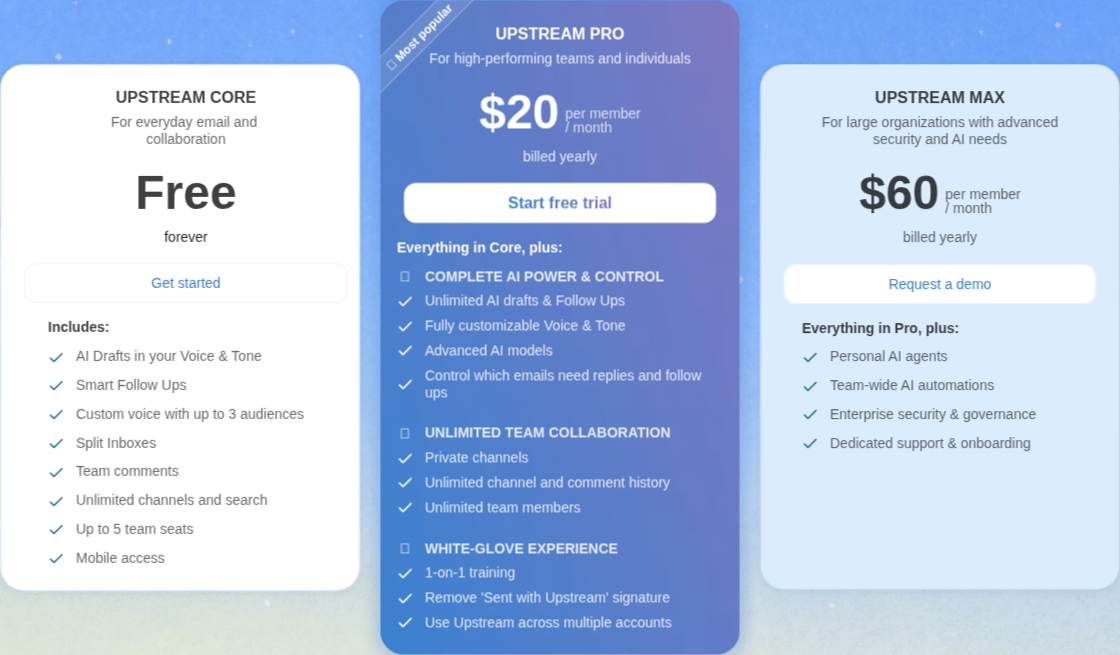
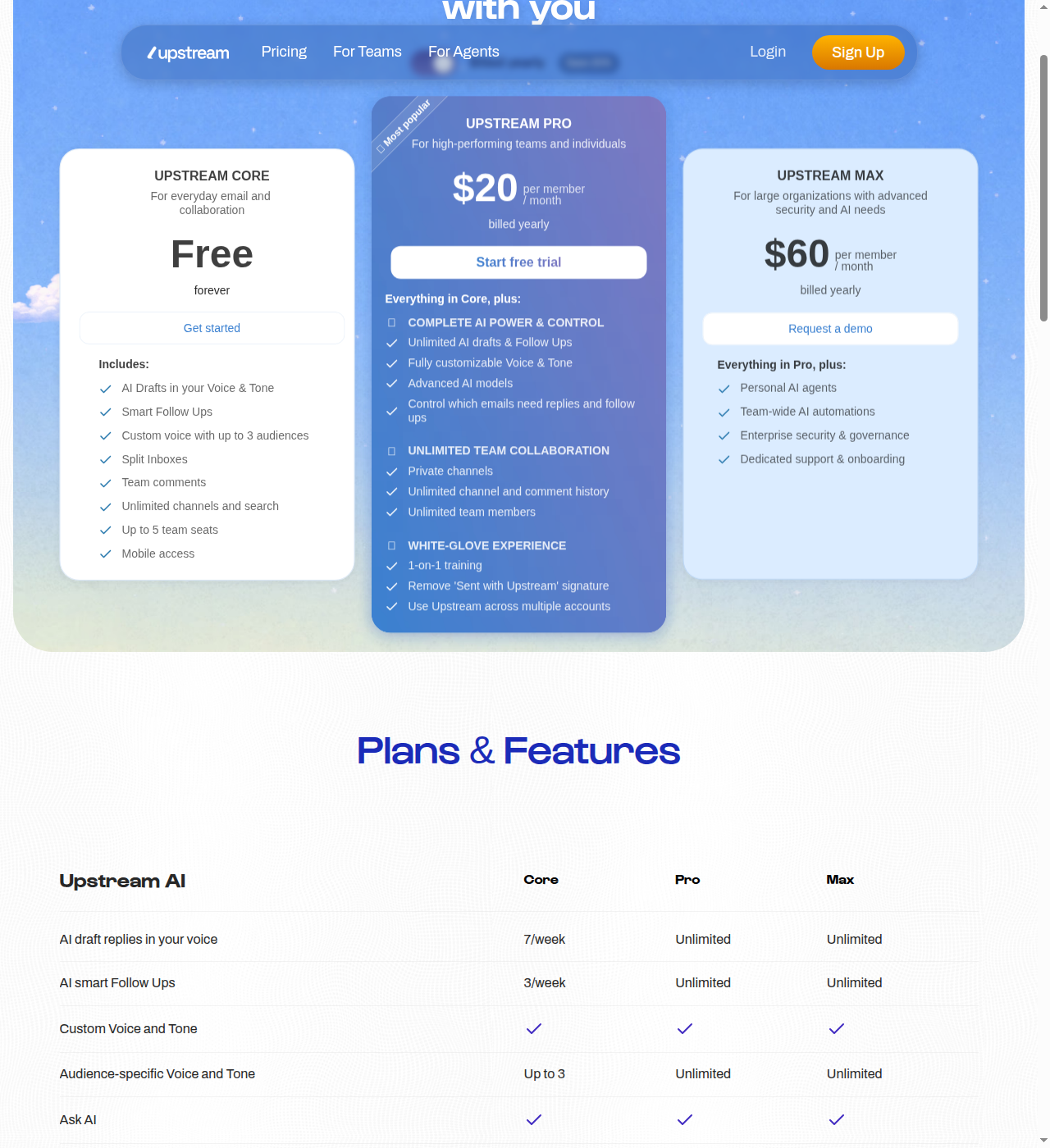
Upstream Pricing
| Plan | Price (billed yearly) | Key Features |
|---|---|---|
| Core | Free forever | 7 AI drafts/week, 3 smart follow-ups/week, up to 5 team seats, unlimited channels, split inboxes, mobile access |
| Pro | $20/member/month | Unlimited AI drafts and follow-ups, customizable voice/tone, advanced AI models (OpenAI and Claude), unlimited team members, private channels, multi-account support, removes “Sent with Upstream” signature |
| Max | $60/member/month | Everything in Pro plus personal AI agents, team-wide AI automations, enterprise security and governance, dedicated support and onboarding |
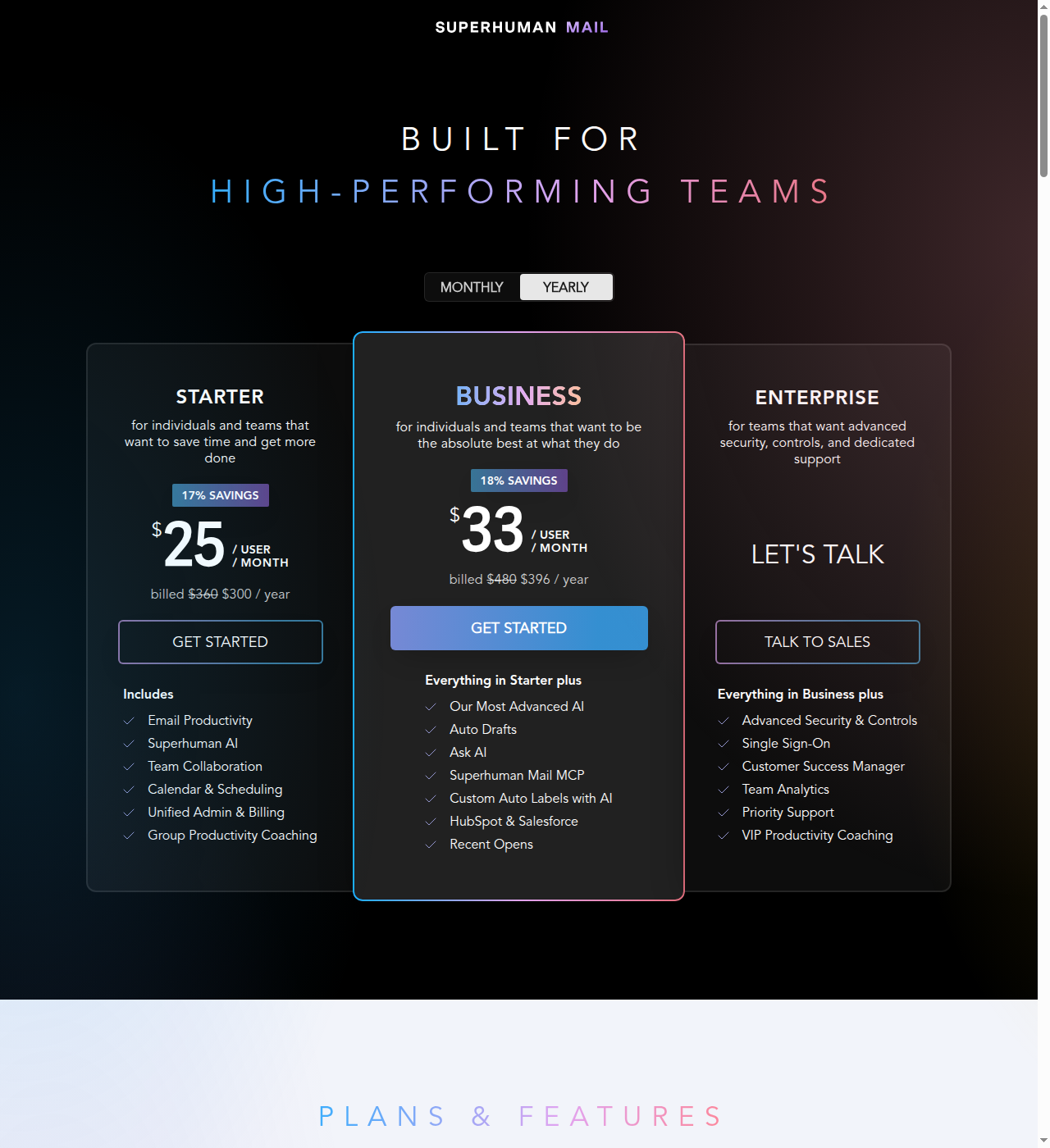
Superhuman Mail Pricing
| Plan | Price (billed yearly) | Key Features |
|---|---|---|
| Starter | $25/user/month | Email productivity (Split Inbox, Snippets, Snooze, Send Later, Undo Send), Superhuman AI (Write with AI, Instant Reply, Auto Archive, Auto Labels, Auto Summarize), Team Collaboration (Shared Conversations, Team Comments, Shared Drafts), Calendar and scheduling, group productivity coaching |
| Business | $33/user/month | Everything in Starter plus: Auto Drafts, Ask AI, Superhuman Mail MCP, Voice and Tone Match, Knowledge Base, Custom Auto Labels with AI, Personalization, Smart Send, Recent Opens, HubSpot/Salesforce/Pipedrive integrations, private group coaching |
| Enterprise | Custom | Everything in Business plus: SSO, SCIM, audit logs, BYOK, priority 1:1 coaching, dedicated support, custom compliance |
Key Pricing Takeaways
- Mail on Starter, not just Business. This is new. Until recently, Superhuman gated email behind the Business plan. Now the $25/mo Starter includes a full Mail client, which narrows the price gap with Upstream Pro at $20/mo.
- Superhuman’s AI features are tiered. Write with AI, Instant Reply, and basic auto-features are on Starter. But Auto Drafts, Ask AI, MCP, and Voice and Tone Match require Business at $33/mo. Upstream includes those AI capabilities on Pro at $20/mo.
- Upstream has a genuine free tier. Core is free forever with limited AI usage. Superhuman has no free Mail plan at all.
- Upstream is team-friendly on pricing. Core gives you 5 team seats free. Superhuman charges per user on every plan.
- Enterprise features are asymmetric. Superhuman is SOC 2 Type II certified on every plan, including Starter; SAML SSO, SCIM user provisioning, and BYOK are reserved for Enterprise. Upstream Max offers “enterprise security and governance” per its pricing page but has no published compliance certifications.
AI Capabilities: Agent-Native vs Additive AI
This is the architectural fork in the road.
Upstream: Built for Agents from Day One
Upstream was designed with the assumption that your inbox contains messages from both humans and AI agents. Its AI features are not bolted on, they are the inbox’s operating system:
- Agentic triage. Your inbox is automatically split into Primary, Needs Reply, VIP, and Noise. AI moves cold emails and newsletters out of the way and surfaces reply-needed messages before you open the app.
- AI drafts ready on open. Upstream learns your voice from your own emails, stores it as an editable system prompt, and has a draft ready the moment you open a message. You tweak and send. Nothing goes out without your approval.
- Smart follow-ups. The system tracks open loops, assesses context, and resurfaces conversations at the right time with a draft already written. It accounts for other threads with the same recipients.
- MCP server with 44 tools. External agents (Claude, ChatGPT, Cursor) connect via a Personal Access Token and can browse, search, label, and triage your inbox. Upstream’s own marketing FAQ states the product “never sends emails without your approval,” but its MCP tool reference also lists
compose-threadandreply-to-threadtools that create and send email directly - the documented safeguard is that “most MCP clients will ask for confirmation before executing them,” which is a client-side prompt, not an Upstream-configurable restriction. - No published permission scoping. Per Upstream’s own docs, a Personal Access Token “gives the MCP server access to the same data you see in the Upstream app” - your whole inbox, labels, channels, rules, and contacts. There is no documented way to scope a token to specific labels or projects.
Superhuman: AI Added to a Human-First Client
Superhuman’s AI is powerful, but it was added to a client originally built for humans:
- AI triage. Split Inbox, Auto Labels, Auto Archive, Auto Reminders, and Auto Summarize organize your inbox, but these are rules and AI layered on top of a traditional email client, not a fundamentally different architecture.
- AI writing. Write with AI, Instant Reply, Autocorrect, and Autocomplete speed up composition. Voice and Tone Match (Business plan) learns your style per recipient.
- Auto Drafts (Business plan). Superhuman can draft replies for you, similar to Upstream’s core feature. But this is only available on Business at $33/mo.
- Mail MCP (Business plan and up). Superhuman’s own FAQ confirms its MCP includes a
send_emailtool that “allows AI agents to send email directly, not just draft them.” Customers must approve use of the tool, can set the server to read-only mode, and Claude team admins can additionally restrict send access - the most explicit admin-configurable send control either vendor publishes. - No published per-label permission scoping. Like Upstream, Superhuman’s MCP does not document a way to scope an agent to specific labels, folders, or projects - connecting an agent gives it the same inbox access you have.
The Architectural Difference in One Paragraph
Superhuman asks: “How do we make a human faster at email using AI?” Upstream asks: “How do we build an inbox where humans and agents coexist as first-class participants?” This difference shows up in triage (rule-based vs agentic) and in drafts (tools to write faster vs an inbox that writes before you arrive). It does not, based on each vendor’s own published documentation, show up in agent permissions - neither product documents per-label or per-project scoping, and Superhuman is the more explicit of the two about admin-configurable send controls for its MCP server.
Where Upstream Loses
Every tool in an honest comparison needs its downsides. Upstream has real ones:
- Very new. Upstream is a Y Combinator-backed startup that launched in 2026 - its homepage carries a “Backed by Combinator” badge. Features, pricing, and even the company’s viability are unproven next to a competitor with an eight-year track record.
- Gmail only. Upstream’s own FAQ is explicit: “No, Upstream does not currently work with non-Gmail accounts.” There is no Outlook, no IMAP, and no other provider integration.
- Rough keyboard shortcuts. Early reviewers report that after two weeks of use, they found themselves reverting to the mouse. Superhuman’s legendary 100-plus keyboard shortcuts are the benchmark Upstream has not yet reached.
- No built-in calendar. Upstream integrates with Google Calendar but has no built-in calendar app. Superhuman includes a full calendar with scheduling, share availability, and meeting integrations.
- No CRM integrations. Superhuman bundles HubSpot, Salesforce, and Pipedrive integrations into Business and Enterprise. Upstream has none.
- No enterprise compliance. No SOC 2, no HIPAA, no SAML SSO, no published compliance certifications. For enterprise teams, this is a hard blocker.
- Agents stop at inbox edge. Upstream’s MCP tools (per its docs) cover inbox, thread, label, and channel actions but not calendar actions, CRM updates, or other cross-tool workflows.
Where Superhuman Loses
Superhuman is the polished veteran, but it has genuine downsides in this comparison:
- AI is additive, not architectural. Every AI feature in Superhuman was bolted onto a client built for human speed. Upstream was built from the ground up assuming agents are inbox participants. This shows up most in triage: Superhuman’s Auto Labels and Auto Archive are rules-plus-AI on a traditional inbox, while Upstream’s Splits are the inbox’s default view.
- No shared channels. Upstream has Slack-style shared channels with comments and emoji reactions inside email. Superhuman has Team Comments and Shared Conversations but no equivalent of a persistent shared channel.
- No free Mail plan. You cannot use Superhuman for email without paying at least $25/user/month. Upstream Core is free forever with limited AI usage and up to 5 team seats.
- MCP is Business-plan-and-up only. Superhuman’s
send_email-capable MCP tool requires the $33/mo Business plan or Enterprise; Starter customers don’t get MCP access at all. Upstream’s MCP is not documented as plan-gated. - Suite bloat. Superhuman’s pricing bundles Mail with Docs, Go AI assistant, Grammarly, and Databases. You pay for the suite whether you use the non-Mail components or not. Upstream sells email only.
- AI features gated. Auto Drafts, Ask AI, Voice and Tone Match, and MCP all require Business at $33/mo. Comparable draft/follow-up AI features are available on Upstream Pro at $20/mo.
Head-to-Head Comparison
| Dimension | Upstream | Superhuman Mail |
|---|---|---|
| Starting price (email) | $0 (Core) to $20/mo (Pro) | $25/mo (Starter) to $33/mo (Business) |
| Free email tier | Yes, Core (limited AI, 5 seats) | No free Mail plan |
| Email providers | Gmail only | Gmail + Outlook |
| AI triage | Agentic: Primary/Needs Reply/VIP/Noise | Split Inbox, Auto Labels/Archive/Reminders/Summarize |
| AI drafting | Voice-matched drafts ready on open, editable prompt | Write with AI, Voice and Tone Match (Business) |
| Auto Drafts | Included on Pro ($20/mo) | Business only ($33/mo) |
| MCP server | Not documented as plan-gated; tools can send/reply | Business ($33/mo)+; can send/reply (read-only mode available) |
| Per-label agent permission scoping | Not documented | Not documented |
| Shared channels | Yes, Slack-style with comments and emoji reactions | No |
| Built-in calendar | No (Google Calendar integration only) | Full calendar with scheduling and meeting integrations |
| CRM integrations | None | HubSpot, Salesforce, Pipedrive (Business+) |
| Enterprise compliance | None (too new) | SOC 2 Type II (all plans), SAML SSO, BYOK, SCIM (Enterprise) |
| Keyboard shortcuts | Basic (reviewers revert to mouse) | 100+ shortcuts, legendary speed |
| Product maturity | Launched 2026 (YC-backed) | 8+ years |
| Team features | Shared channels, team comments, split inboxes, 5 free seats | Shared Conversations, Team Comments, Shared Drafts, Team Read Statuses |
The Decision Heuristic
The comparison boils down to one question: Are AI agents sending email on your behalf?
If no agents are involved, or you have at most one or two simple automations, pick Superhuman. The keyboard shortcuts, calendar, Outlook support, and eight years of polish make it the better tool for a human processing their own inbox at speed. At $25/mo for Starter, it is more expensive than Upstream Pro at $20/mo, but the maturity gap is real. If calendar matters, if Outlook matters, if enterprise compliance matters, Superhuman is the only viable pick.
If you have agents producing outbound emails on your behalf, pick Upstream. The agentic triage auto-sorts what needs a reply, and the $20/mo Pro plan bundles unlimited AI drafts and follow-ups with an MCP server, all for less than Superhuman’s cheapest MCP-inclusive tier ($33/mo Business). Note that neither vendor publishes granular per-label agent permissions, so evaluate MCP access on trust in the vendor rather than on a scoping feature that doesn’t exist yet on either side.
If you need both speed and agent management, you can run both. Your human email flows through Superhuman for raw keyboard speed. Your agent email traffic routes through Upstream where it gets triaged separately. This is expensive (two subscriptions in the $20-$50/mo range) and complex (two inbox clients), but some founders will find it the right answer while Upstream matures.
Upstream is wrong for founders who need Outlook, a built-in calendar, enterprise compliance, CRM integrations, or a proven product with a track record. It is also wrong if your agents need to take calendar actions or update CRM records - Upstream’s MCP tools stop at inbox, thread, label, and channel actions.
Superhuman is wrong for founders who want a free email client for a team, who want Slack-style shared channels in email, or who want AI drafting and MCP at a $20/mo price point rather than $33/mo.
Alternatives Worth Knowing
If neither tool fits, these are the credible next stops:
- Shortwave. AI-native Gmail client founded by former Google engineers. No free email tier. Closest established product to Upstream’s shape. Check shortwave.com/pricing for current rates.
- Spark. All-in-one email client with smart inbox, team features, and Gmail plus Outlook support. Has a free plan. Check sparkmailapp.com/pricing for current rates.
- Missive. Email plus chat plus tasks in one app. Gmail, Outlook, and IMAP support. Team collaboration focus. Check missiveapp.com/pricing for current rates.
- Carly. AI executive assistant that acts across inbox, calendar, CRM, and Slack. Works on top of your existing email client. Pricing available at calibrservice.com/pricing.
- Fyxer AI. AI executive assistant for Gmail and Outlook. Triage plus voice-matched drafts. Check fyxer.com/pricing for current rates.
- SaneBox. Behind-the-scenes triage that works with any provider and any client. Check sanebox.com/pricing for current rates.
Prices for these alternatives change frequently and weren’t independently re-verified for this comparison - confirm current rates on each vendor’s site before deciding. See also: if you’re evaluating AI agents elsewhere in your stack, our CloudEagle AI vs BetterCloud comparison covers agent-native tooling for SaaS management, and Mailwarm vs Warmy is worth a look if deliverability, not client choice, turns out to be your actual email bottleneck. For more comparisons like this one, browse our full blog archive.