Notion vs Confluence (2026): Which Workspace Wins for You?
Verdict: Notion wins for startups, small-to-mid teams, and anyone who wants one tool to replace several. Confluence wins for large enterprises, engineering teams deep in the Atlassian ecosystem, and organizations that need mature admin controls with a self-hosted option. If you’re a fast-moving team that wants docs, project management, and databases in one intuitive package, pick Notion. If you already live in Jira and need enterprise-grade permissions and compliance, stick with Confluence.
Affiliate disclosure: Some links in this post are affiliate links, meaning we may earn a commission if you sign up through them — at no extra cost to you. Our assessments are based on hands-on testing and live pricing checks, not on which tool pays us.
Side-by-Side at a Glance
| Notion | Confluence | |
|---|---|---|
| Starting price (paid) | Notion Plus €9.50/member/month | Confluence Standard $5.42/user/month |
| Free tier | Unlimited for individuals; limited blocks for teams of 2+ | Up to 10 users, 2GB storage, 3 whiteboards per user |
| Core strength | All-in-one: docs + databases + project management + AI | Deep Jira integration + enterprise documentation |
| AI capabilities | Notion AI, Agents, Meeting Notes, Enterprise Search | Rovo AI: Search, Chat, Agents, Remix |
| Databases | Flexible, multiple views, custom properties, relations | Newer feature; more limited, info-organization focus |
| Self-hosted | No | Yes (Data Center) |
| Web publishing | Built-in with custom domains | Public view-only links only |
| Best for | Startups, SMBs, individuals, creative/marketing teams | Enterprise, engineering/IT, regulated industries |
Notion: The All-in-One Contender
Notion markets itself as “the AI workspace that works for you.” It combines docs, wikis, databases, project management, calendar, email, and AI into a single platform. The pitch is consolidation: use one tool instead of five.
Key Features
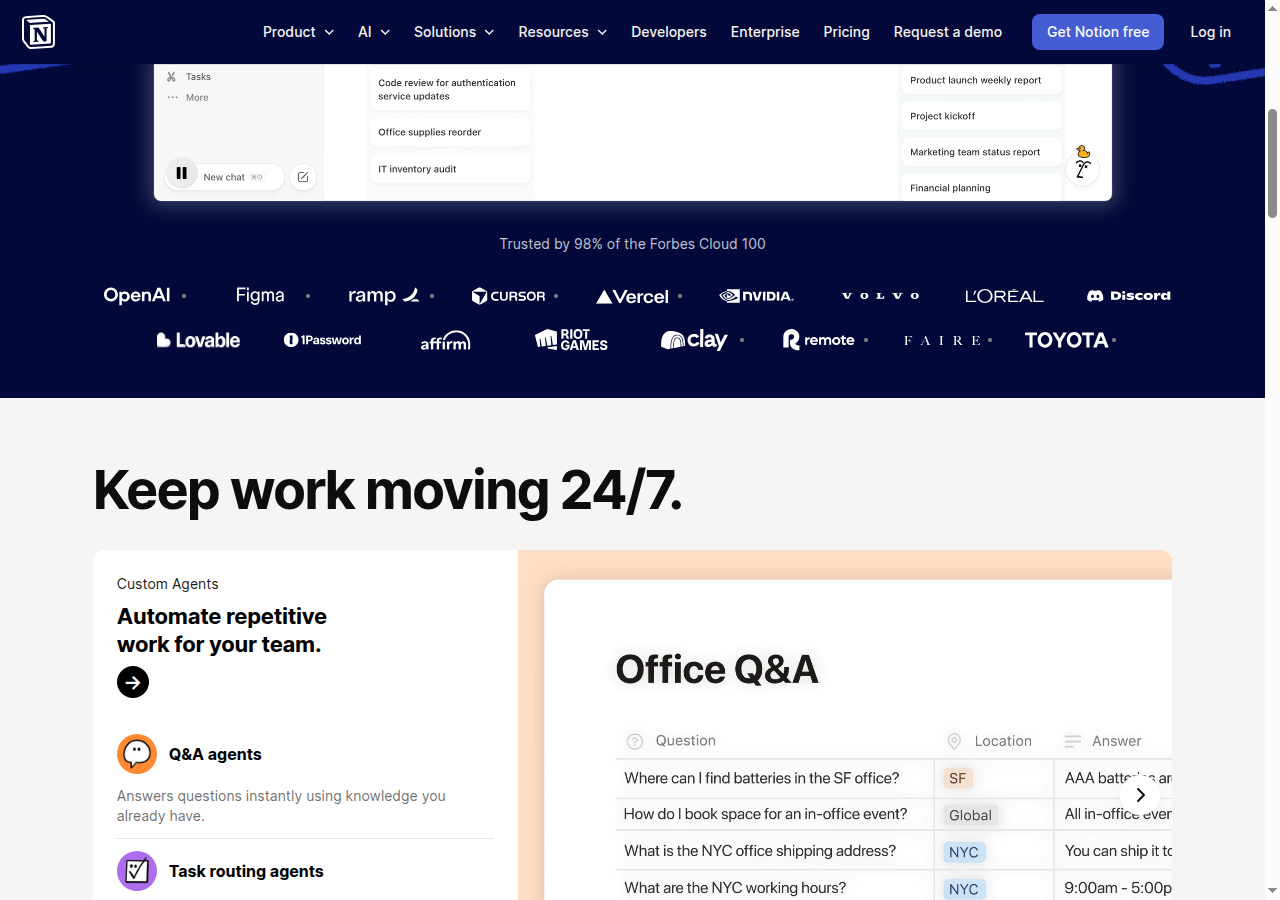
- Block-based editor: Every piece of content — text, headings, to-do items, databases, code blocks, embeds — is a modular block you can drag and rearrange. This makes Notion more flexible than Confluence’s page-based format.
- Databases: Notion’s databases are its killer feature. You can create tables, boards (Kanban), calendars, galleries, and timelines — all pulling from the same data. Add custom properties, filters, sorts, relations between databases, rollups, and formulas. It’s a lightweight app builder disguised as a wiki.
- Notion AI: Built into the editor. Generate and edit text, autofill database properties, translate content, and search across connected tools. The AI is context-aware — it knows what’s in your workspace.
- Notion Agents: Autonomous AI that handles multi-step workflows. You can build custom Agents for repetitive processes. This is Notion’s biggest current push.
- Notion Calendar & Mail: Integrated calendar (syncs with Google Calendar) and AI-powered email (Gmail sync). These are newer additions that deepen the consolidation play.
- Web publishing: Make any page public with a custom domain, SEO settings, and Google Analytics. Confluence offers public links but not a real publishing workflow.
Pricing
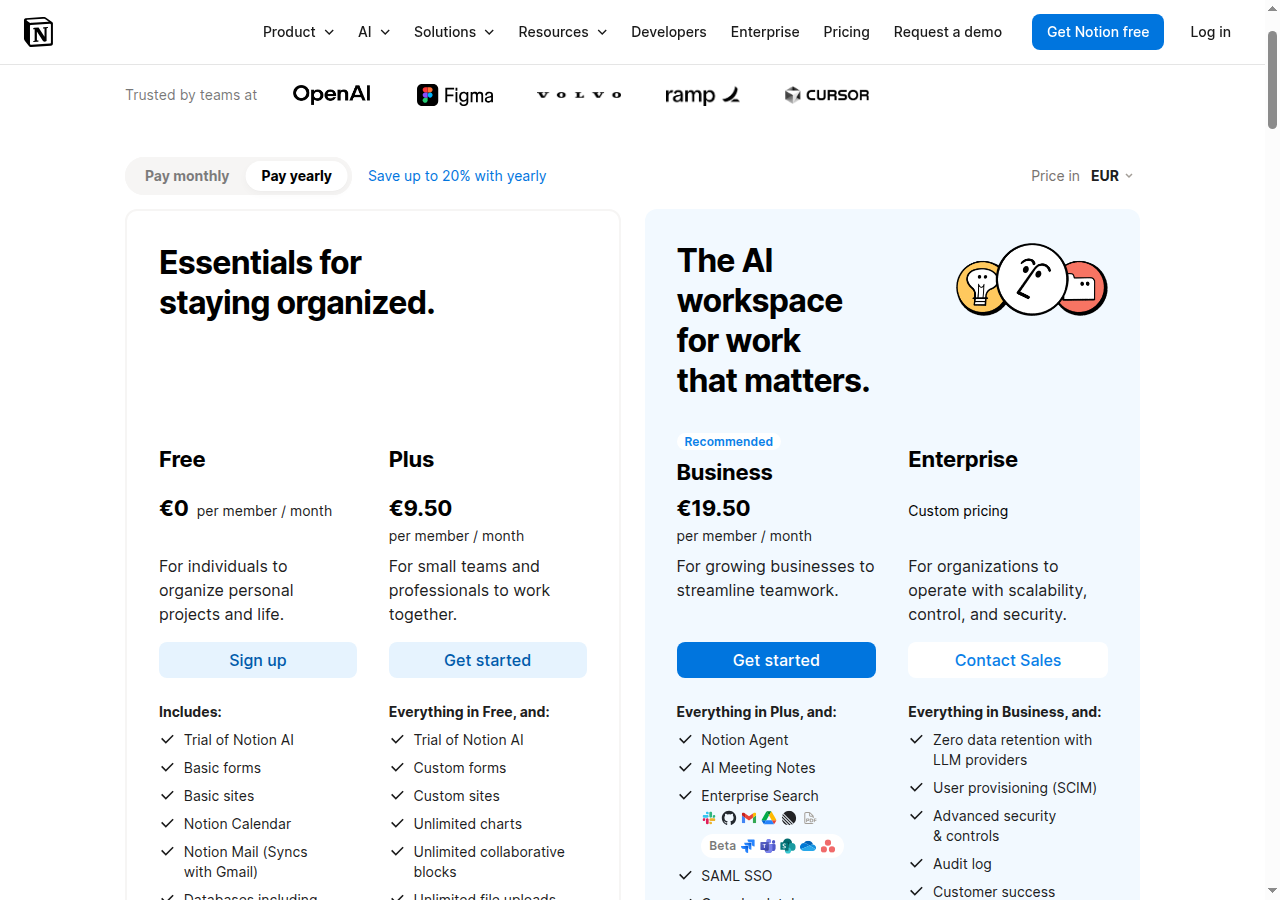
Notion offers four tiers. Here’s what you get at each level (prices as of June 2026; check Notion’s site for current rates):
- Free: For individuals to organize personal projects. Includes trial of Notion AI, basic forms, sites, calendar, mail, and databases.
- Plus: €9.50/member/month. Includes everything in Free, plus custom forms/sites, unlimited charts, unlimited collaborative blocks, unlimited file uploads, and basic connections.
- Business: €19.50/member/month. Includes Notion Agent, AI Meeting Notes, Enterprise Search, SAML SSO, granular database permissions, Verify any page, private teamspaces, domain verification, and premium connections.
- Enterprise: Custom pricing — SCIM provisioning, audit logs, zero data retention, advanced security controls, workspace analytics, SIEM/DLP integrations.
Notion AI core features (chat, generate, autofill, translate) come as a limited trial on Free and Plus; they’re included for Business and Enterprise. Custom Agents are available as a usage-based add-on (free to try), billed through Notion’s credit system. Workers, a code-extensibility beta, also runs on credits once launched.
Where Notion Wins
- All-in-one consolidation — Notion genuinely replaces separate tools for docs, project management, wikis, and lightweight databases. Their homepage even has a calculator showing cost savings vs. separate tools.
- Flexible databases — The database views (table, board, calendar, timeline, gallery) with custom properties, relations, and formulas let teams build CRMs, content calendars, and task trackers without a separate tool.
- Design and UX — Notion is widely considered the best-looking and most intuitive tool in the category. Non-technical teams onboard quickly. Confluence feels heavier and more menu-driven by comparison.
- Personal/individual tier — Strong free tier for individuals drives bottoms-up adoption. Someone starts using Notion for personal notes, brings it to their team, and it spreads.
- Innovation pace — Notion ships aggressively: Agents, Mail, Calendar, Workers (beta) have all landed recently. Confluence’s databases and whiteboards feel like catch-up.
Where Notion Loses
- No deep Jira integration — Notion connects to Jira, but it’s a standard integration. Confluence’s Jira connection is native and unmatched — embed issues, roadmaps, and tickets directly into pages with live data.
- Cloud-only — No self-hosted option. If you’re in a regulated industry that requires on-premise infrastructure, Notion is out. Confluence offers Data Center for exactly this.
- Permissions at scale — Notion’s permission model (teamspaces, groups, granular database permissions at Business tier) works well for small-to-mid teams. For organizations with thousands of users and complex access hierarchies, Confluence’s model is more mature.
- Formal documentation structure — Confluence’s space-and-page-tree hierarchy is better for large, structured documentation sets. Notion’s freeform block structure can become chaotic at enterprise scale — pages get lost in the sidebar.
- Enterprise features are newer — SCIM, audit logs, DLP/SIEM integrations are Enterprise-tier only in Notion. Confluence offers more enterprise controls at lower tiers, with 20+ years of enterprise experience.
Confluence: The Enterprise Knowledge Hub
Confluence positions itself as the AI-powered workspace for team collaboration and knowledge management, deeply embedded in the Atlassian ecosystem.
Key Features
- Pages and Spaces: The classic Confluence structure — pages are living documents, spaces are organizational containers. This hierarchy is familiar to enterprise teams and scales well for large documentation sets.
- Jira integration (native): This is Confluence’s single biggest advantage. Jira issues, roadmaps, and tickets embed directly into Confluence pages with live data. For engineering teams already using Jira, nothing else comes close.
- Rovo AI: Atlassian’s AI platform includes Search (find anything across your tools), Chat (conversational), and Agents (automation). The standout is Remix — transform any content into timelines, charts, maps, or slides in one click. Notion has nothing equivalent.
- Databases: Newer feature (2024-2025). More focused on organizing and referencing structured information than building lightweight apps.
- Whiteboards: Digital whiteboard for visual brainstorming, included at all tiers (limited in Free).
- Loom integration: Async video messaging built in. Notion’s video feature is in development.
- Company Hub (Premium+): A dynamic intranet that pulls live data across Atlassian tools. Think of it as an automatically-updating company portal.
- Teamwork Graph: Maps connections between teams, work, and goals across the Atlassian ecosystem. Enterprise-scale context that Notion doesn’t attempt.
Pricing
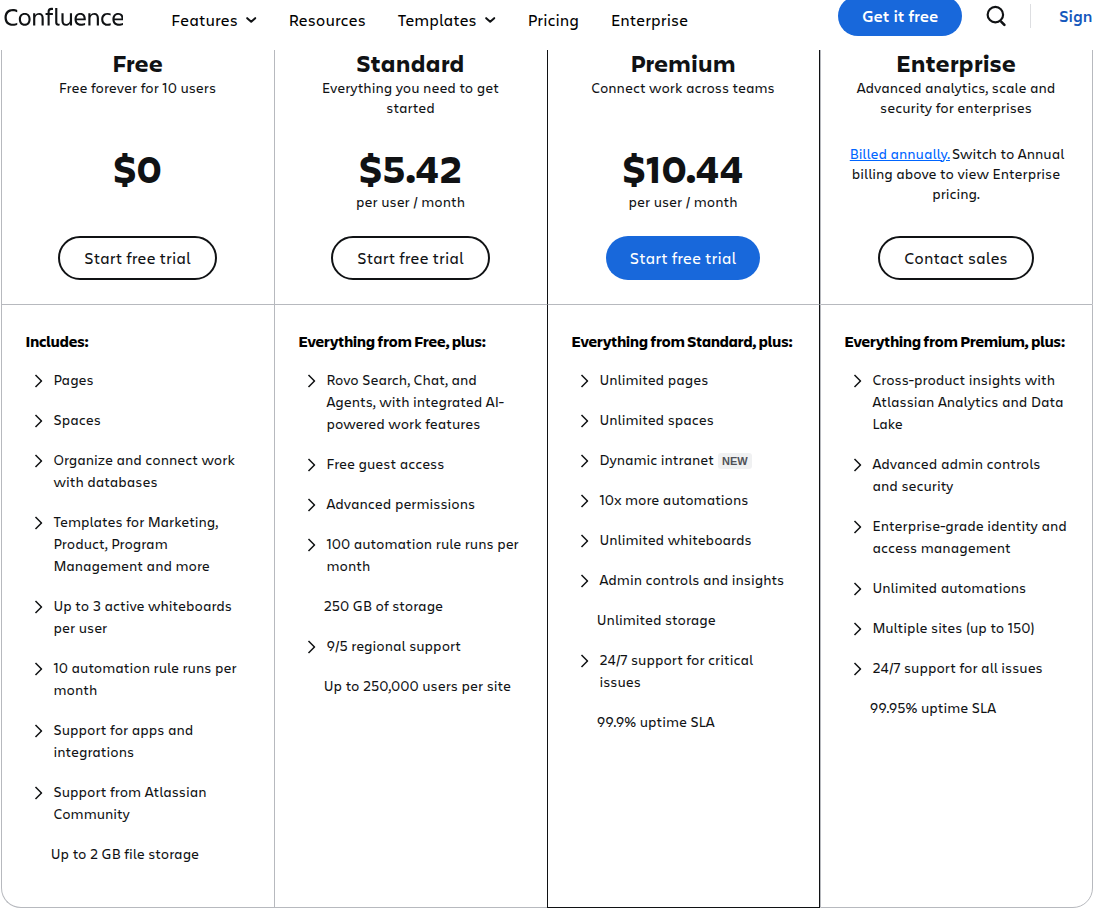
Confluence has four tiers (prices as of June 2026; check Atlassian’s site for current rates):
- Free: Up to 10 users. Includes Pages, Spaces, databases, templates, up to 3 active whiteboards per user, 10 automation rule runs per month, and app support.
- Standard: $5.42/user/month. Includes Rovo AI, free guest access, advanced permissions, 100 automation rule runs per month, 250 GB of storage, and 9/5 regional support (up to 250,000 users per site).
- Premium: $10.44/user/month. Includes unlimited pages/spaces, dynamic intranet, 10x more automations, unlimited whiteboards, admin controls/insights, unlimited storage, 24/7 support for critical issues, and 99.9% uptime SLA.
- Enterprise: Custom pricing, billed annually — cross-product analytics, advanced admin/security, multiple IdPs, unlimited automations, up to 150 sites, 24/7 support with 30min critical response, 99.95% SLA.
Where Confluence Wins
- Jira integration — If your team uses Jira, Confluence is the natural documentation layer. Issues, roadmaps, and tickets live-embed into pages. This single integration drives most Confluence adoption.
- Enterprise maturity — 20+ years of enterprise experience. Permissions, admin controls, compliance certifications, and support SLAs are battle-tested. You don’t have to worry about whether Confluence handles your compliance needs.
- Data Center (self-managed) — For regulated industries that can’t use cloud, Confluence Data Center is a real self-hosted option. Notion doesn’t offer anything comparable.
- Rovo Remix — The ability to transform any content into a timeline, chart, map, or slide is genuinely useful and unique. It solves a real pain point: reformatting information for different audiences.
- Pricing at entry level — Confluence Standard at $5.42/user/month undercuts Notion Plus at ~$10.30/user/month. On paper, Confluence looks cheaper for documentation-focused teams.
Where Confluence Loses
- UX and learning curve — Confluence feels heavier. Non-technical users often struggle with the interface — menus are deeper, formatting is less intuitive, and the editor can be finicky with tables and layouts. Notion’s block-based editor is simply easier.
- Not an all-in-one — Confluence is a documentation tool, not a tool-consolidation platform. You still need Jira for project tracking, a separate CRM, a separate task manager. If you’re trying to reduce your SaaS stack, Confluence doesn’t help.
- Hidden cost: Jira dependency — Confluence Standard at $5.42/user looks cheap, but you almost certainly need Jira too ($8.15+/user). Combined, you’re at $13.57+/user — more than Notion Business where databases and project management are included.
- No personal/individual tier — Free is capped at 10 users. There’s no individual workflow. No bottoms-up adoption path the way Notion has.
- Innovation pace — Confluence’s recent features (databases, whiteboards) feel reactive to Notion. The core editing experience hasn’t fundamentally improved in years.
- Page formatting frustrations — Tables, embedded content, and complex layouts are harder to manage than in Notion. Users frequently complain about the editor’s limitations.
Alternatives Worth a Look
Notion and Confluence aren’t the only options. Depending on your needs, these might fit better:
- Coda: Formula-powered documents that act as applications. Stronger database/formula capabilities than Notion. Pricing is per-doc-maker, not per-seat — you only pay for the people who build docs, while Editors and Viewers are free. That makes it cheaper for large, mostly read-only teams.
- Slite: Pure knowledge base with AI-powered document verification. Best for teams that want a simple, focused documentation tool without project management bloat.
- Nuclino: Fast, simple wiki. Claims to be “blazingly fast.” Good for small-to-mid teams that find Notion complex and Confluence heavy. Used by NASA, Ubisoft, MIT.
- Slab: Knowledge hub with unified search across integrated tools. Good if you want a knowledge base that connects to your existing stack rather than replacing it.
Wrangling a sprawling SaaS stack beyond docs? Our CloudEagle.ai vs BetterCloud comparison covers SaaS management platforms. For everything else, check out our blog archives.
Bottom Line: Who Picks What
Pick Notion if:
- You’re a startup, SMB, or individual wanting an all-in-one workspace
- You want flexible databases that double as lightweight apps
- UX and design matter to your team (especially non-technical users)
- You’re trying to reduce your total number of SaaS tools
- You want built-in web publishing
Pick Confluence if:
- Your team already uses Jira and lives in the Atlassian ecosystem
- You need enterprise-grade permissions, admin controls, and compliance
- You require a self-hosted option (Data Center)
- Your documentation is large-scale and needs formal structure
- You value platform maturity over innovation speed
Avoid both if:
- You want a pure, simple knowledge base — look at Slite or Nuclino
- You need formula-driven documents — look at Coda
- You’re a solo user — Notion Free is the clear winner here; Confluence doesn’t compete
Notion’s consolidation play and aggressive AI roadmap make it the stronger pick for most teams evaluating both tools in 2026 — but Confluence’s Jira integration and enterprise depth make it irreplaceable for teams already committed to the Atlassian stack.
Notion vs Confluence: FAQ
Can Notion replace Confluence?
For startups and small-to-mid teams, yes — Notion covers docs, wikis, databases, and project management in one tool, which is more than Confluence attempts. It can’t replace Confluence where the Atlassian ecosystem is the point: live-embedded Jira issues, enterprise permission hierarchies, and the self-hosted Data Center option have no Notion equivalent.
Is Notion or Confluence cheaper?
On paper, Confluence: Standard is $5.42/user/month against Notion Plus at €9.50/member/month. In practice the gap often inverts — most Confluence teams also pay for Jira ($8.15+/user), which puts the combined bill at $13.57+/user, more than Notion Business where project management and databases are already included.
Does Confluence make sense without Jira?
It works without Jira, but the native Jira integration is Confluence’s single biggest advantage — it’s what drives most adoption. Without it you’re left with a capable but heavier documentation tool, and a focused alternative like Slite or Nuclino may serve you better.
Which has the better free plan?
Different audiences. Notion’s free tier is effectively unlimited for individuals (with limited collaborative blocks once a team joins), making it the clear pick for solo users. Confluence’s free plan covers teams of up to 10 users with 2GB storage and 3 active whiteboards per user — fine for a small team trial, but there’s no individual tier at all.
Should you switch from Confluence to Notion?
Switch if you’re consolidating tools: if your team maintains separate apps for tasks, wikis, and lightweight databases and isn’t dependent on Jira, Notion replaces several subscriptions at once. Stay on Confluence if Jira is central to your workflow, you need Data Center for compliance, or your documentation set is large enough that Confluence’s space-and-page-tree structure beats Notion’s freeform sidebar.