18 June 2026 · Comparison
NordPass vs 1Password (2026): Which Password Manager Wins?
The short answer
if you're an individual or small team watching the budget — it's cheaper at every tier, with email masking included.
if you're a developer or a growing company needing more than password storage, and you'll pay for the more polished product.
Verdict: 1Password wins for developers, mid-to-large businesses that need SaaS discovery and device trust, and anyone who wants the most polished, mature product. NordPass wins on price - it is significantly cheaper at every tier - and for organizations that need customizable password policies, built-in email masking without a separate subscription, or full data recovery from deleted users. If you are an individual or small team watching your budget, go NordPass. If you are a developer or a growing company that needs more than password storage, pay the premium for 1Password.
Disclosure: This post contains affiliate links. If you purchase through these links, we may earn a commission at no extra cost to you. We checked both tools’ live pricing pages before writing this, and the opinions here are our own.
Quick Comparison Table
| NordPass | 1Password | |
|---|---|---|
| Personal price (annual) | $1.49/mo (2-year promo, normally $2.99/mo) | $2.99/mo |
| Family price (annual) | $2.79/mo (2-year promo, up to 6 members) | $4.49/mo (up to 5 members) |
| Business price (annual) | $3.59/user/mo (2-year promo) | $7.99/user/mo |
| Free plan | Yes (single device only, no sync) | No (14-day trial only) |
| Encryption | XChaCha20-Poly1305 | AES-256-GCM + 128-bit Secret Key |
| Email masking | Built-in | Requires Fastmail subscription ($5/user/mo) |
| Built-in authenticator (TOTP) | Yes | Yes (in-vault TOTP) |
| Travel mode | No | Yes |
| Developer tools (CLI, SSH, Git) | No | Yes |
| SaaS Manager / shadow IT | No | Yes |
| Device Trust | No | Yes |
| Free Families for business users | Yes (Free Premium plan) | Yes (Families plan, Business tier only) |
Encryption: XChaCha20 vs AES-256 + Secret Key
Both NordPass and 1Password use zero-knowledge, end-to-end encrypted architectures. Your passwords are encrypted on your device before they ever reach the cloud. Neither company can read your vault.
NordPass uses XChaCha20-Poly1305-IETF - a modern stream cipher. It is the only major password manager using this algorithm. The practical benefit: XChaCha20 runs faster on devices without AES hardware acceleration (some mobile chips, older laptops) and is resistant to certain timing attacks. NordPass derives your encryption key from your master password using Argon2id with a 16-byte salt.
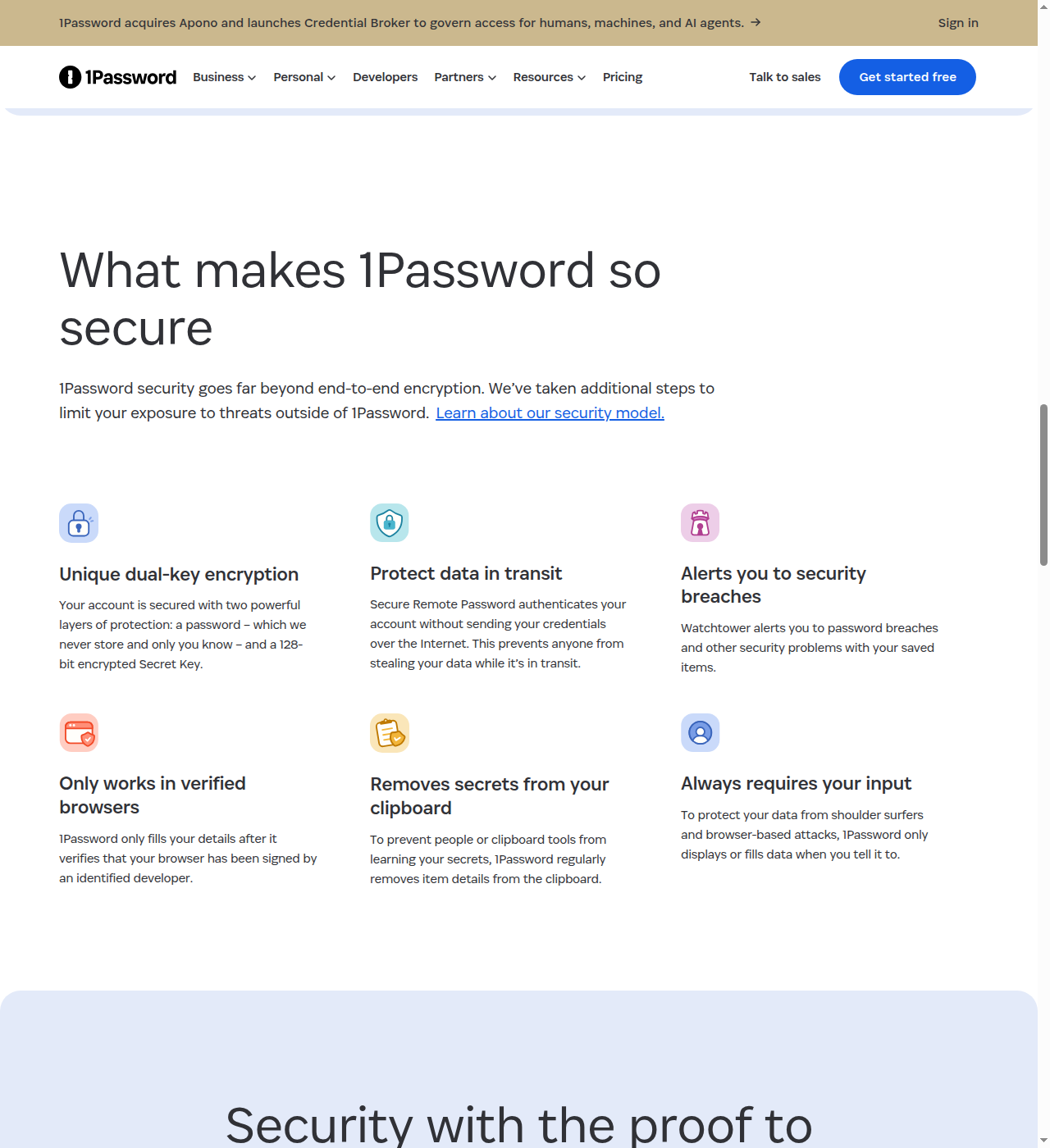
1Password uses AES-256-GCM - the industry standard block cipher. But the real differentiator is not the cipher choice. It is the Secret Key: a 128-bit random value generated locally on your device and never sent to 1Password’s servers. Combined with your account password, it creates a dual-key encryption model. Even if 1Password’s servers are breached and your encrypted vault is stolen, attackers still cannot decrypt it without the Secret Key that exists only on your devices.
Honest take: Both ciphers are unbreakable in practice. Nobody is cracking XChaCha20 or AES-256 with a brute-force attack. The practical security edge goes to 1Password’s Secret Key architecture. If 1Password’s cloud is compromised, your vault remains encrypted. With NordPass, your master password is the sole key - so a weak master password leaves you more exposed. Use a strong, unique master password regardless of which tool you pick, and that gap mostly closes.
Feature Comparison: Personal Plans
Pricing
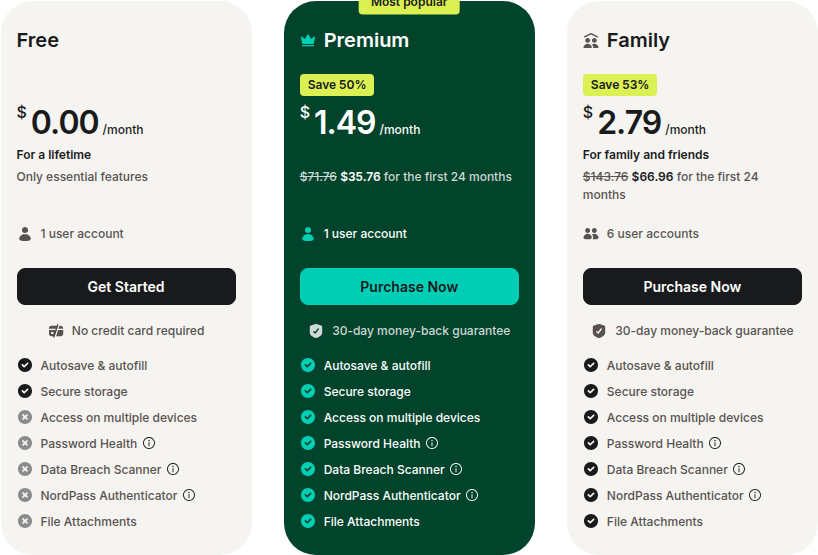
NordPass offers a permanently free plan, but it is restrictive: single device only, no multi-device sync, no Password Health, no Data Breach Scanner, and no sharing. It works if you only use one computer and never need your passwords on your phone. For most people, the free tier is a trial at best.
NordPass Premium costs $1.49/month on a 2-year plan (50% promotional discount, regularly $2.99/month) and $1.99/month on a 1-year plan. Both plans unlock multi-device sync, Password Health, Data Breach Scanner, Email Masking, NordPass Authenticator (TOTP), and file attachments.
1Password Individual costs $2.99/month billed annually ($3.99/month monthly). There is no free tier, but the 14-day trial requires no commitment. The Individual plan includes unlimited devices, Watchtower breach monitoring, Travel Mode, developer tools (CLI, SSH agent, Git signing), and in-vault TOTP storage.
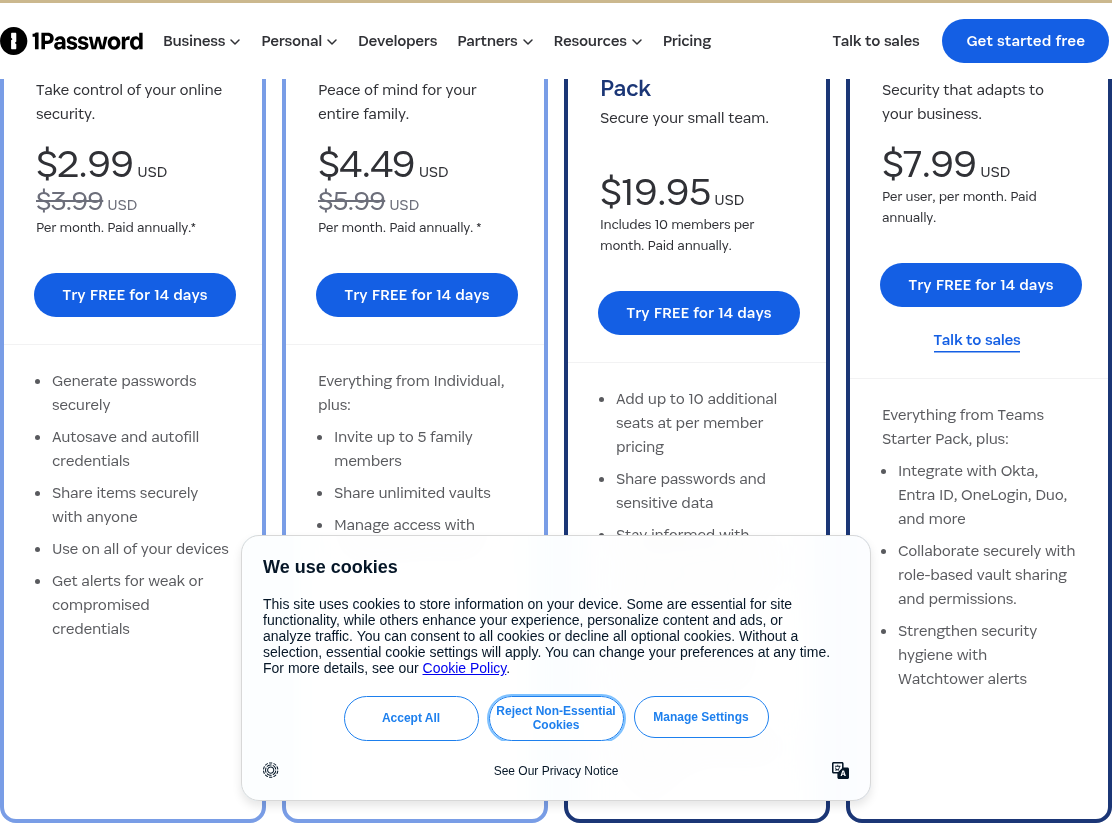
1Password Families costs $4.49/month annually for up to 5 family members. NordPass Family at $2.79/month (2-year promo) covers 6 users.
Email Masking: The Biggest Personal-Plan Differentiator
NordPass includes built-in email masking on Premium and Family plans. When you sign up for a service, NordPass can generate a disposable masked email alias that forwards to your real inbox. This reduces phishing risk and spam.
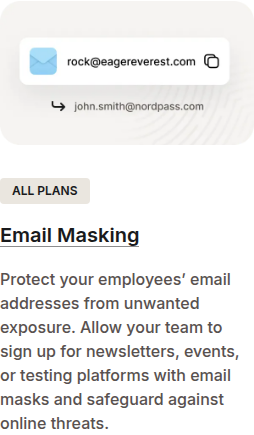
1Password has no native email masking. To get the equivalent, you need a separate Fastmail subscription at $5/user/month on top of your 1Password plan. Fastmail integrates with 1Password’s “Masked Email” feature, but the cost adds up fast. A family of four using 1Password Families ($4.49/mo) plus Fastmail for everyone ($20/mo) would pay $24.49/month. NordPass Family with built-in masking at $2.79/month would cost a fraction of that.
Travel Mode
1Password’s Travel Mode lets you mark specific vaults to be hidden when you cross borders. If a border agent forces you to unlock your phone, your sensitive vaults simply do not appear. NordPass has no equivalent. For journalists, activists, or frequent international travelers, this is a genuine security feature no other major password manager offers.
Feature Comparison: Business Plans
Pricing
NordPass Business is dramatically cheaper at every level:
| Plan | NordPass (2-year, per user/mo) | 1Password (annual) |
|---|---|---|
| Small team | $1.79/user/mo (Teams, 10-user pack) | $19.95/mo flat (Teams Starter, 10 users) |
| Business | $3.59/user/mo (5 user min) | $7.99/user/mo |
| Enterprise | $5.39/user/mo (5 user min) | Custom quote |
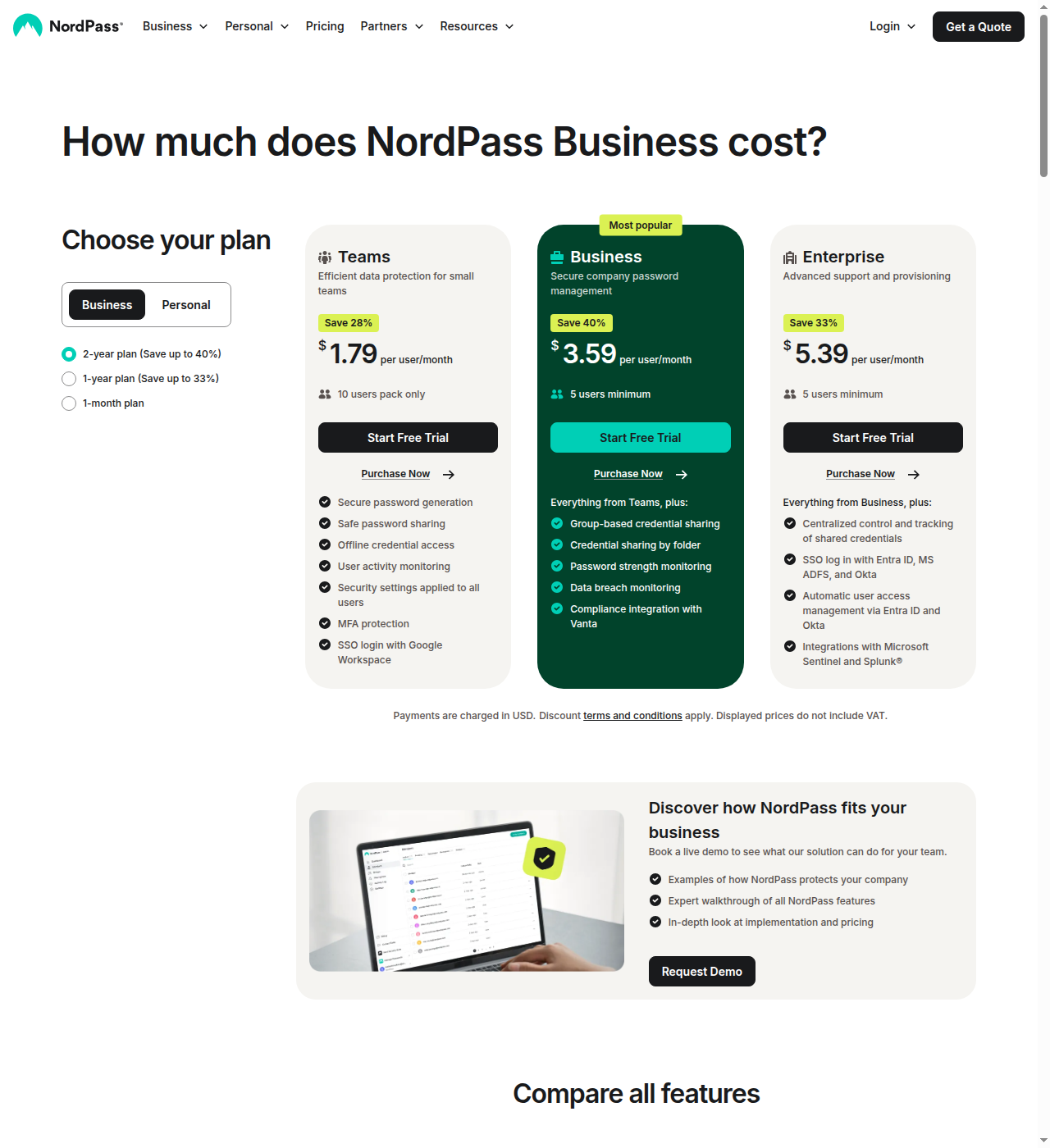
NordPass Business pricing shown above reflects promotional 2-year rates. Standard renewal pricing is higher: Teams renews at approximately $2.49/user/mo, Business at approximately $5.99/user/mo, Enterprise at approximately $7.99/user/mo. 1Password Business at $7.99/user/month is consistent year after year. But even at standard rates, NordPass undercuts 1Password significantly per seat.
Admin Controls: Where NordPass Surprises
NordPass has a Sharing Hub that gives the organization Owner visibility into every shared credential - including peer-to-peer shares between users. If an employee shares a company password directly with someone outside the organization via a share link, the owner can see and revoke it. 1Password’s admin panel shows vault-level sharing but is blind to peer-to-peer share links. This creates a visibility gap that security-conscious IT teams should know about.
NordPass also offers customizable Password Policies that admins can enforce company-wide. You define the rules (minimum length, required character types, expiration periods), and NordPass actively monitors compliance. 1Password provides Watchtower insights - it flags weak or reused passwords - but admins cannot define and enforce custom password rules. If your organization needs to mandate specific password standards (common in regulated industries), NordPass is the only option.
NordPass Business includes data recovery from deleted users. Even non-shared vault items survive employee deletion - the admin can reassign them. 1Password permanently loses non-shared vault data when a user is deleted. For compliance and incident response, this is a meaningful difference.
Where 1Password Pulls Ahead for Business
1Password is no longer just a password manager. It has expanded into Extended Access Management (XAM) - a platform that includes:
- SaaS Manager: Discovers every SaaS app your employees use (shadow IT), tracks spend, and lets you control access. NordPass has no equivalent.
- Device Trust: Checks device posture (is the OS patched? Is the firewall on?) before granting vault access. NordPass has no device trust features.
- Developer tooling: SSH key signing, Git commit signing, CLI, SDKs, CI/CD integrations, and IDE extensions. NordPass has no developer tools whatsoever.
- Broader SSO support: Okta, Entra ID, OneLogin, Duo, JumpCloud are available on the Business tier. NordPass gates Entra ID, Okta, and ADFS behind Enterprise only.
- Guest accounts: 1Password Business includes up to 20 guest accounts for external collaborators. NordPass has no guest account feature.
If your company has developers, needs shadow IT discovery, or wants device-level security checks before granting password access, 1Password’s XAM platform justifies its higher price. NordPass remains a password manager; 1Password is becoming an identity and access management platform.
Where NordPass Wins
- Price. Cheaper at every tier - personal, family, and business. The gap is substantial at the business level.
- Built-in email masking. No Fastmail subscription needed. Saves $5/user/month.
- Customizable password policies. Enforce organization-specific rules. 1Password cannot.
- Full data recovery from deleted users. Recover even non-shared vault data. 1Password loses it permanently.
- Sharing Hub visibility. Owner sees and controls all shared items, including peer-to-peer shares. 1Password admins are blind to P2P share links.
- More detailed breach scanner. Monitors hashed passwords, emails, credit cards, API keys - more comprehensive than 1Password’s Watchtower alerts.
- NordVPN bundling. Existing NordVPN users get a discounted bundle; useful cross-sell for the Nord ecosystem.
Where 1Password Wins
- Secret Key architecture. Genuine security advantage: breached cloud servers do not expose your vault. No other major password manager has an equivalent second encryption factor.
- Developer tooling. CLI, SSH agent, Git signing, CI/CD integrations, SDKs. NordPass has none of this. If your team writes code, 1Password is the clear pick.
- SaaS Manager and Device Trust. Extended Access Management goes far beyond password storage. Shadow IT discovery, spend management, and device posture checks are unique to 1Password in this comparison.
- Travel Mode. Hide vaults when crossing borders. Unique in the market.
- Enterprise maturity. 180,000+ business customers including Reddit, Slack, IBM, Salesforce. Longer track record (founded 2006 vs 2019). More polished admin console.
- Free Families for business users. Every Business-tier user gets a free personal Families plan - reduces the risk of employees using weak personal password practices. (NordPass Business users get a free Premium plan, not Family.)
- Watchtower 2FA/passkey checks. Flags accounts that support 2FA or passkeys but are not using them. NordPass does not.
Where NordPass Loses
- Free plan is unusually restrictive. Single device only, no sync. Most competitors (Bitwarden, Proton Pass) offer multi-device sync on their free tiers. NordPass Free functions more like a demo than a usable free password manager.
- No developer tools. No CLI, SSH, Git signing, CI/CD support. This is a hard stop for any team that writes code.
- No SaaS discovery or shadow IT management. If you want to know what SaaS tools your employees are actually using, you need a separate solution.
- No device trust. Cannot enforce device posture checks before granting vault access.
- SSO limited on lower tiers. Entra ID, Okta, ADFS only on Enterprise. 1Password offers them on Business.
- No Travel Mode. If you cross borders regularly and face device searches, 1Password’s Travel Mode is a genuine security feature NordPass cannot match.
- Younger product. Launched in 2019 vs 1Password’s 2006. Less mature, smaller feature set, and the UI/UX polish gap is noticeable.
- Nord Security ownership. Some privacy-focused users prefer independent companies to large corporate entities. If you left LastPass after the LogMeIn/private equity era, you may feel the same about Nord Security.
Where 1Password Loses
- Expensive. $2.99/mo for Individual, $7.99/user/mo for Business. NordPass is cheaper at every tier, sometimes dramatically so on promotional pricing.
- No native email masking. Requires a separate $5/user/month Fastmail subscription. This is a real cost for anyone who wants masked emails.
- No customizable password policies. Admins cannot enforce organization-specific password rules. Watchtower alerts are recommendations, not enforceable policies. For compliance-heavy industries, this is a meaningful gap.
- No data recovery from deleted users. If an employee leaves and you delete their account, any non-shared vault data is gone permanently. NordPass recovers everything.
- No synchronized peer-to-peer sharing. 1Password shares via vaults. P2P share links exist but are not synced or admin-visible. NordPass’s Sharing Hub tracks everything.
- Less detailed breach monitoring. Watchtower alerts on compromised passwords and websites, but does not monitor credit cards, bank details, or API keys the way NordPass does.
- No HIPAA certification listed. NordPass holds it; 1Password does not explicitly list it on their pricing page. Relevant for healthcare organizations.
Bottom Line: Who Should Pick What
Pick NordPass if:
- Price is your top consideration. You get strong security, email masking, and solid admin controls for less money.
- You need built-in email masking without paying for a separate service.
- Your organization needs enforceable custom password policies.
- You want full data recovery from deleted user accounts.
- You already use NordVPN and want the bundled discount.
Pick 1Password if:
- You are a developer or have developers on your team. The CLI, SSH agent, Git signing, and CI/CD integrations have no equivalent in NordPass.
- You need more than a password manager - SaaS discovery, device trust, and shadow IT management.
- You travel internationally and want Travel Mode.
- You want the most polished, mature product with a longer track record and larger enterprise customer base.
- You are willing to pay for the Secret Key architecture, Watchtower, and broader SSO/integration support.
What about the free tiers? If you just need a free password manager, neither tool is ideal. NordPass Free locks you to one device. 1Password has no free tier (only a 14-day trial). For a genuinely free option, look at Bitwarden or Proton Pass - both offer multi-device sync on free plans. And if you are already paying NordVPN, it is worth checking whether the bundle beats buying separately — NordVPN Complete vs separate tools prices the VPN, antivirus, password manager and 1TB storage against buying Bitwarden and Tresorit on their own. See our blog for more password manager comparisons.
Competitor Alternatives Worth Mentioning
Neither NordPass nor 1Password is the right fit for everyone. Here are the other options worth considering:
-
Bitwarden: Open source, self-hosting option, and one of the most affordable premium plans at $1.65/month ($19.80 billed annually). The top recommendation in Reddit/tech communities. If you want transparency and a low price, Bitwarden is hard to beat.
-
Dashlane: Closest feature competitor to both tools. Includes a built-in VPN on premium, dark web monitoring, and passkey support. Priced in the same range as NordPass’s and 1Password’s mid-tier plans. Worth a look if you want VPN + password manager in one subscription.
-
Proton Pass: From the Proton ecosystem (Proton Mail, VPN, Drive). Open source, includes SimpleLogin email aliases, and privacy-focused. Plus plan starts at $2.99/month, billed annually. Good pick if you are already in the Proton ecosystem.
-
Keeper: FedRAMP authorized with extensive compliance certifications (HIPAA, SOC 2, ISO 27001). Personal plan starts at $33.87/year (about $2.82/month, billed annually). The go-to for government and highly regulated industries.
-
LastPass: Mentioned for completeness. Once the market leader, now a cautionary tale after the 2022 breach. Both NordPass and 1Password are more secure choices today.
Prices accurate as of June 2026; check the vendor's site for current rates. NordPass promotional pricing shown may differ from standard renewal rates. Regional pricing may vary.